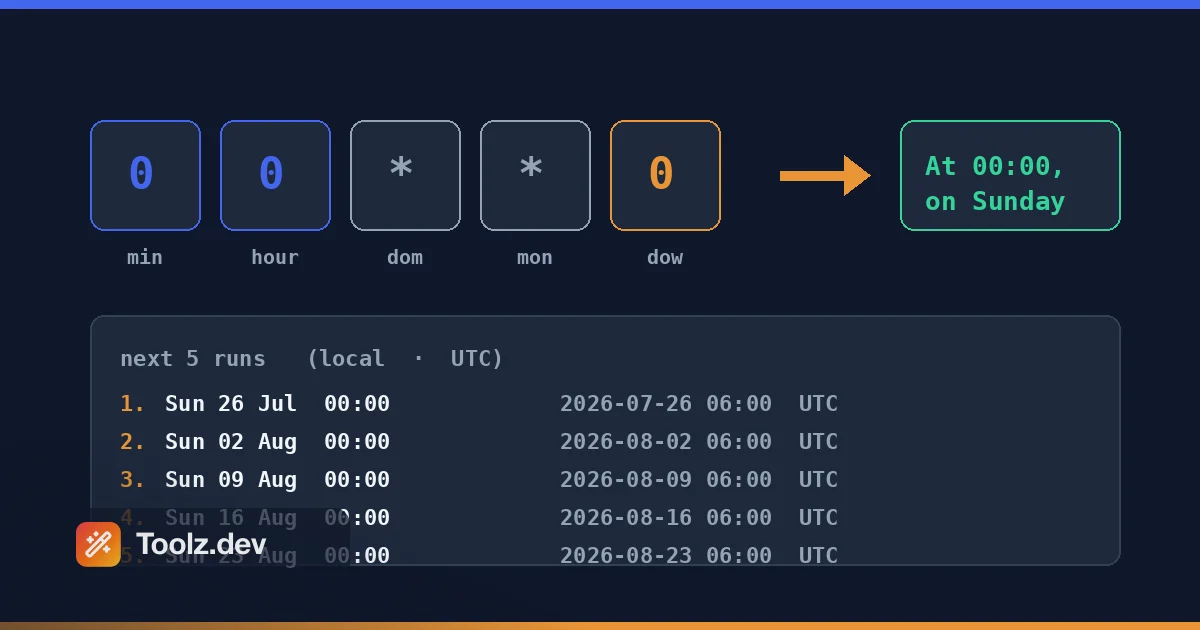
La expresión cron más cara que he escrito fue 0 0 * * 0. Publicó un correo electrónico de resumen semanal para un Laravel SaaS que estaba construyendo, y estaba absolutamente seguro de que significaba " Medianoche del último día de la semana." Significa medianoche del domingo. Mi modelo mental decía que la semana terminaba el sábado. Durante cinco semanas, los clientes recibieron su " semana en revisión" Envíe un correo electrónico con un día de retraso y nadie en el equipo lo captó porque nadie en el equipo podía leer cron tampoco; todos miramos entrecerrados los ojos en los cinco campos y asintimos.
Ese es el sucio secreto de la sintaxis cron: casi todos los que lo escriben coinciden con una expresión anterior que recuerdan. El formato tiene más de cuarenta años, lo suficientemente denso como para que un solo personaje cambie por completo el cronograma y falla en silencio. No hay ningún error del compilador para "se ejecuta en el día equivocado. El trabajo simplemente se ejecuta en el día equivocado, para siempre, hasta que alguien se da cuenta.
un Analizador de expresión de cron cierra esa brecha. Pegas la expresión y te dice en un inglés sencillo lo que realmente sucederá 0 0 * * 0 vuelve como "A las 00:00, el domingo" - además, cuando se dispararán las próximas ejecuciones. Ese paso de lectura es la diferencia entre enviar un horario y enviar una suposición. Construí el de Toolz.dev porque me cansé de cambiar de contexto a una terminal y porque el lío de wp-cron con el que me ocupé durante años en WP Adminify me enseñó que los errores de programación son los errores más pacientes en el software.
Esta guía cubre cómo utilizar el analizador, cómo funcionan realmente los cinco campos (incluidas las dos peculiaridades que causan la mayoría de los incidentes de producción) y en qué se diferencia la sintaxis cron crontab, Acciones de GitHub, Cuarzo y Laravel.
TL;Dr: Pegue cualquier expresión crontab en el Toolz.dev cron analizador y obtenga una traducción al inglés simple más los próximos tiempos de ejecución: instantáneamente, del lado del cliente, sin registro. Antes de implementar un cronograma, siempre verifique dos cosas: la numeración del día de la semana (0 y 7 son domingos) y la zona horaria en la que se ejecuta el programador (GitHub Actions siempre es UTC). Emparejarlo con el Convertidor de marca de tiempo Cuando necesite traducir los tiempos de la próxima ejecución en todas las zonas, y el Calculadora de diferencia de fecha a intervalos de control de cordura.
Características clave
Traducción en inglés simple
El trabajo central del analizador es girar */15 9-17 * * 1-5 En " Cada minuto 15 después de la hora 9, 10, 11, 12, 13, 14, 15, 16 y 17, los lunes, martes, miércoles, jueves y viernes." It' detallado: enumera en lugar de colapsar " 9 a 17" volver a un rango, y esa verbosidad es el punto. La enumeración es inequívoca; un rango resumido es otra oportunidad de leer mal. La oración es algo que se puede pegar en una descripción de solicitud de extracción, leer en voz alta en un stand-up o mostrar a una parte interesada no técnica. La expresión sin procesar no lo es. En mi experiencia, la traducción es más importante durante la revisión del código: un revisor que aprobaría cinco campos crípticos atrapará inmediatamente a " Espera, ¿por qué aparece la hora 17 cuando se supone que el trabajo debe detenerse a las 5 p.m?" cuando cada hora está detallada. La traducción hace que el cronograma sea falsificable, que es exactamente en lo que falla la sintaxis cron sin procesar.
Vista previa de la próxima ejecución
Saber lo que una expresión dinero a pagar es la mitad del problema; saber cuándo incendios a continuación Es la otra mitad. El analizador calcula los siguientes cinco tiempos de ejecución para que puedas compararlos con tu intención. Aquí es donde surgen errores sutiles: una expresión que se lee bien en inglés pero produce una siguiente ejecución de "en 27 días" porque confundiste el día del mes con el mes, o uno que se activa a las 03:00 de esta noche cuando quisiste decir 03:00 después del fin de semana. Ahora reviso la lista de próxima ejecución cada vez, incluso para las expresiones I' tengo confianza. Especialmente para las expresiones I' Tengo confianza en - ver la anécdota inicial.
Dos detalles sobre cómo se calculan esos tiempos. Primero, se evalúan en la zona horaria local de su navegador, no UTC ni su servidor's zona: cada ejecución se muestra dos veces, una como marca de tiempo local y otra como el instante UTC equivalente, para que pueda leer lo que coincida con su objetivo de implementación. En segundo lugar, cuando tanto el día del mes como el día de la semana están restringidos, el analizador aplica cron's O semántica real en lugar de AND: 0 0 1 * 1 Incendios el 1 del mes y Todos los lunes, no solo los lunes que caen el día 1. Esa regla se tropieza con personas experimentadas, y ver cinco fechas concretas lo hace obvio de una manera que la oración nunca lo hace.
Una aspereza: una expresión imposible como 0 0 30 2 * (30 de febrero) analiza como válido, se describe felizmente como " A las 00:00, el día del mes 30, en febrero, " y luego muestra una lista vacía de próximas ejecuciones. Vacío significa nunca. It' es correcto, pero it' es silencioso - un " este horario nunca se activará" La advertencia es la mejora obvia y aún no lo he construido.
Desglose campo por campo
El analizador divide la expresión en sus cinco componentes (minuto, hora, día del mes, mes, día de la semana) y muestra lo que aporta cada uno. Esto importa porque los errores cron son casi siempre un problema de un solo campo: el valor correcto en la columna incorrecta. 0 12 * * * (dia del mediodía) y 12 0 * * * (12:12 am todos los días... No, 00:12 al día) son un intercambio de diferencia. Ver "hora: 0" etiquetado explícitamente es cómo se captura ese intercambio en dos segundos en lugar de dos semanas.
Soporte para rangos, pasos y listas
Las expresiones del mundo real se apoyan mucho en la sintaxis del operador: 1-5 rangos, */10 pasos, 1,15 listas y combinaciones como 0 8-18/2 * * 1,3,5. El analizador lo maneja todo, incluidas las formas combinadas que hacen tropezar a los lectores humanos. Valores de paso en rangos - 8-18/2 significado "cada 2 horas del 8 al 18" - son legales, útiles y casi ilegibles sin herramientas. Si usted ' Alguna vez ha heredado una crontab llena de estos de un administrador del sistema fallecido, sabe por qué existe esta característica.
Estricta validación de cinco campos (incluyendo lo que no aceptará)
El analizador toma expresiones estándar de cinco campos y nada más. masa @daily y obtienes un error - " Se esperan 5 campos (minuto hora día del mes mes día de la semana), obtuvo 1" - no es una traducción. Lo mismo para @hourly, @weeklyy @reboot. Esa es una brecha genuina en lugar de un principio de diseño, y prefiero decirlo que dejar que descubras a mitad de la depuración; las macros abreviadas son lo suficientemente comunes en crontabs reales como para que pertenezcan a la herramienta. Hasta que estén en, traduzca manualmente: @hourly es 0 * * * *, @daily es 0 0 * * *, @weekly es 0 0 * * 0, @monthly es 0 0 1 * *, @yearly es 0 0 1 1 *. @reboot no tiene equivalente de cinco campos en absoluto: es ' Es un cronograma, se ejecuta una vez al iniciar el demonio, un hecho que ha sorprendido a muchas personas que realizan migraciones desde crontab.
La riguridad vale la pena en otro lugar. Una expresión de cuarzo de seis campos se rechaza con un recuento de campos en lugar de ser malinterpretado silenciosamente. Valores fuera de rango Nombra el campo y el rango legal (Value 25 out of range for hour (allowed 0-23)). Rangos invertidos como 5-1 son atrapados. Y acepta las cosas que contienen crontabs reales: nombres de meses y días (JAN, SUN, 7 Como segunda ortografía del domingo, y el vixie 5/15 Formular significado "cada 15 a partir de 5". Vale la pena saber mientras traduces esas macros a mano: cada @daily el trabajo en un servidor se activa en el mismo instante (medianoche), por lo que cuarenta de ellos son un pico de carga nocturno. Disperso el mío en minutos impares (17 3 * * *, 43 4 * * *) exactamente por esa razón.
Procesamiento del lado del cliente
El analizador se ejecuta completamente en su navegador. Nada de lo que pega se carga, registra o se almacena. Eso suena como un lenguaje de privacidad repetido hasta que recuerde lo que realmente contienen los crontabs: su horario de copia de seguridad, su tiempo de ejecución de facturación, el momento exacto en que se dispara su seguridad. La programación de infraestructura es datos de reconocimiento. Mantenerlo alejado de los servidores de otras personas no es paranoia; simplemente no está creando un problema donde no es necesario existir.
Cómo usar el analizador cron
Paso 1: Pega o escribe tu expresión
Abre el analizador de cron y suelte la expresión - de un archivo crontab, a schedule: Bloquear en un flujo de trabajo de acciones de GitHub, un manifiesto de cronjob de Kubernetes o un Laravel ->cron() llamada La sintaxis estándar de cinco campos funciona tal cual; @daily Y sus hermanos no, así que expande esos a cinco campos primero. Luego presione Analizar. Si está comenzando desde cero en lugar de decodificar, los botones preestablecidos (cada minuto, hora, diariamente a la medianoche, de lunes a viernes de 9 a. m. a 1 de mes) cargan una expresión de trabajo que puede modificar campo por campo, reajustando sobre la marcha.
Paso 2: Lea la traducción
Este es el paso que la gente salta y debería 't. Lea la salida en inglés simple y compárela con la oración en su cabeza. Si escribió la expresión pretendiendo "todos los lunes a las 9 a. m. " y la lectura dice "A las 09:00 del día del mes 1" - felicidades, acabas de captar el clásico intercambio de columnas antes de que lo hiciera la producción. La lectura es tu prueba unitaria.
Paso 3: Verifique los siguientes tiempos de ejecución
Consulta las cinco próximas ejecuciones. ¿Las fechas llegan a donde esperas? ¿La primera carrera es esta noche, mañana o el próximo mes? Preste atención a la brecha entre carreras, un lugar fuera de lugar */ Paso se convierte "cada 6 horas" en "cada minuto de cada 6 ª hora" (* */6 * * * contra 0 */6 * * *), y cinco carreras de diferencia en lugar de seis horas de diferencia es difícil de pasar por alto. Una lista vacía significa que el horario nunca puede disparar.
Paso 4: Contabilidad para la zona horaria antes de implementar
El analizador te dice cuando relativo a un reloj; su programador decide cuyo reloj Antes de implementar, confirme qué zona horaria utiliza el sistema de ejecución. Acciones de GitHub: siempre UTC, sin excepciones. Servidores: independientemente de lo que esté configurado en el sistema operativo, con frecuencia UTC en Cloud Boxes. Laravel: tu zona horaria de la aplicación, a menos que encadenes ->timezone(). Traducir un tiempo de ejecución siguiente a través de la Convertidor de marca de tiempo Si necesita verlo en su zona local o en un cliente.
Inmersión profunda técnica: cómo funcionan realmente las expresiones de Cron
El formato de cinco campos proviene de Unix cron, estandarizado en la práctica por Paul Vixie & #39;s implementación cron a finales de los años 1980, la documentada en crontab(5) Y sigue enviando, en forma descendiente, en la mayoría de los sistemas Linux hoy en día. Los campos, de izquierda a derecha:
| prado | valores permitidos | notas |
|---|---|---|
| minutero | 0–59 | |
| hora | 0–23 | Reloj de 24 horas, 0 es medianoche |
| día del mes | 1–31 | Cuidado con los meses sin un 31 |
| mes | 1-12 o enero-diciembre | Nombres permitidos en Vixie Cron |
| día de la semana | 0–7 o sol–Sáb | 0 y 7 son los domingos |
Cada campo acepta * (cualquier valor), listas (1,15), rangos (1-5), y pasos (*/10 investigaciones operacionales 20-59/5). Eso's toda la gramática. La complejidad es't en la sintaxis - it's en tres peculiaridades de comportamiento.
Quirk One: el día de la semana cero. por crontab(5), tanto 0 como 7 significan domingo. Algunas implementaciones más antiguas o más estrictas solo aceptan 0. Quartz, el programador Java utilizado por Jenkins y la mitad del software empresarial, numera los días 1 a 7 a partir de domingo, así que el cuarzo 2 es lunes mientras que Crontab 2 es martes. Si alguna vez migras los horarios entre sistemas, esto está en espera. Siempre analiza, nunca transcribir.
Quirk dos: día de mes o día de semana. Aquí está el que casi nadie sabe hasta que los muerde. cuando a la vez Los campos del día del mes y del día de la semana están restringidos (ni *), Vixie cron ejecuta el trabajo cuando uno u otro coincidencias: un OR, no un AND. Entonces 0 0 13 * 5 No significa "Viernes 13." Significa "cada 13 del mes y todos los viernes". Esto es un comportamiento documentado en crontab(5) Y es profundamente contradictorio. Si realmente necesita "Viernes 13", necesita una verificación de fecha del lado del script o un programador con una sintaxis más rica.
Quirk tres: zonas horarias y DST. cron no tiene campo de zona horaria. La expresión se interpreta en la hora local del programador, sea lo que sea. Dos consecuencias concretas:
- Ejecuciones de acciones de GitHub
schedule:Disparadores en UTC, punto final. un flujo de trabajo programado en0 9 * * *se dispara a las 9 a. m. UTC - 4 o 5 a. m. en Nueva York según la temporada, porque UTC no observa el horario de verano pero su audiencia prevista & 39; el reloj sí. Tu "9 a. m. informe diario" se desplaza una hora dos veces al año a menos que ajuste el flujo de trabajo o lo maneje en código. - En los servidores configurados en una zona de observación de DST, una noche al año, la hora de 02:00 a 03:00 no existe, y una noche sucede dos veces. Un trabajo programado a las 02:30 ya sea o doble disparos dependiendo de la implementación. La solución correcta y aburrida: programe trabajos críticos fuera de 01:00–03:00 local o ejecute servidores en UTC. hago ambas cosas
formatos extendidos. El cuarzo usa seis o siete campos (un campo de segundos inicial y un año final opcional), además de operadores adicionales como L (último), W (Día de la semana más cercano), y # (noveno día laborable del mes). Algunos crons también admiten un campo de segundos principales. Si su expresión tiene seis campos y usted ' No estoy seguro de qué dialecto es, péguelo en el analizador; una expresión de seis campos interpretada como cinco campos producirá un resultado visiblemente incorrecto, lo cual es en sí mismo diagnóstico. Y @reboot, el pato extraño de las cadenas especiales, no es un horario en absoluto: se ejecuta una vez en el inicio de demonio, que en sistemas modernos significa "siempre que la caja se reinicie", un hecho que ha sorprendido a muchas personas que ejecutan migraciones de bases de datos desde crontab.
Para un recorrido más amplio de las utilidades de desarrollador que se combinan con el trabajo de programación, el Guía de herramientas de codificación Cubre toda la caja de herramientas.
Casos de uso comunes
Depuración de una entrada de Laravel Scheduler
El programador Laravel's envuelve cron en métodos fluidos - ->dailyAt('03:00'), ->weeklyOn(1, '8:00')- dar la trampilla de escape, ->cron('*/5 * * * 1-5'), es la sintaxis de crontab sin procesar, y los horarios complicados terminan allí. El sistema se ejecuta crontab schedule:run Cada minuto, y Laravel decide internamente lo que se debe. Cuando un comando programado no está activando, mi primer paso es pegar el ->cron() Cade en el analizador para confirmar que significa lo que dice el comentario anterior. Aproximadamente la mitad del tiempo, no. La otra mitad, el error es la zona horaria: la aplicación está configurada en UTC mientras que el desarrollador asumió la hora local. El analizador resuelve el primer caso en segundos y señala con el dedo el segundo.
Desenredando WP-Cron en sitios de WordPress
WordPress viene con wp-cron, que es 't cron en absoluto - it' es un pseudoprogramador que se aprovecha en las visitas a la página, por lo que un sitio de bajo tráfico 's " cada hora" El trabajo podría realizarse cada cuatro horas y un sitio de alto tráfico paga un pequeño impuesto por cada solicitud. Durante mis años de WP Adminify, esto generó un flujo constante de " las publicaciones programadas son 't publicación" informes. La solución estándar es deshabilitar wp-cron (DISABLE_WP_CRON) y activación wp-cron.php desde un crontab de servidor real, momento en el que usted 'Estás escribiendo expresiones cron reales, generalmente */5 * * * *, y el analizador gana su mantenimiento verifiándolos. Si ejecuta WordPress a cualquier escala, vale la pena hacer esta migración esta semana, no algún día.
Verificación de los cronogramas de acciones de GitHub
Los horarios de CI fallan en silencio: una compilación nocturna que deja de funcionar no tiene ninguna página. Al escribir un schedule: desencadenar, analizo la expresión, miro los tiempos de ejecución siguientes y luego agrego mentalmente el desplazamiento UTC. Dos detalles adicionales específicos de las acciones: los horarios solo se ejecutan en la rama predeterminada y las ejecuciones pueden retrasarse o descartarse durante períodos de carga alta: los propios documentos de GitHub & # 39 lo dicen. Si el tiempo exacto importa, las acciones activadas por cron son la herramienta incorrecta; Si el tiempo aproximado está bien, al menos haga que el tiempo aproximado sea el enderezar tiempo aproximado.
Auditar un crontab heredado
Cada servidor de larga duración acumula un crontab escrito por personas que ya no trabajan allí. jogging crontab -l y pegar cada línea en el analizador es la auditoría más rápida que conozco: en diez minutos tienes un inventario de programación en inglés sencillo y casi siempre encontrarás al menos un trabajo haciendo algo que nadie recordaba: una copia de seguridad ejecutándose dos veces, un script de limpieza que nunca coincidió con el día en que se suponía que debía hacerlo, a * * * * * eso debió haber sido 0 * * * * Martillando una API sesenta veces por hora. Al comparar un viejo crontab con uno nuevo durante una migración, el Herramienta de diferencia de texto Junto al analizador hace que la revisión sea mecánica.
Programación de kubernetes cronjobs
Los cronjobs K8 usan una sintaxis estándar de cinco campos y, desde 1.27, admiten una explícita timeZone campo: una mejora genuina con respecto al cron clásico. El flujo de trabajo del analizador es el mismo: verifique la expresión, verifique las siguientes ejecuciones y luego confirme startingDeadlineSeconds y concurrencyPolicy Cubra los modos de falla Cron en sí no. Una expresión puede ser perfecta y el trabajo sigue acumulando si una ejecución lenta se solapa con el siguiente disparador; el analizador obtiene el cronograma correcto para que puedas dedicar tu atención a esos ajustes operativos.
Dialectos cron comparados
| Cron Vixie / Crontab | Acciones de GitHub | cuarzo | Programador de Laravel | Temporizadores de sistema | |
|---|---|---|---|---|---|
| tribución | 5 | 5 | 6–7 (segundos, año) | 5 (a través de ->cron()) |
OnCalendar Sintaxis, no cron |
| Numeración día de la semana | 0–7 (0 y 7 = sol) | 0–6 (0 = Sol) | 1–7 (1 = Sol) | Sigue crontab | nombres (Mon, Tue) |
| huso horario | Sistema local | siempre UTC | configurable | zona horaria de la aplicación o ->timezone() |
Sistema local o Timezone= |
| Cuerdas especiales | @daily, @reboot, etc. |
No compatible | No compatible | Métodos fluidos en su lugar | OnBootSec=, abreviaturas de calendario |
| Segundos Preci | prohibido | No (mín. ~ 5 min práctico) | sí | No (Traque por minuto) | sí |
| mejor para | Trabajos de servidor | Horarios CI/CD | Ecosistemas JVM | Aplicaciones de Laravel | Servicios de Linux modernos |
Cuándo usar cuál: crontab para trabajos de servidor simples, temporizadores systemd cuando desea registrar y manejar dependencias de forma gratuita en Linux moderno, el programador de marcos cuando el trabajo vive dentro de su aplicación de todos modos y los programas de acciones solo para tareas de CI que toleran tiempos difusos. Elijas lo que elijas, la expresión de cinco campos es la lengua franca, razón por la cual un analizador que la habla con fluidez pertenece a tus marcadores junto al resto de los tuyos Kit de herramientas para desarrolladores web.
preguntasrán el
¿Qué es un analizador de expresión cron?
Un analizador de expresiones cron es una herramienta que lee sintaxis crontab, como */15 9-17 * * 1-5- y lo traduce a una descripción de programación en inglés sencillo, normalmente junto con una vista previa de los próximos tiempos de ejecución. Le permite verificar lo que realmente hace un cronograma antes de implementarlo, en lugar de descubrir un campo mal leído cuando un trabajo se activa en el momento equivocado de la producción.
¿Qué significan los cinco campos en una expresión de cron?
De izquierda a derecha: minuto (0–59), hora (0–23), día del mes (1–31), mes (1–12) y día de la semana (0–7, donde 0 y 7 media el domingo). Cada campo acepta * Para cualquier valor, listas de comas, rangos de guión y / valores de paso. de esta manera 30 2 1 * * Significa 02:30 el primer día de cada mes.
¿Por qué mi trabajo cron se ejecuta en el momento equivocado?
Las dos causas más comunes son la confusión entre zonas horarias y campos. Cron se ejecuta en el programador 's hora local - GitHub Actions siempre usa UTC, y muchos servidores en la nube también lo hacen - por lo que un trabajo programado para "9 AM" puede disparar horas libres desde su reloj de pared. El otro clásico es intercambiar campos, como poner el valor de la hora en la columna de minutos. Analizar la expresión y verificar los tiempos de siguiente ejecución detecta ambos.
¿Son 0 y 7 los dos domingos en Cron?
En Vixie cron y en la mayoría de las implementaciones de Linux, sí, el crontab(5) Man Page permite tanto 0 como 7 para el domingo. Pero esto no es universal: los números de cuarzo días 1 a 7 a partir del domingo, y algunos analizadores estrictos rechazan 7. Al mover expresiones entre sistemas, vuelva a verificar el campo del día de la semana en lugar de asumir que la numeración se transfiere.
que hace 0 0 13 * 5 en realidad hacer?
No "Viernes 13". Cuando tanto el día del mes como el día de la semana están restringidos, Standard Cron los trata como un OR: El trabajo se ejecuta cada 13 del mes y en todos los viernes. Este es el comportamiento documentado de Vixie cron y una de las reglas más incomprendidas del formato. Si necesita una verdadera y, agregue una verificación de fecha dentro del script.
¿Cómo afecta el horario de verano a los trabajos de cron?
En los servidores en zonas horarias de observación de DST, los trabajos programados entre las 01:00 y las 03:00, la hora local pueden saltarse una ejecución (cuando los relojes saltan hacia adelante) o dos veces (cuando retroceden), dependiendo de la implementación. Los patrones más seguros son ejecutar servidores en UTC o programar trabajos críticos fuera de esa ventana. Tenga en cuenta que los programadores basados en UTC como las acciones de GitHub no saltan, pero la hora local corresponde a turnos una hora dos veces al año.
es @daily lo mismo que 0 0 * * *¿?
Da - @daily (y su sinónimo @midnight) se expande exactamente 0 0 * * * En Vixie Cron. dos advertencias. Primero, el analizador Toolz.dev solo acepta expresiones de cinco campos, así que pegue 0 0 * * * más bien que @daily por ahora Segundo, cada @daily Se dispara en el mismo instante, por lo que un servidor con muchos de ellos obtiene un pico de carga de medianoche. Difundir los trabajos diarios a través de minutos y horas escalonados evita esa manada atronadora autoinfligida.
¿El analizador cron Toolz.dev sube mis expresiones?
prohibido .el analizador de cron se ejecuta completamente en su navegador: las expresiones se analizan del lado del cliente y nunca se envían a un servidor, ni se registran ni se almacenan. Dado que las crontabs revelan detalles operativos como el tiempo de copia de seguridad y las ejecuciones de facturación, mantenerlas fuera de los servidores de terceros es un valor predeterminado sensato y usted mismo puede confirmar el comportamiento en su navegador 's Pestaña Red.
Vuelve a leerlo antes de enviarlo
Cinco semanas de correos electrónicos digeridos que llegan con un día de retraso no es una interrupción dramática. Nadie me llamó. Eso' es exactamente lo que encarece los errores de programación: no lo hacen't se anuncian, simplemente hacen algo incorrecto en silencio hasta que un cliente lo menciona de pasada. El hábito que me lo arregló es 't disciplina o un mejor recuerdo para el orden de campo - it's una lectura de treinta segundos. Pegue la expresión, lea la oración en inglés, mire cinco fechas concretas y luego implemente.
mantener el analizador de cron Junto a las herramientas que buscará en la misma sesión de depuración: el Convertidor de marca de tiempo Cuando un tiempo de ejecución siguiente necesita moverse entre zonas (he escrito el Trampas de marca de tiempo UNIX que muerda más fuerte), el Calculadora de diferencia de fecha para los intervalos de comprobación de cordura, y el Herramienta de diferencia de texto Cuando comparas un crontab antiguo con uno nuevo durante una migración. los Guía de herramientas de codificación analiza cómo encaja el conjunto y cómo todo se ejecuta en el lado del cliente, lo cual, para un archivo que documenta exactamente cuándo se activan sus copias de seguridad y facturación, es el único valor predeterminado sensato.