Una volta ho rimborsato un cliente $ 9 a causa di un fencepost. I Saa che stavo costruendo avevano una prova di 14 giorni e il mio codice di proration calcolava "giorni usati" come endDate - startDate in millisecondi, diviso per 86.400.000, arrotondato Inizia una prova alle 23:00 del 1°, converti all'1:00 del 15 e i calcoli dicono 14 giorni - ma il modello mentale del cliente' ha detto & quot; Mi sono iscritto il 1°, quel' il primo giorno, & quot; che rende il quindicesimo giorno quindici. La prova è stata di 14 giorni o 14 notti? Il mio codice e la mia pagina dei prezzi non erano d'accordo tra loro e il cliente se ne è accorto prima di me.
Questo è il problema dell'aritmetica della data: la sottrazione è banale e il definizione è dove tutto va storto. Conteggio inclusivo o esclusivo. Sia che un mese dal 31 gennaio sia il 28 febbraio, il 2 marzo o il 3 marzo. Se un "giorno" è di 24 ore quando l'ora legale fa un giorno all'anno 23 ore e un altro 25. Ognuno di questi mi ha morso almeno una volta, e ho spedito applicazioni Laravel e React per oltre un decennio.
un' Calcolatore di differenza di data esiste per rispondere alla domanda precisamente in modo da poter controllare le tue ipotesi - e il tuo codice - rispetto a un risultato noto-corretto Quello su Toolz.dev calcola il divario tra due date qualsiasi in giorni, settimane, mesi e anni, interamente nel tuo browser Lo uso costantemente: verificando i periodi della fattura, controllando le durate del contratto, regolando & quot; quanti giorni mancano al lancio" dibattiti in Slack con un link invece di un argomento.
Questa guida illustra come usarlo e, cosa più utile, i cinque modi in cui la matematica ti viene data ti mente silenziosamente, in modo da riconoscerli nel tuo codice.
tl; dr: Scegli due date nel Calcolatore di differenza di data Toolz.dev e ottieni il divario esatto in giorni, settimane, mesi e anni: istantaneo, gratuito, lato client. Le tre trappole da controllare ogni volta: conteggio inclusivo vs. esclusivo (la data di fine viene conteggiata?), mese aritmetico (i mesi hanno 2831 giorni, quindi "1 mese dopo" è ambiguo) e fusi orari (una data senza timezone è un istante diverso in ogni zona: converti i timestamp prima con il Convertitore di timestamp). per intervalli ricorrenti piuttosto che lacune una tantum, questo è un lavoro per il Cron Parser.
Caratteristiche principali
Conteggi esatti del giorno (nessuna mine antiuomo)
L'output fondamentale: il numero preciso di giorni tra due date di calendario. l'ingenuo (b - a) / 86400000 you' troveranno in mille codebase JavaScript rompe ogni volta che una transizione salva-luce si trova tra le date in ora locale, producendo risultati come 89.958333 giorni che poi vengono arrotondati in qualunque direzione sia sbagliata Questo calcolatore elude l'intera classe di bug analizzando entrambe le date come UTC prima che faccia qualsiasi aritmetica - UTC non scatta mai in avanti o cade indietro, quindi un giorno c'è sempre esattamente 86.400.000 millisecondi e il conteggio esce pulito La ripartizione anni/mesi/giorni, nel frattempo, viene calcolata con la matematica del calendario reale (avanzare mesi interi, quindi contare i giorni rimanenti), non dividendo per un mese medio Quando il tuo codice dice 90 e il calcolatore dice 89, credi al calcolatore e vai a trovare il confine DST nei tuoi dati locali.
Più unità contemporaneamente
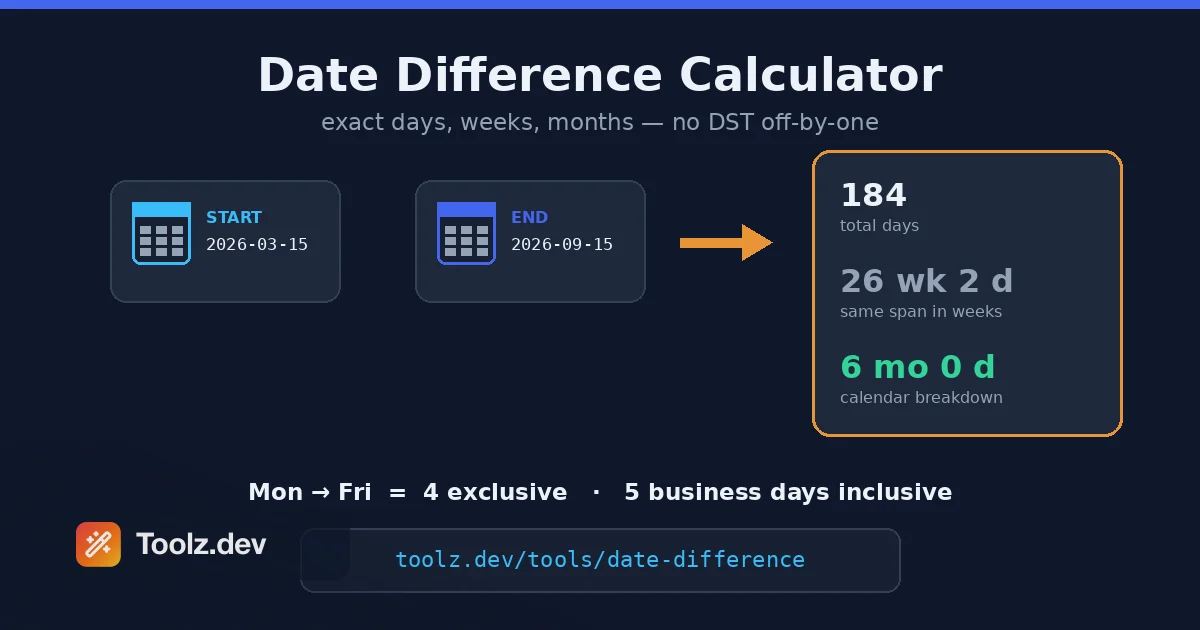
Lo stesso divario espresso come giorni, settimane, mesi e anni - simultaneamente Questo è più utile di quanto sembri, perché diversi domini parlano unità diverse: i contratti legali parlano in mesi, i colloqui di pianificazione dello sprint in settimane, i colloqui di fatturazione in giorni, i colloqui HR in anni di servizio Il divario tra il 15 marzo e il 15 settembre è di 184 giorni, 26 settimane e 2 giorni, o esattamente 6 mesi, e quale numero ti serve dipende interamente da chi' chiede Avendoli tutti in una vista significa che smetti di fare il & quot;184 diviso per 7 è... 26 e change& quot; aritmetica nella tua testa, che è esattamente l'aritmetica le persone sbagliano.
Totali esclusivi più giorni lavorativi inclusi
Il problema del palo di recinzione, reso visibile. Il conteggio del giorno totale qui è ristretto- il divario tra le date - quindi dal lunedì al venerdì si legge come 4. proprio sotto di esso, conta la calcolatrice giorni lavorativi (dal lunedì al venerdì, fine settimana esclusi) utilizzando la convenzione inclusiva utilizzata da Excel's NETWORKDAYS, e ti dice anche quanti giorni del fine settimana è diminuito, quindi lo stesso intervallo dal lunedì al venerdì si legge come 5 giorni lavorativi. Vedere un totale esclusivo e un conteggio inclusivo dei giorni lavorativi nella stessa visualizzazione è un piccolo promemoria giornaliero che & quot; quanti giorni& quot; ha due risposte giuste a seconda che conti entrambi gli endpoint Il mio rimborso di $ 9 è avvenuto perché il mio codice ha risposto alla domanda esclusiva mentre la mia pagina dei prezzi chiedeva quella inclusiva - e uno strumento che mostra entrambe le convenzioni contemporaneamente è uno strumento che ti impedisce di sceglierne uno per sbaglio.
Funziona attraverso mesi, anni bisestili e secoli
Febbraio ha 28 giorni tranne quando ne ha 29; Il 2024 è stato un anno bisestile, 2100 won' t nonostante sia divisibile per 4 (la regola del secolo gregoriano che cattura tutti) La calcolatrice ottiene tutto questo giusto perché utilizza regole del calendario reali piuttosto che & quot; un anno è 365,25 giorni& quot; approssimazioni. Se tu' avessi mai avuto bisogno del conteggio dei giorni per un intervallo di date che abbraccia febbraio in un anno bisestile - maturazione degli interessi, finestre SLA, calcoli dell'età vicino al compleanno del 29 febbraio - sai che questi casi limite sono proprio dove la matematica arrotolata a mano fallisce.
istantaneo, nessuna registrazione, nessun caricamento
Le date entrano, la risposta esce, interamente lato client Nulla viene trasmesso o memorizzato Per la maggior parte della matematica delle date questa è convenienza piuttosto che sicurezza - ma non sempre Date di impiego, tempistiche mediche, scadenze del contenzioso: le coppie di date possono essere silenziosamente sensibili, e lì' non c'è motivo per cui una calcolatrice dovrebbe mai vederle lato server Lo strumento si carica velocemente e funziona offline una volta caricato, il che lo rende anche la cosa che raggiungi per metà riunione quando qualcuno chiede & quot; aspetta, quanto tempo è stato aperto quel biglietto?& quot;
Come utilizzare il calcolatore della differenza di data
Passaggio 1: inserisci la data di inizio
Apri il Calcolatore di differenza di data e imposta la prima data Usa il picker, digitalo direttamente o premi il pulsante Oggi per agganciarlo alla data corrente There' è un campo orario opzionale (HH: mm) se hai bisogno che i totali scendano all'ora o al minuto anziché da mezzanotte a mezzanotte Se i tuoi dati di origine sono un timestamp Unix o una stringa ISO 8601 con un componente orario, risolvilo prima in una data di calendario e intendi sul fuso orario, perché 1751846400 è il 7 luglio a Tokyo e il 6 luglio ancora a Los Angeles. la Convertitore di timestamp gestisce quella traduzione.
Passaggio 2: inserisci la data di fine
Imposta la seconda data. L'ordine non vale & #39; t deve preoccuparti - una differenza è una grandezza, e lì & #39; s un pulsante di scambio se si desidera capovolgere inizio e fine comunque Vale la pena un pensiero deliberato qui: è la data di fine l'ultimo giorno di il periodo o il primo giorno dopo esso? Un abbonamento che "finisce il 31 dicembre e uno che "rinnova il 1 gennaio" descrivere lo stesso periodo con date di fine diverse, e questa è la fonte più comune di disaccordi di un giorno tra due persone che calcolano la stessa gamma di "stesso".
Passaggio 3: leggi la differenza nell'unità di cui hai bisogno
Il risultato mostra il divario tra le unità Prendi quello in cui è denominato il tuo problema e resisti alla conversione tra loro manualmente in seguito - & quot;6 mesi& quot; e & quot;182,5 giorni& quot; non sono intercambiabili, perché i mesi sono' t una lunghezza fissa Se la risposta entrerà in un contratto, fattura o SLA, indica l'unità e La Convenzione di conteggio ("30 giorni di calendario, esclusa la data di inizio") in modo che la prossima persona non reintroduca l'ambiguità che hai appena risolto.
Passaggio 4: verifica della salute contro il tuo codice
Se stai utilizzando la calcolatrice per eseguire il debug di un'applicazione, confronta la sua risposta con quella che il tuo codice produce per la stessa coppia di date. Una mancata corrispondenza di un giorno esatto significa un problema di fencepost o di contorno di fuso orario. Una mancata corrispondenza di un giorno frazionario significa divisione millisecondo su una variazione dell'ora legale. Una mancata corrispondenza di due o tre giorni verso la fine di un mese significa traboccamento aritmetico del mese. la grandezza dell'errore è la diagnosi - più su ciascuno di questi qui sotto.
Profondo tecnico: perché la matematica della data va storta
L'aritmetica del datario sembra sottrazione ed è in realtà un mucchio di regole del calendario, politica del fuso orario e ambiguità di definizione. Cinque modalità di errore rappresentano quasi tutti i bug che ho spedito o esaminato.
1. Il problema del fencepost (off-by-one). Tra il giorno 1 e il giorno 15 ci sono 14 intervalli ma 15 giorni se si contano entrambe le estremità. Nessuno dei due numeri è "la differenza" fino a quando non si specifica la convenzione. Le notti in hotel, gli interessi di prestito e i periodi di noleggio utilizzano conteggio esclusivo; prescrizioni, durata dell'evento e "giorni di copertura" di solito da utilizzare inclusi. Il modello di bug: una parte di un sistema utilizza ciascuno. Annota la convenzione.
2. I mesi non sono un'unità. & quot; Un mese dopo il 31 gennaio" non ha una risposta ovvia - Il 31 febbraio non esiste't esiste JavaScript's legacy Date gestisce questo traboccando: new Date(2026, 0, 31) Inoltre un mese atterra il 3 marzo (28 febbraio + 3 giorni di overflow). strtotime('+1 month') fa lo stesso. La maggior parte degli esseri umani, e la maggior parte dei sistemi di fatturazione, vogliono serraggio invece: 31 gennaio + 1 mese = 28 febbraio (o 29) Le biblioteche differiscono: date-fns e Carbon clamp per impostazione predefinita nei loro aiutanti con aggiunta di mese, raw Date overflow - e il nuovo API temporale Rende il comportamento un'opzione esplicita, che è il design corretto. Se la tua app fa qualcosa mensilmente con le date di ancoraggio dopo il 28, questo è il bug che hai, indipendentemente dal fatto che l'abbia già trovato o meno.
3. Un giorno non è sempre 24 ore. In qualsiasi fuso orario che osserva l'ora legale, un giorno all'anno dura 23 ore e un altro dura 25. codice che calcola le differenze di giorno come milliseconds / 86_400_000 produce un non intero ogni volta che l'intervallo attraversa una transizione e il successivo Math.round contro Math.floor la scelta decide se tu' si stacca di uno L'approccio robusto è fare aritmetica giornaliera sulle date del calendario, non sugli istanti - o normalizzare tutto in UTC, che non ha l'ora legale, prima di dividerlo.
4. Una data senza fuso orario non è un momento nel tempo. "2026-07-06" è largo 24 ore catena che inizia e finisce in istanti diversi in ogni fuso orario. La versione più cattiva di questo bug in JavaScript: new Date("2026-07-06") Analisi come Mezzanotte UTC Secondo le specifiche EcmaScript, quindi in qualsiasi fuso orario a ovest di Greenwich viene visualizzato il 5 luglio. ho perso la maggior parte di un pomeriggio in questo dashboard di react in cui risale a un postgres DATE colonna visualizzata un giorno prima per gli utenti statunitensi - la colonna andava bene, l'API andava bene, il costruttore era il bug Se si toglie una riga da questo articolo: mai nutrire un nudo YYYY-MM-DD affaticare new Date() Quando l'interpretazione dell'ora locale è importante.
5. ISO 8601 è la risposta a una domanda diversa. ISO 8601 (2026-07-06, big-endian, imbottito zero) risolve la data rappresentanza- it' non è ambiguo dove 07/06/2026 Significa il 6 luglio in Ohio e il 7 giugno a Oxford, e si ordina in modo lessicografico. Usalo in ogni log, API e nome file. ma non fa nulla per la data aritmetica; Una coppia di date ISO perfettamente formattata ha ancora tutti e quattro i problemi sopra. Formatta disciplina e disciplina matematica sono discipline separate.
La meta-lezione: usa una libreria di calendario reale (date-fns, Luxon, Carbon o Temporal quando i tuoi obiettivi la supportano), fai aritmetica nello spazio del calendario anziché nello spazio millisecondo e verifica i casi limite - fine mese, giorni bisestili, DST fine settimana - contro una fonte indipendente come il calcolatore. la verifica indipendente è l'intero punto di attrezzatura; più su quella filosofia nel Guida al convertitore di timestamp.
Casi d'uso comuni
Periodi di fatturazione e durata della prova
I sistemi di abbonamento vivono e muoiono in matematica della data La prorazione necessita di conteggi esatti dei giorni entro un periodo di fatturazione; le prove necessitano di una data di fine inequivocabile; i piani annuali devono sopravvivere al 29 febbraio Quando creo flussi di pagamento ora calcolo due volte il limite di ogni periodo - una volta nel codice, una volta nella calcolatrice - prima di scrivere il test Ha rilevato bug reali almeno quattro volte, sempre ai bordi di fine mese o DST, e sempre del tipo che altrimenti sarebbe emerso come e-mail confusa del cliente Se il denaro si moltiplica rispetto a un conteggio giornaliero in qualsiasi parte del sistema, verifica il conteggio giornaliero in modo indipendente.
Scadenze del progetto e pianificazione dello sprint
& quot; Quante settimane lavorative da qui alla data di rilascio?& quot; viene fuori in ogni riunione di pianificazione, e la risposta che le persone calcolano nelle loro teste è attendibilmente fuori da uno o due - gli esseri umani sono cattivi a contare oltre i confini del mese Ottenere il vero intervallo di calendario in giorni e settimane richiede cinque secondi e fonda la conversazione Da lì sottrai le vacanze e buffer onestamente, piuttosto che partire da un numero che era già ottimista di una settimana.
Calcoli di contratto, avviso e termine
Le date legali e delle risorse umane sono accompagnate da convenzioni spietate: un periodo di preavviso di 90 giorni, una finestra di cura di 30 giorni, una presentazione dovuta & quot; entro 21 giorni di servizio.& quot; Questi sono esattamente i campi minati inclusivi contro esclusivi, e il costo di un giorno di ritardo è categoricamente peggiore del costo di un giorno di anticipo Calcolare l'intervallo, quindi confermare quale convenzione endpoint utilizza il documento. (E per tutto ciò che conta veramente, un avvocato batte una calcolatrice: lo strumento ti dice il conteggio, non le regole di conteggio della giurisdizione & #39;s)
Calcoli di età e di mandato
Età, anni di servizio, durata dell'account - tutto & quot; differenza in anni e mesi& quot; problemi con una regola di clampaggio che si nasconde all'interno (qualcuno nato il 29 febbraio ha un compleanno legale del 28 febbraio o 1 marzo a seconda della giurisdizione, che è una cosa reale che gli ingegneri hanno dovuto codificare) Per una risposta rapida - quanti anni ha questo account, quanto tempo dall'ultima distribuzione, quanti giorni dall'incidente - la calcolatrice fornisce la cifra esatta senza caricare un REPL.
Controlli di sanità mentale
Quando un rapporto afferma che il divario medio tra l'ordine e la consegna è di 47 giorni e il tuo intestino dice due settimane, prendi una riga effettiva e controlla le due date a mano. La metà delle volte il "bug" è un turno di fuso orario o un mese/giorno scambiato nell'analisi a monte. Controllo a punti di tre o quattro file contro una calcolatrice affidabile è il modo più veloce per decidere se diffidare dell'oleodotto o dell'intestino. Per osservare ciò che è cambiato tra due rapporti esportati, il Strumento Diff di testo Si abbina bene a questo flusso di lavoro.
Conteggio delle convenzioni a confronto
| convegno | Lun → Ven è uguale | usato per | stare attento |
|---|---|---|---|
| Esclusivo (divario) | 4 giorni | Notti in hotel, maturazione degli interessi, età in giorni | si sente "un breve" per i lettori non tecnici |
| compreso (campata) | 5 giorni | Giorni di farmaci, durata degli eventi, "giorni di copertura" | OFF-BY-ONE se miscelato con sistemi esclusivi |
| giorni lavorativi | 4 o 5 meno ferie | SLA, preventivi di spedizione, scadenze legali | I calendari festivi differiscono per paese e anche per contratto |
| Periodi esatti di 24 ore | Dipende dai tempi | Affitti, Parcheggio, Finestre a tariffa API | L'ora legale fa un giorno locale 23h e un'altra 25h |
| Calendario mesi/anni | "1 mese dopo" | Cicli di fatturazione, contratti, locazioni | Le lunghezze dei mesi variano; serraggio rispetto a troppopieno a fine mese |
Il vero messaggio della tabella: "Quanto tempo tra queste date" non è una domanda. Scegli la riga che corrisponde al tuo problema, nominalo esplicitamente nel tuo codice e nella tua copia e l'intera categoria di controversie scompare. Questa è la stessa disciplina il resto del Toolkit per sviluppatori web continua a spingere: rendi esplicito l'implicito e metà dei tuoi bug evaporano.
FAQ
Che cos'è un calcolatore della differenza di data?
Un calcolatore della differenza di data calcola il divario esatto tra due date del calendario, espresso in giorni, settimane, mesi e anni A differenza della matematica mentale o dell'ingenua sottrazione di millisecondi, applica regole del calendario reali - lunghezze dei mesi variabili, anni bisestili, regole del secolo - quindi il risultato è corretto in tutti i casi limite come febbraio in un anno bisestile o intervalli che abbracciano transizioni diurne.
Come faccio a calcolare il numero di giorni tra due date?
Inserisci entrambe le date in Calcolatore di differenza di data e leggere il conteggio dei giorni Facendolo a mano, contare i giorni rimanenti nel mese di inizio, aggiungere i mesi interi tra, quindi aggiungere i giorni nel mese di fine - e decidere in anticipo se contare la data di fine stessa Quell'ultima decisione, compreso contro conteggio esclusivo, è dove la maggior parte dei calcoli manuali vanno male di uno.
La data di fine è inclusa quando si contano i giorni tra le date?
Per convenzione, no - lo standard & quot;difference" è esclusivo, contando gli intervalli tra le date, quindi dal lunedì al venerdì è di 4 giorni Ma molti contesti del mondo reale (programmi di medicazione, periodi di copertura, lunghezze degli eventi) contano inclusivamente, rendendolo 5. Nessuno dei due è sbagliato; rispondono a domande diverse Indica sempre quale convenzione tu're utilizzando quando il numero entra in un contratto o in una fattura.
Perché la mia matematica con la data di JavaScript fornisce una risposta diversa?
Tre soliti sospetti: new Date("YYYY-MM-DD") Analizza le stringhe di data di UTC, spostando la data di un giorno nei fusi orari occidentali; dividendo le differenze di millisecondo per 86.400.000 di rotture tra le transizioni DST in cui un giorno è escluso 24 ore e aggiungendo mesi con l'oggetto data ereditabile, l'oggetto data esaurisce le transizioni di 31 + 1 mese = 3 marzo. Usa una libreria sensibile al calendario come Date-FNS, Luxon o l'API temporale invece di Raw Aritmetica.
Come vengono contati i mesi quando hanno lunghezze diverse?
Le differenze mensili vengono calcolate sul calendario, non dividendo i giorni per una media: dal 15 marzo al 15 settembre sono esattamente 6 mesi anche se & #39; s 184 giorni L'ambiguità appare con le date di ancoraggio dopo il 28 - un mese dopo il 31 gennaio è in genere bloccato al 28 o 29 febbraio. ben educato sistema di fatturazione clamp; codice ingenuo trabocca all'inizio di marzo, che è un bug genuino che vale la pena verificare.
Gli anni bisestili influiscono sulla differenza di data?
Sì - qualsiasi intervallo che si estende dal 29 febbraio in un anno bisestile (come il 2024 o il 2028) contiene un giorno in più rispetto allo stesso intervallo in un anno comune, e i calcolatori corretti lo tengono conto automaticamente La regola sottile: gli anni divisibili per 100 non sono anni bisestili a meno che non siano divisibili anche per 400, quindi il 2000 è stato un anno bisestile ma 2100 won' t be. Laminati a mano & quot; divisibili per 4& quot; i controlli falliscono esattamente su quegli anni.
In che modo i fusi orari influiscono sul calcolo dei giorni tra le date?
Una data nuda è una finestra diversa di 24 ore in ogni fuso orario, quindi due sistemi in zone diverse possono legittimamente non essere d'accordo su cosa sia & quot; today" è - e un timestamp vicino a mezzanotte può cadere su date di calendario diverse a seconda della zona utilizzata per interpretarlo Per differenze pure di data di calendario, i fusi orari non si applicano e n. 39; t si applicano; per le date derivate dal timestamp, converti prima entrambi i timestamp nella stessa zona utilizzando uno strumento come il Convertitore di timestamp.
Il calcolatore della differenza di data di Toolz.dev è gratuito e privato?
Sì su entrambi i fronti Funziona interamente nel tuo browser senza registrazione - le date che inserisci non vengono mai caricate, registrate o archiviate da nessuna parte Ciò conta più di quanto sembri, poiché le coppie di date possono codificare fatti sensibili come periodi di lavoro, tempistiche mediche o scadenze legali, e lì' non c'è motivo tecnico per cui una calcolatrice debba vederli lato server.