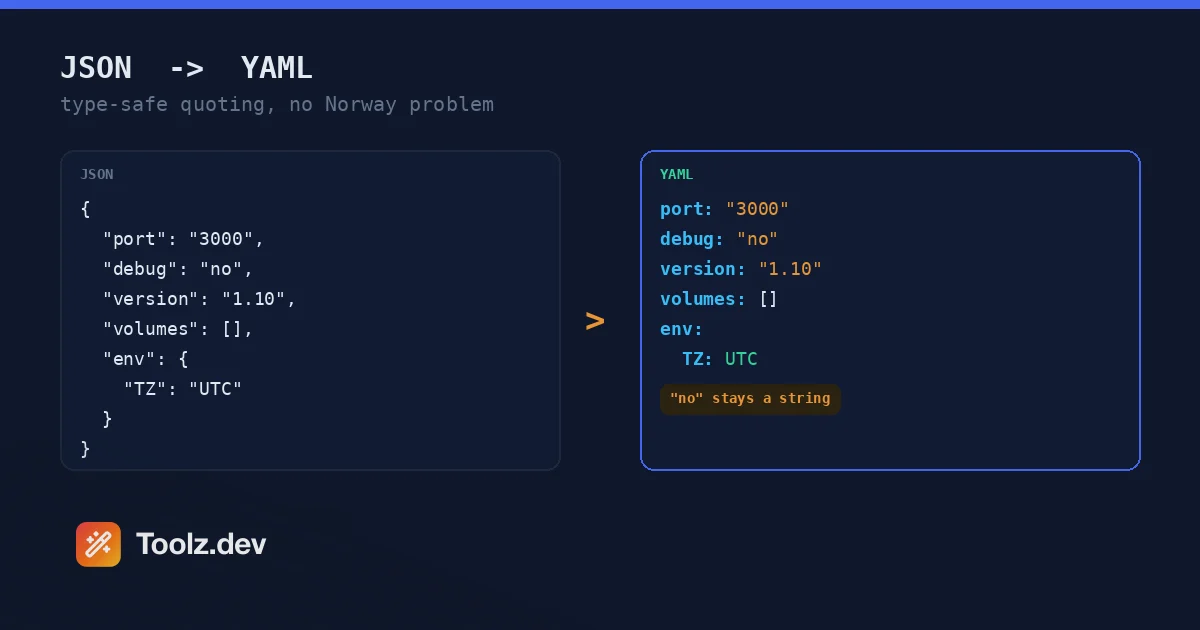
La prima volta che Yaml mi ha bruciato correttamente, era un prefisso internazionale. Stavo spostando una configurazione locale da file JSON di un progetto Laravel in un formato YAML adatto alla distribuzione, convertendo a mano mentre procedevo perché "sta solo cambiando parentesi graffe in rientro". Una delle voci era la Norvegia: "country": "NO". In YAML, senza virgolette, quel' non è una stringa - secondo le regole YAML 1.1 che PyYAML e molti altri parser applicano ancora, NO è il booleano false. Lo script di distribuzione, scritto in Python, ha valutato allegramente gli utenti norvegesi come country: false e li ho indirizzati verso il luogo del fallback. Questo bug ha un nome - la comunità lo chiama il problema della Norvegia - e ho potuto scoprirlo in modo artigianale, un biglietto di supporto confuso alla volta.
La conversione manuale di JSON in Yaml sembra banale ed è in realtà un campo minato, perché i due formati hanno idee molto diverse su cosa significhi una parola nuda. In JSON, tutto è esplicito: le stringhe hanno virgolette, i numeri non, true/false/null sono parole chiave, fine della storia. In YAML, viene ottenuto uno scalare non quotato interpretato: no diventa falso, 3000 diventa un numero intero, 1.10 diventa il galleggiante 1.1 (arrivederci, stringa di versione), 08 soffoca alcuni parser come ottale non valido e un valore con uno spazio dei due punti vagante diventa una mappa annidata quando meno te lo aspetti. Ognuno di questi è una corruzione silenziosa dei dati: il file si analizza bene, i tipi sono semplicemente sbagliati.
un' Convertitore JSON a YAML che capisce queste regole ti fa ottenere la leggibilità per cui YAML è stato inventato senza il tipo roulette Quello che ho costruito per Toolz.dev rileva ogni scalare ambiguo - sosia booleani, sosia di numeri, valori legacy YAML 1.1, stringhe con caratteri speciali - e cita esattamente quelli, quindi quella che era una stringa nel tuo JSON è ancora una stringa dopo che lo strumento successivo analizza lo YAML. Quello & quot;esattamente quelli& quot; conta: citare tutto Sarebbe anche al sicuro, ma l'output smette di sembrare yaml idiomatica e idiomatica è il punto centrale.
Questa guida spiega come la conversione gestisce gli spigoli vivi di Yaml, perché JSON è tecnicamente già YAML (e perché questo fatto non ti aiuta) e i flussi di lavoro Kubernetes, CI e Docker componeno dove questa conversione avviene settimanalmente.
tl; dr: Incolla JSON nel Convertitore Toolz.dev JSON a YAMLscegli il rientro a 2 o 4 spazi e ottieni YAML pulito in stile blocco con quotazione sicura per il tipo -
"3000"rimane una corda,"no"rimane una corda,"1.10"rimane una versione. l'ordine delle chiavi viene preservato, le raccolte vuote escono come[]e{}, e tutto funziona sul lato client, quindi le configurazioni con i segreti non lasciano mai il tuo browser. andata e ritorno con il Condivisore di yam, e formatta prima la sorgente con il Formattatore JSON.
JSON è già valido YAML?
Sì - e it's il più inutile & quot; yes" nella gestione della configurazione YAML 1.2 è stato esplicitamente progettato come superset di JSON: ogni documento JSON valido analizza come YAML valido Potresti incollare JSON grezzo in un manifesto di Kubernetes e kubectl lo accetterebbe.
Nessuno lo fa, perché il motivo per cui YAML esiste ergonomia umana. Manifesti Kubernetes, flussi di lavoro delle azioni GitHub, file Docker Compose, playbook Ansible, configurazioni Home Assistant: queste sono YAML perché le persone le leggono e le modificano manualmente costantemente, e replicas: 3 sotto un blocco rientrato scansiona meglio di {"replicas":3} annidato in bretelle. Quando qualcuno dice "converti JSON in YAML, significano a blocchi Yaml: rientro al posto di parentesi graffe, - trattini invece di array tra parentesi, nessuna citazione dove non ne è necessaria.
L'ultima clausola è dove vive la difficoltà. Passare dalla sintassi di JSON all'esplicito syntax alla sintassi minima di YAM Decidendo, per ogni stringa, se può perdere le sue virgolette in sicurezza- e quella decisione richiede di conoscere YAML's regole di risoluzione scalare migliori di quanto la maggior parte degli esseri umani faccia in modo affidabile alle 17:00 di venerdì. Quello's il lavoro effettivo di un convertitore; la parte tra parentesi graffe e rientranze è banale.
Cosa si rompe silenziosamente quando converti a mano?
I casi di fallimento si riducono in quattro famiglie e ho colpito ognuna di esse in configurazioni reali:
Sosia booleane. YAML 1.1 risolve yes, no, on, off, y, n (in vari involucri) come booleani e Yaml 1.2 mantiene true/false. PyYAML - ancora la libreria YAML predefinita nella maggior parte delle basi di codice Python - implementa 1.1. COSÌ "debug": "no" convertito a mano in debug: no diventa debug: false nel tuo tooling di distribuzione Python. il problema della Norvegia (NO → false) e suo cugino il problema dell'Ontario (ON → true) sono i più grandi successi di questa famiglia.
numero sosia. "port": "3000" convertito in port: 3000 ora è un numero intero. Kubernetes lo fa' t importa in alcuni campi e hard-fail in altri: i valori env var, ad esempio, devono essere stringhe e kubectl apply rifiuterà un numero intero lì con un errore che nomina il campo ma non il perché. Le stringhe di versione sono peggio perché niente fallisce: version: 1.10 analizza come il galleggiante 1.1e il tuo script di distribuzione riporta felicemente per sempre la versione sbagliata Zeri iniziali: codici postali, numeri di telefono, ID dall'aspetto ottale come 0755- completa la famiglia.
caratteri speciali. Un punto di riferimento seguito da uno spazio all'interno di un valore non quotato avvia una mappatura (message: error: not found è un errore di analisi o una mappa nidificata, parser a seconda). un' # Avvia un commento a metà valore. primario *, &, ! Collidi con l'ancora, l'alias e la sintassi di tag di Yaml. Le stringhe con le nuove righe devono essere fuggite o bloccare gli scalari.
la stringa vuota. Il vuoto non quotato in YAML è null, no "". Qualsiasi campo JSON in possesso di una stringa vuota deve uscire citato o cambia tipo.
la convertitore controlla ogni stringa rispetto a tutte e quattro le famiglie e cita quelle che ne hanno bisogno - e solo quelle. production esce nudo perché è inequivocabile; "3000", "no", "1.10", e "" Vieni fuori citato perché non lo sono. C'è anche un "quota tutte le stringhe" per quando stai alimentando un parser di cui non ti fidi e vuoi che si verifichi una risoluzione scalare zero.
Come si converte JSON in YAML con lo strumento?
Passaggio 1: incolla il tuo JSON
Qualsiasi lavoro JSON valido: oggetti, array, nidificazione profonda, unicode. Il pulsante Carica campione ti offre una configurazione di servizio realistica che esercita i casi interessanti: una porta stringa numerica, un booleano, un array vuoto, mappe nidificate Se il tuo input ha problemi di sintassi, il convertitore segnala l'errore esatto parser' s piuttosto che convertire un documento troncato; per dare la caccia cui L'errore è in un grande blob, il Formattatore JSON è il microscopio migliore.
Passaggio 2: scegli il rientro
Due spazi o quattro Due è la convenzione travolgente: documenti Kubernetes, esempi di azioni GitHub, riferimenti Docker Compose e yamllint tutti i valori predefiniti lo utilizzano, ma alcuni team si standardizzano su quattro per la leggibilità nel nesting profondo. Qualunque cosa tu scelga, il convertitore è coerente al riguardo, incluso il caso sottile degli elementi dell'elenco sotto una chiave, dove il rientro manuale incoerente è una classica fonte di & quot; i valori di mappatura non sono consentiti qui& quot; errori.
Passaggio 3: converti e rivedi
L'output appare con i conteggi di linee e byte. Sfioralo una volta, non per correttezza (quello e n. 39; è il lavoro del convertitore e n. 39;) ma per verificare la sanità mentale delle decisioni di quotazione rispetto alle tue aspettative. Vedere PORT: "3000" citato mentre NODE_ENV: production IS non è lo strumento che ti dice quali valori erano pericolosi.
Passaggio 4: copia o scarica
Copia negli appunti per incollare in un manifest esistente o scarica come a .yaml file. L'output utilizza solo spazi: YAML vieta le schede per il rientro, che vale la pena conoscere quando successivamente modifichi il file in un editor configurato per il rientro delle schede.
JSON vs YAML: Quando vince ogni formato?
| json | igname | |
|---|---|---|
| letto/modificato da | macchine, API | Umani, squadre operative |
| commentario | non nelle specifiche | # commenti: la funzionalità killer per le configurazioni |
| Digita Esplicitezza | Totale - le quotazioni decidono tutto | Risoluzione scalare - decide il contesto |
| stringhe multilinea | \n Fugge solo |
Blocca gli scalari (` |
| Analisi velocità e ubiquità | Più veloce, ovunque | Parser più lenti e pesanti |
| pistole a gambe | virgole finali, questo è tutto | Problema della Norvegia, schede, deriva di indentazione, troncamento della versione |
| Habitat naturale | payload API, package.json, scambio di dati |
Kubernetes, CI Pipelines, Compose, Ansible |
Lo schema dietro il tavolo: JSON vince ovunque una macchina scriva e una macchina legge; Yaml vince ovunque una macchina legge ma a umano scrive La configurazione si trova esattamente nella seconda categoria, motivo per cui la direzione da JSON a YAML è quella comune: i dati iniziano la vita in un'API o in un'esportazione di database e devono diventare qualcosa che un team operativo può mantenere Il viaggio inverso, YAML torna a JSON leggibile dalla macchina, è ciò che il Condivisore di yam maniglie: incolla YAML, ottieni la convalida più l'equivalente JSON.
Quali sono i flussi di lavoro quotidiani per questa conversione?
Manifesti di Kubernetes dall'output dell'API
kubectl get deployment my-app -o json ti dà JSON; il manifesto che controlli in Git è YAML. Convertire le risposte API in YAML pulito è il modo più veloce per avviare un manifesto da una risorsa live: convertire, spogliare il server popolato status e metadata.managedFields blocchi e hai un punto di partenza dichiarativo. Il preventivo per la sicurezza dei tipi guadagna la sua conservazione qui: valori env in Kubernetes muffa essere stringhe e l'insistenza del convertitore nel citare "3000" è la differenza tra kubectl apply riuscire e fallire.
Configurazione della pipeline CI
Le azioni GitHub e il CI GitLab sono solo YAML. Quando I'm genera passaggi del flusso di lavoro a livello di programmazione - una matrice di versioni PHP e Node per testare WP Adminify contro, diciamo - il generatore produce naturalmente JSON e l'ultimo passaggio è la conversione Le stringhe di versione nelle matrici di test sono esattamente i valori che vengono mutilati dalla conversione ingenua: una matrice di ["1.9", "1.10", "1.11"] Convertito a mano senza virgolette test contro PHP 1.1 due volte. la Collezione di strumenti di codifica Copre di più di questo modello di generazione e poi convertito.
Docker compone dall'output di ispezione
docker inspect emette JSON; docker-compose.yml vuole YAML. Reverse-engineering di un file Compose da un container in esecuzione - porte, volumi, env - è un lavoro di conversione e potatura Array vuoti e oggetti convertiti in [] e {} Sintassi del flusso, che compone accetta e che mantiene leggibile lo stadio di potatura.
Rendere la configurazione revisionabile
Questo è sottovalutato: le configurazioni JSON con dozzine di chiavi nidificate sono infelici nella revisione del codice, in parte perché non possono portare commenti. La conversione in YAML ti consente di annotare perché rateLimit è 250 proprio accanto al valore. per la recensione stessa, accoppiando la conversione con a differenziale di prima/dopo JSON mantiene la domanda "cosa è effettivamente cambiato" onesto mentre la versione YAML gestisce il "perché".
Documenti OpenAPI e Schema
Le specifiche OpenAPI sono comunemente scritte in YAML ma generate e servite come JSON. Convertire una specifica generata in YAML per la modifica umana - quindi convalidare il viaggio di andata e ritorno - è un flusso di lavoro standard del team API e le garanzie di fedeltà (ordine chiave conservato, tipi citati) significano che la versione YAML rimane diffamabile rispetto al suo antenato JSON.
Perché la conservazione degli ordini chiave è importante?
Secondo la specifica JSON, l'ordine delle chiavi dell'oggetto non ha alcun significato {"a":1,"b":2} e {"b":2,"a":1} sono lo stesso oggetto. Quindi un convertitore potrebbe ordinare le chiavi in ordine alfabetico ed essere tecnicamente corretto. Sarebbe anche praticamente ostile, perché i file di configurazione lo sono leggere In ordine: una distribuzione di Kubernetes si legge naturalmente come apiVersion, kind, metadata, spec- ordinarli in ordine alfabetico produce un manifesto che si analizza in modo identico e si legge come una richiesta di riscatto.
Il convertitore emette chiavi in ordine di origine. Il tuo modello mentale del documento sopravvive alla conversione, lo yaml si differenzia in modo netto rispetto alle precedenti conversioni della stessa fonte e gli ordinamenti convenzionali (nome prima del valore, apiVersion Primo) Rimani convenzionale. se tu mancanza ordinamento canonico a scopo di confronto, che' è una preoccupazione di diversi strumenti: il JSON DIFF Checker Confronta per chiave indipendentemente dall'ordine, che è il livello giusto per quel problema.
È sicuro convertire configurazioni contenenti segreti?
La configurazione è il testo più denso di segreti gestito da uno sviluppatore: URL di database con password incorporate, token API in blocchi env, nomi host interni che mappano la tua infrastruttura. It' è anche esattamente ciò che le persone incollano nei convertitori online, solitamente a metà distribuzione, di solito in fretta.
la Convertitore Toolz.dev funziona interamente nel tuo browser: analisi, analisi scalare, serializzazione: tutto è JavaScript lato client, nessuna richiesta di rete trasporta i tuoi dati e lo strumento continua a funzionare con la tua connessione tagliata. That' è un fatto architettonico, non una promessa di politica della privacy. La filosofia di progettazione del browser alla base dell'intera cassetta degli attrezzi è delineata nel Guida al kit per gli sviluppatori webQuesto strumento è la filosofia applicata al tipo di documento più sensibile nel tuo flusso di lavoro.
L'ovvio avvertimento: la conversione lato client protegge il conversione. Il luogo in cui incollate l'output è la sua decisione di sicurezza.
FAQ
Come faccio a convertire JSON in Yaml online?
Incolla il tuo JSON nel Convertitore JSON a YAMLscegli il rientro a 2 o 4 spazi e fai clic su Converti Ottieni YAML in stile blocco con quotazione sicura per il tipo, pronto per copiare o scaricare come file.yaml. La conversione viene eseguita interamente nel tuo browser: non viene caricato nulla.
JSON è già valido YAML?
Tecnicamente sì - YAML 1.2 è un superset di JSON, quindi qualsiasi documento JSON valido viene analizzato come YAML. Ma la sintassi JSON sconfigge lo scopo di leggibilità di YAML' Converting produce YAML in stile blocco con rientro invece che parentesi graffe, che è ciò che manifesta Kubernetes, flussi di lavoro CI e file Compose si aspettano che gli esseri umani leggano e modifichino.
Qual è il problema della Norvegia in yaml?
Sotto le regole scalari YAML 1.1, che i parser come PyYAML applicano ancora, i valori non quotati no, sì, on e off parse come booleani - quindi il codice paese NO diventa silenziosamente falso Il convertitore lo impedisce citando automaticamente qualsiasi stringa che un parser YAML potrebbe interpretare come booleano, numero o nullo.
Le stringhe numeriche come "3000" rimarranno stringhe dopo la conversione?
si. Il convertitore rileva le stringhe che assomigliano a numeri e le cita nell'output, quindi "3000" rimane una stringa invece di diventare l'intero 3000. Questo è importante per le porte, i numeri di versione come "1.10" (che altrimenti troncherebbe nel float 1.1), i codici postali e gli ID con zeri iniziali.
Il convertitore conserva l'ordine delle mie chiavi JSON?
Sì. Le chiavi vengono emesse nell'ordine in cui appaiono nel JSON sorgente. L'ordinamento delle chiavi sarebbe tecnicamente valido: l'ordine degli oggetti JSON non ha alcun significato per RFC 8259- ma l'ordine di origine mantiene le configurazioni leggibili nella loro struttura convenzionale e mantiene YAML diffamabile rispetto alla sua sorgente JSON.
Posso usare l'output direttamente in Kubernetes o Docker Compose?
Sì. L'output è YAML standard in stile blocco rientrato con spazi (mai schede), che kubectl, Docker Compose, GitHub Actions e GitLab CI accettano tutti Valori che devono essere stringhe - come Kubernetes env var values - escono quotati, evitando gli errori di tipo che kubectl solleva sui numeri non quotati.
Come faccio a riconvertire YAML in JSON?
Usa il Condivisore di yam su Toolz.dev - analizza il tuo YAML, segnala eventuali errori di sintassi e restituisce l'equivalente JSON. Insieme al convertitore da JSON a YAML, ti offre un viaggio di andata e ritorno completo tra i due formati.
È sicuro convertire i file di configurazione che contengono segreti?
Sì. La conversione viene eseguita interamente in JavaScript nel browser: nessuna richiesta di rete trasporta i tuoi dati, nulla viene archiviato o registrato e lo strumento funziona offline. Configura con credenziali di database, token API o nomi host interni non lasciare mai la macchina.
YAML's la leggibilità è reale, e lo sono anche i suoi spigoli vivi - il formato risolve i tipi dal contesto, e il contesto è esattamente ciò che la conversione manuale sbaglia Un convertitore che conosce le regole scalari ti dà la configurazione leggibile senza la corruzione del tipo silenzioso: converti il tuo JSON, screma il citazione che ha scelto e spedisci un manifesto in cui la Norvegia è ancora un paese.