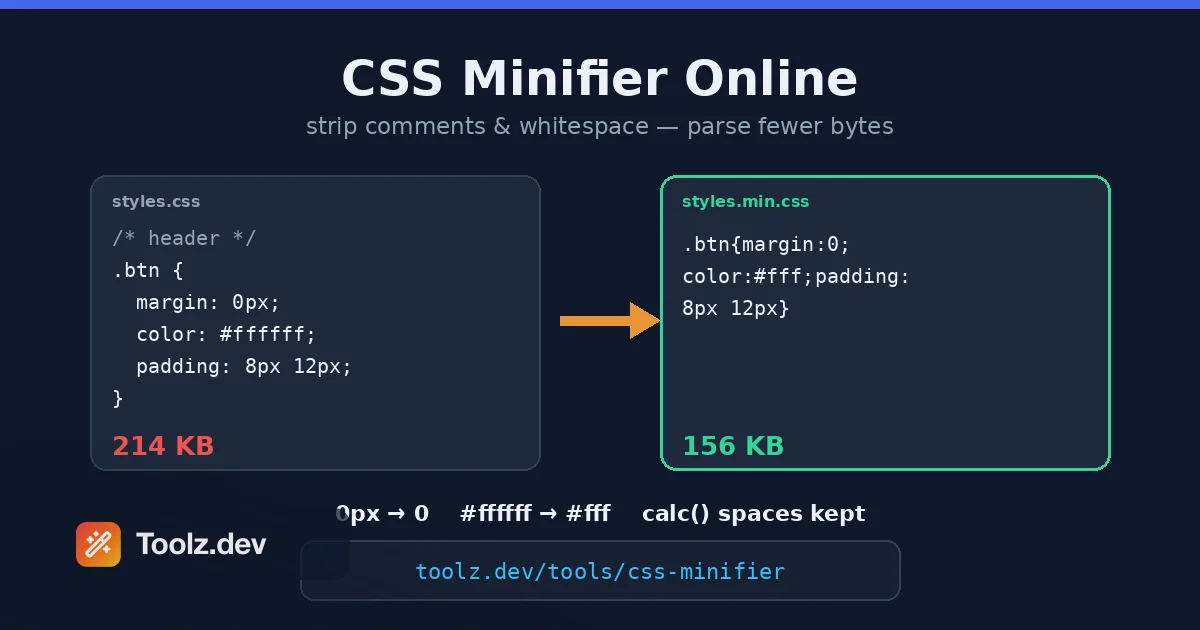
La prima volta che ho effettivamente misurato il nostro foglio di stile invece di supporre, il numero mi ha imbarazzato WP Adminify's admin bundle aveva fatto crescere un file CSS a 214 KB - anni di funzionalità, tre sviluppatori, zero eliminazioni Minificato, è sceso a 156 KB. Gzippato sopra, 24 KB via cavo We' aveva spedito quasi nove volte più foglio di stile di quanto gli utenti stavano scaricando necessario analizzato, e ogni pagina di amministratore ha pagato il costo di analisi ad ogni carico. Nessuno l'aveva notato perché CSS non genera mai un errore per essere grasso. Fa semplicemente tutto in silenzio dopo.
CSS si trova nel percorso critico del rendering I browser bloccano la pittura finché i fogli di stile nella testa non vengono scaricati e analizzati - that's what & quot;render-blocking CSS" significa nel tuo rapporto Lighthouse, e it's perché la dimensione del foglio di stile viene visualizzata direttamente in First Contentful Paint e Largest Contentful Paint, due delle metriche Vitali Web principali si preoccupa di Il tuo JavaScript può essere caricato pigramente, le tue immagini possono essere differite; il tuo CSS critico no. It's il casello di ogni carico di pagina attraversa.
La minimizzazione è lo sconto sul pedaggio più economico disponibile: elimina tutto ciò di cui il parser ha bisogno & #39; t ha bisogno - commenti, spazi bianchi, sintassi ridondante - e le regole che sopravvivono sono equivalenti byte per byte in effetti Nessun refactoring, nessun rischio di cambiamento di comportamento se fatto correttamente, nessuna pipeline di compilazione richiesta se usi uno strumento basato su browser Il Minifier CSS su Toolz.dev Fa esattamente questo, lato client, nel tempo necessario per incollare.
Questa guida spiega come usarlo, cosa fa effettivamente la minimizzazione sotto il cofano, come interagisce con Gzip e Brotli (questa è la parte che la maggior parte degli articoli sbaglia) e quando minimizzare è la mossa sbagliata.
tl; dr: Incolla il tuo foglio di stile nel Minifier CSS Toolz.dev e recupera funzioni identiche CSS con commenti, spazi bianchi e sintassi ridondante spogliata - in genere 15.40% più piccola prima della compressione Funziona interamente nel tuo browser, senza registrazione Minificazione e stack gzip/Brotli: fai entrambe le cose Mantieni la fonte leggibile, spedisci l'output minificato e non modificare mai manualmente un file minificato Per il resto del payload front-end, abbinalo allo Minifier HTML e il lavoro di immagine coperto nel Guida all'ottimizzazione dell'immagine SEO.
Caratteristiche principali
Spazio bianco e spogliarello dei commenti
La maggior parte dei risparmi di minificazione deriva dalle cose noiose: rientro, interruzioni di riga, spazi attorno a parentesi graffe e due punti e commenti Un foglio di stile ben commentato è facilmente il 20% di commenti e spazi bianchi in peso - e ogni byte di esso è per gli esseri umani, non per i browser Stripping non cambia nulla su come viene interpretata una singola regola Questo è anche il motivo per cui si mantiene il file originale: l'output minificato è un artefatto di build, come il codice compilato La versione leggibile con i commenti che spiegano perché la quale z-index IS 9999 rimane nel tuo repository; la versione spogliata va in produzione.
Ottimizzazione a livello di sintassi
Una buona minimizzazione passa oltre gli spazi bianchi nella grammatica stessa. Il minifier Toolz.dev esegue tre trasformazioni di sintassi sicura: 0px diventa 0 (una lunghezza zero non ha bisogno di unità), #ffffff diventa #fff (l'esagono di sei cifre collassa a tre quando le coppie corrispondono) e il punto e virgola finale prima che ogni parentesi graffa di chiusura venga eliminato. Individualmente si tratta di byte singoli; attraverso un foglio di stile reale la somma ammonta a uno o due percento. Fondamentalmente, ognuno è definito sicuro dalla specifica CSS - margin: 0px e margin: 0 sono la stessa dichiarazione al parser. Altrettanto importante è ciò che deliberatamente WON'T Tocco: lascia 0%, 0s, e 0deg da solo (l'unità è significativa lì), non si accorcia mai a otto cifre #rrggbbaa Alpha Hex (la quarta coppia non è ridondante) e mantiene /*! ... */ Licenza e commenti banner in modo che la tua attribuzione sopravviva. Questa moderazione è tutta la differenza tra minimizzazione e territorio più rischioso della ristrutturazione, che arriverò nel profondo.
Feedback istantaneo sul risparmio
Lo strumento mostra la dimensione dell'input rispetto alla dimensione dell'output, il che trasforma una best practice astratta in un numero concreto Quel numero è diagnostico, non solo gratificante Una riduzione del 40% + di solito significa che il file era pieno di commenti e formattazione generosa - normale per i CSS scritti a mano Una riduzione inferiore al 10% significa che il file era già minificato o generato strettamente, e il tuo sforzo di ottimizzazione appartiene ad altre parti, probabilmente immagini I & #39; ho visto persone trascorrere un pomeriggio radendosi 3 KB di CSS su una pagina che serve 2 MB di PNG non ottimizzati Misura prima; il numero ti dice dove dovrebbe andare il pomeriggio.
Elaborazione lato client
Il tuo CSS non esce mai dalla scheda del browser Per gli stili open source che & #39; ha un'alzata di spalle, ma molti fogli di stile sono proprietari: una riprogettazione inedita di client' è una riprogettazione inedita, un tema white label che vendi, codice interno del sistema di progettazione Caricandoli su un sito di minificazione casuale senza politica sulla privacy you've read è un rischio strano da correre quando l'operazione funziona perfettamente bene a livello locale Il lato client significa anche che ' è veloce - senza caricamento di andata e ritorno - e funziona su file abbastanza grandi da rendere timeout gli strumenti basati su server.
Gestisce il moderno CSS
proprietà personalizzate, calc() espressioni, media e query sui container, output di nesting da preprocessori, prefissi dei fornitori - i veri fogli di stile 2026 sono pieni di costrutti che gli ingenui minifier basati su regex mangano Whitespace all'interno calc() è notoriamente portante: calc(100% - 20px) richiede gli spazi attorno al segno meno e un minifier che li spoglia rompe l'espressione. Un minifier che tiene traccia delle parentesi e delle stringhe letterali - come questo - sa lasciare in pace quegli spazi e tenere le mani lontane da qualsiasi cosa all'interno url() o una stringa citata. Se sei mai stato bruciato da un cattivo minifier, è stato quasi certamente un regex cieco; la soluzione è uno strumento che rispetta le parentesi, url()e citazioni invece di abbinarle al modello.
Come utilizzare il minifier CSS
Passaggio 1: raccogli il CSS che vuoi minimizzare
Copia il foglio di stile da ovunque viva - a .css file, a <style> Blocca, l'output della tua build Sass o uno snippet destinato a una scatola di personalizzazione WordPress. Se il tuo progetto ha più fogli di stile che vengono spediti insieme, considera prima di concatenarli e minimizzare il risultato; una richiesta per un file compatto di solito ne batte diversi piccoli, sebbene il multiplexing HTTP/2 abbia ammorbidito quella regola.
Passaggio 2: incollalo nel minifier
Apri il Minifier CSS e incolla L'elaborazione è immediata - there's nessun passaggio di caricamento perché there's nessun caricamento Se l'input ha un errore di sintassi, l'output minificato può comportarsi in modo inaspettato (un tutore di chiusura mancante ingoia seguendo le regole in forma minificata proprio come fa in source, ma è molto più difficile da individuare), quindi se qualcosa si distoglie, convalida prima la fonte.
Passaggio 3: confronta le dimensioni
Notare le cifre prima/dopo. Questa è la tua prova per il messaggio di commit e il tuo segnale per sapere se CSS fosse l'obiettivo giusto. Come punto di riferimento personale approssimativo di anni in cui si è svolto: CSS scritto a mano scende del 25–40%, Framework CSS del 15–25%, CSS già elaborato inferiore al 10%. Qualsiasi cosa al di fuori di queste gamme vale una seconda occhiata.
Passaggio 4: spedisci la versione minimizzata, mantieni la fonte
Copia l'output nel tuo asset produttivo: il .min.css file, il foglio di stile compilato del tema, il campo Customizer. Allora la regola che ho visto violato con costose conseguenze: Non modificare mai direttamente il file minimizzato. nel momento in cui qualcuno fissa un colore in un aggiornamento styles.min.css, la fonte e l'artefatto sono divergenti e la successiva build corretta ripristina silenziosamente la correzione. La fonte è per la modifica, Minified è per la spedizione e la freccia tra di loro punta in un modo.
Passaggio 5: verificare nel browser
Carica la pagina con il foglio di stile minificato e fai clic tra le visualizzazioni importanti La corretta minimizzazione preserva il comportamento, quindi questo controllo richiede due minuti e passa quasi sempre - ma & quot;quasi sempre" sta facendo lavoro in quella frase, e due minuti sono un'assicurazione economica Se qualcosa è cambiato, diff le pagine renderizzate' CSS con il Strumento Diff di testo per trovare quale regola è stata maciullata.
Dive Tecnico Deeper: Minificazione, Gzip e Brotli
L'idea sbagliata più comune sulla minificazione è che gzip la renda ridondante - & quot; il server comprime tutto comunque, perché preoccuparsi?" I due operano a livelli diversi e comprendere la differenza ti dice esattamente quanto vale ciascuno.
compressione (Gzip, Brotli) è a livello di trasporto e reversibile Il server comprime la risposta, il browser la decomprime e ciò che esce è byte-identico a ciò che è entrato - inclusi ogni commento e ogni spazio La compressione riduce il scaricare.
minimificazione è a livello di contenuto e unidirezionale I byte che vengono rimossi non vengono mai scaricati, mai decompressi e - questa è la parte che le persone perdono - Mai analizzato. Il parser CSS del browser cammina su ogni carattere del foglio di stile decompresso sul thread principale. Un foglio di stile da 214 kb che gzip a 24 kb costa ancora 214 kb di analisi ad ogni carico non memorizzato nella cache. La minimizzazione è l'unica delle due che riduce quel costo.
Si impilano anche, anche se non in modo additivo. La compressione è meglio a spremere gli spazi bianchi ripetitivi di quasi ogni altra cosa - che significa minification's risparmio relativo si restringono dopo la compressione Forma tipica dei numeri per un foglio scritto a mano: la minifica da sola risparmia il 30%, il solo gzip risparmia l'80%, entrambi gli stili insieme risparmiano forse l'838% Il risparmio marginale di minification post-zip è modesto; il risparmio di tempo di analisi non è toccato dalla compressione ed è l'argomento durevole Fai entrambi It's non è né/o, e nessuno dei due è costoso.
dove entra in gioco la parte di blocco del rendering. fogli di stile a cui si fa riferimento in <head> blocca prima paint by design - il browser si rifiuta di mostrarti un lampo di contenuti senza stile, quindi aspetta Lighthouse lo segnala come & quot; Elimina le risorse di blocco del rendering, & quot; e il toolkit di mitigazione è: minify (bloccante più piccolo), comprimi (ancora più piccolo), inline le regole critiche sopra le pieghe direttamente nell'HTML (nessuna richiesta per la parte che conta) e carica CSS non critici in modo asincrono con il media="print" Scambio di carico o rel="preload" modelli. La minimizzazione è il primo passo perché è l'unico con un rischio di implementazione effettivamente zero.
cosa non è la minimizzazione. non rimuove non abituato regole - that's purging (approccio JIT di PurgeCSS, Tailwind's), che richiede di conoscere il markup e può assolutamente rompere le cose quando i nomi delle classi sono costruiti dinamicamente Non unisce selettori duplicati o ristruttura la cascata - alcuni ottimizzatori aggressivi (cssnano's preset avanzati, csso's modalità di ristrutturazione) tentano questo, e di solito funziona, ma & quot;solitamente& quot; è una garanzia diversa rispetto alla rimozione degli spazi bianchi's & quot; sempre.& quot; L'ordine a cascata è semantico in CSS; due regole con uguale specificità risolvono per ordine di origine, e un ristrutturatore che le riordina cambia la tua pagina La mia politica dopo una cattiva distribuzione venerdì: trasforma sempre sicuro, ristrutturando solo con test di regressione visiva guardando.
per dove si trova la minimizzazione nell'intero gasdotto front-end, il Guida al kit per gli sviluppatori web Mappa il territorio e il Guida al minifier HTML copre la metà del markup dello stesso lavoro: stessa idea, una regola più complicata sugli spazi bianchi.
Casi d'uso comuni
Temi e plugin di WordPress
I siti WordPress accumulano fogli di stile nel modo in cui le soffitte accumulano scatole: tema, tema figlio, generatore di pagine, sei plugin, ciascuno dei quali accoda CSS. Se spedisci un tema o un plugin, minimizzare le tue risorse prima del rilascio è un'igiene di base; L'ho imparato mantenendo WP Adminify, dove si caricavano i nostri CSS Ogni pagina di amministrazione Per decine di migliaia di siti, e ogni kilobyte sprecato è stato moltiplicato per quella base di installazione. Se gestisci un sito, le copie minificate del tuo CSS a tema personalizzato e child-teme sono la vittoria a basso sforzo prima di raggiungere i plug-in di memorizzazione nella cache più pesanti.
Build pre-distribuzione senza un sistema di build
Molti progetti reali non hanno bundler: pagine di destinazione, app legacy, micrositi client, quella pagina di marketing creata da qualcuno nel 2019 che si converte ancora. Aggiungere webpack per minimizzare un foglio di stile è un'eccessiva abilità assurda. Incollarlo attraverso un minifier del browser prima del caricamento richiede quindici secondi e cattura la maggior parte dei vantaggi che una pipeline di compilazione offrirebbe. Non tutti i progetti meritano infrastrutture; ogni progetto merita risorse ridotte al minimo.
Email e widget incorporati CSS
Widget di terze parti, badge incorporabili e e-mail HTML Tutti i CSS iniettano i CSS in ambienti che non controlli, dove i budget delle dimensioni sono stretti e ogni kilobyte spedito viene spedito di nuovo da ogni sito o casella di posta che ti incorpora. Minimizzare gli stili incorporati è un'ingegneria rispettosa. Un avvertimento per l'e-mail in particolare: alcuni clienti più anziani sono davvero strani sull'analisi dei CSS, quindi prova la versione minimizzata nel tuo strumento di anteprima e-mail piuttosto che assumere trasferimenti di equivalenza al motore di rendering di Outlook, perché molto poco lo fa.
Debug al contrario: abbellimento CSS minimizzato
La stessa categoria di strumenti guadagna il suo mantenimento nella direzione opposta Quando tu' stai ispezionando un problema di produzione e tutto ciò che hai è un foglio di stile a riga singola da 90 KB da qualcun altro's sito, formattarlo nuovamente in forma leggibile è il passo zero della sua comprensione La minimizzazione scarta i commenti in modo permanente - quelli non tornano mai - ma la struttura e la leggibilità sono a un clic di distanza Uso questo settimanale quando rispondo a & quot; come hanno costruito che?" domande su altre persone's siti, di solito accanto al Generatore di sfuma Quando la risposta si rivela essere uno sfondo, voglio riprodurre.
Audit delle prestazioni
Quando un Lighthouse esegue flag bloccando il rendering CSS o byte eccessivi di fogli di stile, il minifier funge anche da strumento di misura: incolla il file incriminato e il delta prima/dopo ti dice quanto del problema è la formattazione rispetto a quanto è veramente troppo Un file che si riduce solo dell'8% fa' t ha un problema di spazi bianchi - ha un problema di ambito e la correzione è la purificazione o la suddivisione, non la minimizzazione Sapere quale problema hai prima di iniziare a risolvere è la maggior parte dell'audit.
Minificazione vs compressione vs. spurgo
| minimificazione | compressione gzip/brotli | Purging CSS inutilizzato | |
|---|---|---|---|
| Cosa rimuove | Commenti, spazi bianchi, sintassi ridondante | Niente (codifica reversibile) | Regole intere inutilizzate |
| Risparmio tipico (da solo) | 15–40% | 70–85% | 0–90%, selvaggiamente variabile |
| Riduce il costo di analisi | certo | no | Sì, soprattutto |
| Rischio di rottura | Quasi zero con un vero parser | azzerare | Nomi di classi reali - dinamici |
| dove corre | Crea un passaggio o uno strumento per il browser | Configurazione server/CDN | Costruisci passaggio con l'analisi del contenuto |
| sforzo di adottare | minuto | minuti (spesso già attivo) | ore, oltre alla vigilanza continua |
La strategia che cade da questa tabella: abilita la compressione sul server se in qualche modo è & #39; t già, minifica tutto come un default a rischio zero e riserva l'eliminazione per i casi in cui il foglio di stile è drammaticamente sovradimensionato per la pagina - in genere framework CSS utilizzato su pagine semplici Ogni riga attacca un livello diverso, motivo per cui & quot; gzip rende inutile la minificazione" sbaglia la relazione Più contesto sull'intero stack di ottimizzazione vive nel Guida agli strumenti di codifica.
FAQ
Cosa fa un minifier CSS?
Un minifier CSS rimuove ogni carattere di cui un browser ha bisogno & #39;t - commenti, spazi bianchi, interruzioni di riga - e applica scorciatoie di sintassi sicure come 0px a 0 e #ffffff a #fff. L'output è funzionalmente identico CSS che in genere è inferiore del 15-40% prima della compressione. È una trasformazione che preserva la presentazione: le tue pagine vengono visualizzate esattamente allo stesso modo, il browser scarica e analizza meno byte.
minimizzare i CSS rompono qualcosa?
Non quando il minifier analizza effettivamente i CSS anziché la corrispondenza dei modelli con i regex. Lo stripping degli spazi bianchi e le scorciatoie di sintassi sono definiti sicuri dalla specifica CSS, l'eccezione nota è lo spazio bianco all'interno calc(), che i minificatori corretti conservano. offensivo ristrutturare (Regole di fusione e riordino) è un'operazione diversa con rischio reale, poiché CSS Cascade Order è significativo. Attenersi alla minimizzazione standard e verificare con un rapido controllo visivo.
La minimizzazione vale ancora la pena se il mio server utilizza gzip o brotli?
Sì, per un motivo che manca alla maggior parte degli articoli: la compressione riduce il download, ma il browser si decomprime nei byte originali e deve analizzarli tutti sul thread principale I byte minimizzati non vengono mai scaricati e mai analizzati Il risparmio di filo dopo gzip è modesto - qualche punto percentuale - ma il risparmio di tempo di analisi non viene toccato dalla compressione I due si accumulano, non costano quasi nulla e affrontano diversi colli di bottiglia, quindi fai entrambe le cose.
quanto sarà più piccolo il mio file CSS?
I fogli di stile scritti a mano e ben commentati in genere si riducono del 25–40%; la struttura o l'output del preprocessore si riduce del 15–25%; CSS già ottimizzato inferiore al 10%. la Minifier CSS Toolz.dev mostra le dimensioni esatte prima/dopo e il numero è diagnostico: una piccola riduzione significa che il tuo file non ha' t ha un problema di formattazione e il budget per le prestazioni è meglio speso in immagini o spurgo delle regole inutilizzate.
La minimizzazione dei CSS migliora la SEO e i parametri vitali del Web?
Indirettamente ma genuinamente. CSS nella testina del documento blocca il rendering, quindi le sue dimensioni confluiscono direttamente in First Contentful Paint e Largest Contentful Paint - e LCP è una metrica Core Web Vitals che tiene conto dei segnali di esperienza della pagina Google' La sola minimizzazione ha vinto' t salva una pagina lenta, ma it' è il passo più economico nella sequenza di mitigazione CSS che blocca il rendering consiglia Lighthouse, prima dell'inlining critico dei CSS e del caricamento asincronizzato.
Posso minimizzare CSS senza uno strumento di compilazione come Webpack?
Sì, quello e il numero 39; è esattamente lo scopo di un minifier basato su browser. Incolla il tuo foglio di stile nel Minifier CSS, copia l'output e caricalo come file di produzione Per progetti senza bundler - landing page, temi figlio di WordPress, siti legacy - questo cattura la maggior parte dei vantaggi di una pipeline di compilazione in quindici secondi, senza infrastrutture da installare o mantenere.
Devo modificare direttamente il file CSS minimizzato?
No, e questa regola ha i denti. Il file minimizzato è un artefatto di build; la fonte leggibile è dove appartengono le modifiche. nel momento in cui qualcuno risolve il .min.css direttamente, sorgente e artefatto divergono, e la rigenerazione successiva ripristina silenziosamente la correzione - un bug che riemerge settimane dopo senza alcuna causa evidente Modifica la fonte, ri-minifica, ridistribuisci Una direzione, sempre.
È sicuro incollare i CSS proprietari in un minifier online?
solo in uno lato client. la Minifier Toolz.dev elabora tutto nel tuo browser - il tuo foglio di stile non viene mai caricato, cosa che puoi verificare guardando la scheda Rete mentre incolli I minifier basati su server ricevono necessariamente il tuo codice, il che conta se il CSS appartiene a un prodotto inedito, a un client sotto NDA o a un tema commerciale che vendi.