La minimizzazione HTML una volta ha spostato ogni pulsante sul sito di un cliente quattro pixel a sinistra e mi ci è voluto un tempo imbarazzante per capire perché. la navigazione utilizzata display: inline-block elenca gli elementi e il layout era stato - accidentalmente, come sempre - a seconda degli spazi bianchi fra la </li> e <li> Tag. In HTML, una serie di spazi bianchi tra gli elementi inline renderizza come uno spazio, largo circa quattro pixel. Il minifier ha rimosso lo spazio bianco; il browser ha rimosso le lacune; il design si è spostato. Il markup era "lo stesso". I pixel non erano.
Quella storia è l'intero argomento di minimizzazione HTML in miniatura. A differenza di CSS e JavaScript, dove gli spazi bianchi sono quasi puramente decorativi, lo spazio bianco HTML è A volte rendering-significativo- il che significa che un minifier HTML deve essere più intelligente di un "trova e sostituisci", e devi conoscere i tre o quattro posti in cui & quot; smaller" e & quot; identical" può divergere Ottieni quelli giusti e la minificazione è denaro gratuito: il documento HTML è la primissima risorsa che un browser riceve, nient'altro - nessuna richiesta CSS, nessuna richiesta JS, nessuna scoperta di immagini - accade finché non inizia ad arrivare e ad analizzare, quindi i byte tagliati da esso vengono tagliati dalla parte anteriore del percorso critico.
Ho minimizzato l'HTML in ogni contesto che esiste: cache di pagine WordPress che minimizzano al volo (da dove proviene il bug di quattro pixel), build di siti statici, output di Laravel Blade, modelli di e-mail e pagine di marketing per i miei prodotti. la Minifier HTML su Toolz.dev è lo strumento che volevo per i casi una tantum: incolla, minifica, fatto, interamente lato client, non è richiesto alcun sistema di compilazione.
Questa guida copre come usarlo, esattamente cosa viene rimosso e cosa deve sopravvivere, le regole degli spazi bianchi che causano la classe di bug a quattro pixel e dove la minificazione HTML si trova in a Vitali Web principali strategia.
tl; dr: Incolla il tuo markup nel Minifier HTML di Toolz.dev per eliminare gli spazi bianchi, ridurre le pagine di commenti in genere dell'10 istantaneo e del 5%, senza costi aggiuntivi ed elaborati interamente nel browser. Due cose da sapere: preserva il contenuto di
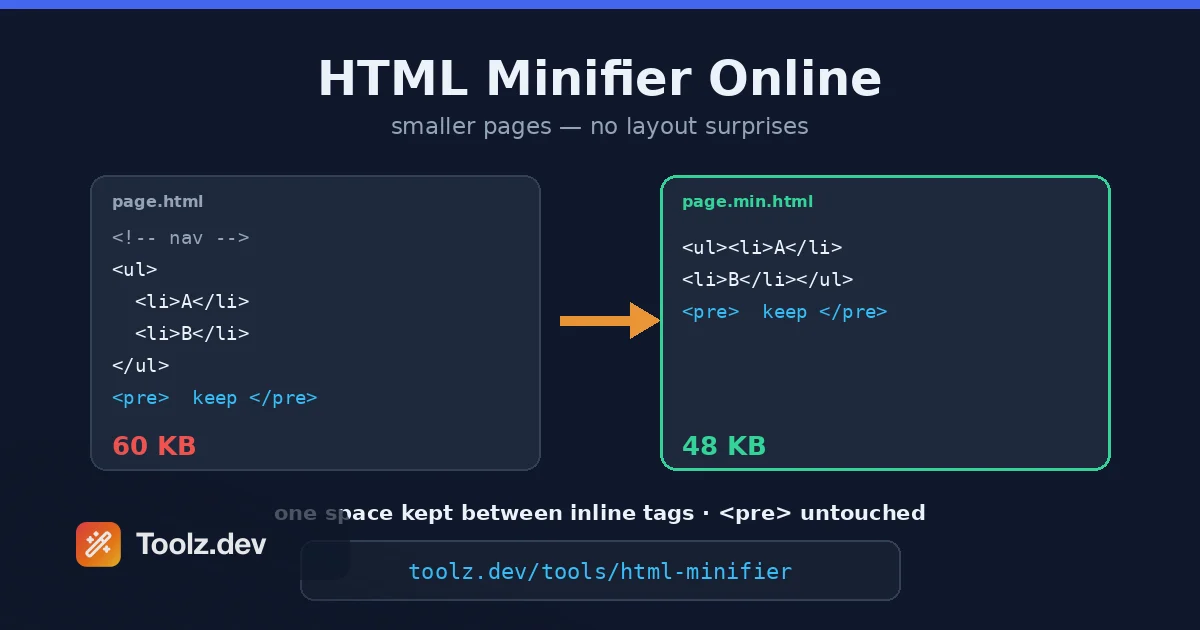
<pre>,<textarea>,<script>, e<style>Byte-for-byte (conserva campioni di codice all'interno<pre>), e poiché comprime ogni esecuzione di spazi bianchi in a unico spazio piuttosto che eliminarlo, gli spazi resi tra gli elementi del blocco in linea sopravvivono: il bug del layout a quattro pixel che morde i minifier aggressivi non si verifica. #39; Non accadere qui Minimizzare anche le metà CSS e JS della pagina: il Minifier CSS gestisce il primo - e vedere il Guida al kit per gli sviluppatori web per la pipeline completa.
Caratteristiche principali
Rimozione commenti
I commenti HTML sono un carico utile puro con effetto di rendering zero e le pagine del mondo reale ne portano un numero sorprendente: annotazioni di modelli, sezioni commentate che & quot; potremmo aver bisogno di later" (dal 2021), banner di build-tool, documentazione di snippet di tracciamento. Tutto viene spedito a ogni visitatore su ogni carico non memorizzato. I commenti di stripping sono la singola trasformazione di minificazione più sicura esistente, con una nota storica a piè di pagina: commenti condizionali (<!--[if IE]>) una volta erano sintassi funzionale, quindi questo strumento li lascia in pace Spoglia i commenti ordinari ma mantiene i blocchi condizionali IE in posizione per impostazione predefinita: nessun browser che hai come target nel 2026 li onora comunque, quindi preservarli costa una manciata di byte e rimuove ogni possibilità di alterare il comportamento nel markup legacy che potresti controllare.
Spazi bianchi che crollano
La trasformazione pesante La sorgente HTML è piena di indentazione e interruzioni di riga che esistono per lo sviluppatore che legge il file e, secondo le regole di rendering HTML, le esecuzioni di spazi bianchi tra elementi a livello di blocco crollano comunque fino a diventare nulla di visibile: il browser stava già ignorando il tuo bellissimo rientro. Collassarlo nel file fa sì che i byte ignorati smettano di esistere. La sfumatura è ciò che separa un minifier sicuro da uno pericoloso: tra in linea elementi, rendering di spazi bianchi come un unico spazio, quindi uno strumento che lo elimina completamente è lo strumento che ha spostato i pulsanti del mio client's. Toolz.dev's minifier sidesteps che intrappola con una regola smussata ma sicura: fa crollare ogni serie di spazi bianchi fino a uno spazio anziché rimuoverlo Tra scatole a livello di blocco che lo spazio solitario rende come nulla, quindi ottieni comunque il risparmio; tra elementi in linea o inline-block rende come spazio su cui contava il layout, quindi non si sposta nulla Rinunci agli ultimi byte che un minifier aggressivo comprimerebbe tra i tag di blocco, e in cambio non insegui mai un fantasma di quattro pixel.
Conservazione di elementi sensibili
<pre> mostra letteralmente i suoi spazi bianchi: quello' è tutto il suo lavoro. <textarea> Il contenuto è un testo predefinito rivolto all'utente in cui ogni nuova riga è importante. <script> e <style> i blocchi hanno i loro linguaggi con le loro regole di spazi bianchi Un minifier HTML affidabile li tratta come regioni opache: tutto ciò che si trova tra i tag di apertura e chiusura passa attraverso byte per byte Questa è la prima cosa che provo quando valuto qualsiasi minifier - incolla una pagina contenente un campione di codice in un <pre> Blocca e conferma che il rientro sopravvive. Se non lo fa, quello strumento non tocca mai più il markup di produzione.
Riordinare all'interno dei tag
Al di là del testo tra i tag, ci sono byte da reclamare al loro interno: il minifier comprime le esecuzioni di spazi bianchi fra attribuisce a un singolo spazio e lascia cadere qualsiasi spazio bianco seduto subito prima della chiusura >. Ciò che deliberatamente non fa è strip attribute quotes La specifica HTML consente valori non quotati in casi ristretti, ma i risparmi sono un byte o due, il costo di leggibilità durante il debug del markup di produzione è reale e gli strumenti diff gestiscono gli attributi quotati molto più con grazia Mantengo le virgolette degli attributi nel mio lavoro e sono d'accordo con lo strumento: la scelta conservativa cattura quasi tutto il valore senza alcun rischio.
Segnalazione prima/dopo
Lo strumento riporta le dimensioni di input e output e, - stesso argomento che faccio per CSS - il delta è diagnostico La tipica minificazione HTML consente di risparmiare 10 HTML25%: meno di CSS, perché il markup ha proporzionalmente meno spazi bianchi e più contenuti Se la tua pagina si restringe del 40%, annegamento nei commenti o nel rientro, e that' va bene Se si riduce del 4%, o era già minificato o it's per lo più contenuto di testo - e una pagina ricca di contenuti's il budget di ottimizzazione appartiene a immagini e caratteri, non a markup Il numero impedisce di ottimizzare la cosa sbagliata, che è la maggior parte di ciò che il lavoro di prestazioni è effettivamente.
Completamente lato client
Il markup viene elaborato nel tuo browser e mai caricato HTML è il minimo & quot; secret" del trio front-end - it's letteralmente pubblicato - ma le pagine di pre-release, i modelli di amministrazione interni e le campagne email con nomi di prodotti non annunciati sono tutti HTML che dovrebbero & #39; t visitare server di terze parti prima del giorno del lancio L'elaborazione lato client rende la domanda discutibile e come bonus gestisce documenti di grandi dimensioni senza timeout di caricamento.
Come utilizzare il minifier HTML
Passaggio 1: ottieni il tuo markup
Copia l'HTML dalla sua origine: un file statico, un output renderizzato template's, un'esportazione di builder di posta elettronica's o Visualizza origine in una pagina di staging Preferisci il reso Output sul modello quando differiscono: minimizzare direttamente un file modello blade o jsx guasterà la sintassi del modello, perché i linguaggi del modello non sono HTML. Rendering Innanzitutto, minimizza il risultato.
Passaggio 2: incolla nel minifier
Apri il Minifier HTML e incolla L'output appare immediatamente Se il documento è malformato - tag non chiusi, elementi mal annidati - la minificazione preserverà la malformazione piuttosto che risolverla; un minifier non è un validatore e la spazzatura in rimane spazzatura fuori, solo più piccola.
Passaggio 3: controlla le regioni protette
Prima della spedizione, scansiona l'output per il tuo <pre> blocchi, textréa e script inline e confermano che sono arrivati intatti. Trenta secondi. Questo è il passaggio specifico dell'HTML di cui non ha bisogno CSS e JS Minificazione, perché l'HTML è l'unico dei tre in cui alcune regioni sono sacri di spazi bianchi e altri non sono.
Passaggio 4: verifica il rendering
Carica la versione minificata e guardala - in particolare nei menu di navigazione, nelle righe dei pulsanti, negli elenchi dei tag e in qualsiasi altra cosa costruita da elementi in linea o inline-block seduti fianco a fianco That's dove si nascondono i layout dipendenti dagli spazi bianchi Se la spaziatura è cambiata, la correzione durevole è nel CSS, non nel minifier: cambia il componente in flexbox con gap, che rende esplicita e immune allo spazio bianco di markup per sempre. Il minifier non ha rotto il tuo layout, ha rivelato che il layout era portante in caso di incidente.
Passaggio 5: distribuisci e mantieni la fonte
Spedisci il file minificato; mantieni la fonte leggibile come la cosa che modifichi Stessa regola unidirezionale di ogni artefatto di compilazione Per i siti con qualsiasi tipo di fase di compilazione o livello di memorizzazione nella cache, promuovi questo processo manuale nella pipeline in modo che avvenga automaticamente: lo strumento del browser è per i siti che don' t ne hanno uno e per ispezionare ciò che ha fatto la pipeline di qualcun altro's.
Deep Dive tecnico: gli spazi bianchi HTML non sono come gli altri spazi bianchi
Per minimizzare l'HTML con sicurezza hai bisogno di un modello mentale: Come i browser elaborano gli spazi bianchi in flusso normale. Le regole, condensate dal comportamento di rendering HTML, ogni browser implementa:
- Le esecuzioni di caratteri di spazi bianchi (spazi, schede, nuove righe) si riducono a un singolo spazio.
- Quel singolo spazio rendering quando si trova tra contenuti a livello inline - testo,
<a>,<span>,<img>, qualsiasi cosadisplay: inlineoppureinline-block. - Tra le caselle a livello di blocco, lo spazio non genera nulla di visibile.
- interiore
white-space: precontesti (<pre>, o qualsiasi elemento così definito), non si applica nulla di quanto sopra: gli spazi bianchi sono letterali.
La regola 2 è l'intera superficie di rischio della minimizzazione HTML. <li>A</li> <li>B</li> e <li>A</li><li>B</li> renderizza in modo identico quando gli elementi dell'elenco sono a livello di blocco - e differiscono di uno spazio di quattro pixel quando sono & #39; sono a blocco in linea La differenza di markup è & quot; solo whitespace"; la differenza di rendering è reale Questo è anche il motivo per cui esistevano i classici hack di layout a blocco in linea (no zero di dimensione del carattere sul genitore, margini negativi, commenti tra i tag) e perché flexbox's gap property ha posto fine all'intero genere: ha spostato la spaziatura da un incidente di markup in uno stile esplicito Se la minificazione cambia il layout, la reazione corretta è la gratitudine - ha trovato una fragilità che alla fine ti avrebbe morso comunque, probabilmente durante una migrazione CMS in un momento peggiore.
Perché minimizzare il documento, date le modeste percentuali di HTML? posizione nella cascata. Il documento HTML è la richiesta numero uno, il suo gate di byte tutto- il parser scopre i tuoi fogli di stile, script e precarichi leggendolo Time to First Byte più download e analisi dei documenti si trovano a monte di First Contentful Paint e Largest Contentful Paint, le metriche Core Web Vitals. Anche There' ha una sottigliezza di compounding: i browser iniziano l'analisi speculativa su documenti parziali man mano che arrivano i pacchetti, quindi un documento che si adatta a meno viaggi di andata e ritorno TCP consente di iniziare prima la scoperta delle risorse. Tagliare 15 KB da un documento da 60 KB è un risparmio assoluto inferiore rispetto al ritaglio di un'immagine, ma è ' salvato nella parte anteriore della linea, dove la latenza si compone invece di parallelizzare.
Minificazione contro compressione, edizione HTML. La stessa relazione dei CSS: gzip e Brotli riducono il trasporto, ma il browser decomprime e analizza ogni byte originale Commenti e spazi bianchi si comprimono estremamente bene - che è proprio il motivo per cui loro' sono economici da spedire e vale comunque la pena di essere eliminati, poiché l'eliminazione è l'unica cosa che rimuove il costo di analisi e la loro quota del dizionario di compressione Entrambi, sempre entrambi.
la versione del sito dinamico. Plugin di memorizzazione nella cache di WordPress, Autominify di Cloudflare (prima del suo pensionamento) e middleware del framework minimizzano tutti gli HTML Al momento della risposta piuttosto che costruire il tempo. Stesse trasformazioni, stessi rischi, più uno nuovo: i minificatori al volo incontrano il markup del tuo costruttore di pagine, i tuoi incorporamenti di terze parti e i tuoi blocchi JSON-LD in linea, e li incontrano in una volta su ogni pagina del sito. Esegui queste funzionalità con l'abitudine di verifica dal passaggio 4, un modello alla volta. Chiedimi come lo so.
Per la sequenza di ottimizzazione più ampia - markup, stili, script, immagini - il Guida all'ottimizzazione dell'immagine SEO Copre lo strato più pesante e, onestamente, fai le immagini prima del markup se stai provando. la Guida al minifier CSS è il compagno di questo: la stessa disciplina applicata ai tuoi fogli di stile, dove le regole di sicurezza sono più semplici perché gli spazi bianchi CSS non vengono quasi mai visualizzati.
Casi d'uso comuni
Siti statici e pagine di destinazione
Le landing page costruite a mano, i siti di documentazione e le pagine di marketing statiche sono i candidati perfetti per la minificazione: nessun sistema di compilazione per farlo automaticamente, markup che cambia raramente e traffico che fa contare ogni byte non memorizzato nella cache La mia routine per questi è render, minify, deploy - lo strumento del browser sostituisce la pipeline che il progetto è troppo piccolo per giustificare Una landing page è anche esattamente dove FCP conta di più commercialmente; il visitatore che decide se rimanere sta fissando il tuo percorso critico.
Modelli di posta elettronica
L'e-mail HTML è il luogo in cui la minificazione guadagna denaro direttamente: Gmail ritaglia messaggi più grandi di 102 KB, nascondendo la parte inferiore dell'e-mail - inclusi, in genere, il collegamento e il piè di pagina di annullamento dell'iscrizione - dietro un & quot; Visualizza l'intero messaggio e quot; link quasi nessuno fa clic I modelli di e-mail sono gonfiati per natura (tabelle nidificate, stili inlineati, vent'anni di soluzioni alternative per i client), quindi una riduzione del 20% può essere la differenza tra clippato e non Minimizzare ogni campagna prima dell'invio e testare in uno strumento di anteprima in seguito, perché i parser di posta elettronica dei client sono un museo di comportamenti non standard.
Ottimizzazione dell'output di Word
Se si esegue WordPress, la minificazione HTML di solito arriva tramite un plug-in di memorizzazione nella cache o di ottimizzazione piuttosto che a mano - ma lo strumento del browser è il modo in cui si revisione Cosa ha effettivamente fatto il plugin. Visualizza l'origine su una pagina memorizzata nella cache, incollala attraverso il minifier e verifica se c'è qualcosa da salvare; spesso i plug-in configurati lasciano in modo conservativo commenti e spazi bianchi sul tavolo. Dai miei anni di sviluppo del plug-in aggiungerò la nota a lato del fornitore: sviluppatori, non spedire modelli pieni di esperimenti commentati. I tuoi commenti finiscono nella fonte di centomila siti i cui plugin di minimizzazione sono configurati, in media, male.
Widget incorporati e payload snippet
Se spedisci un widget incorporabile, gli snippet HTML iniettati dal tuo script vengono scaricati da ogni visitatore di ogni sito di incorporamento - i tuoi byte, moltiplicati per il traffico di qualcun altro's. Minimizzazione del markup dello snippet (e codifica delle risorse in modo efficiente; il convertitore base64 aiuta quando si allineano piccole immagini) è una posta in gioco per essere una terza parte educata. La stessa logica copre modelli di blocchi CMS, contenuti per l'estensione del browser e qualsiasi altra cosa iniettata nelle pagine che non possiedi.
Reversing: lettura del markup minimizzato
Come ogni minifier, questo one's uso inverso è silenziosamente il più frequente: rendere qualcun altro's pagina minified leggibile Quando si esegue il debug di un conflitto di incorporamento o rispondere a & quot; come fa questo sito strutturare il suo markup di schema, & quot; View Source ti consegna una singola riga da 300 KB Abbelliscila, leggila, trova la risposta I commenti sono andati per sempre - la minificazione è lossy per i commenti per progettazione - ma la struttura torna con un clic, e quando si confrontano due versioni di una pagina, il Strumento Diff di testo On markup abbellito mostra esattamente cosa è cambiato tra le distribuzioni.
Cosa rimuove la minimizzazione HTML rispetto a Preserves
| elemento/regione | Cosa fa lo strumento | perché |
|---|---|---|
Commenti ordinari <!-- --> |
tolto | Effetto di rendering zero; payload puro |
| Spazio bianco tra elementi di blocco | compresso in uno spazio | comunque non rende nulla tra i blocchi |
| Spazio bianco tra elementi in linea/blocco in linea | compresso in uno spazio (mantenuto) | Render come gap - quindi it's preservato, non cancellato |
<pre> e <textarea> contento |
conservato alla lettera | Lo spazio bianco è il contenuto |
<script> e <style> blocchi |
conservato alla lettera (minimifica separatamente) | Lingue diverse, regole diverse |
| Citazioni di attributo | tenere | Spec-legale da rilasciare, ma questo strumento non lo fa mai |
Commenti condizionali <!--[if IE]> |
Conservato per impostazione predefinita | Sicurezza economica per il markup legacy |
Stampa questa tabella nella tua testa e la minificazione HTML smette di essere spaventosa: le righe si dividono in modo pulito in & quot; sempre sicuro da strip" e & quot; deve essere preservato testualmente, & quot; e l'interessante ingegneria vive nella riga inline-whitespace, dove questa regola collap-to-one-space di tool's ti tiene fuori dai guai Strumenti che mettono a posto quella riga - e il Minifier HTML di Toolz.dev è costruito per - rendere l'intera operazione di routine Per tutto ciò che circonda questo passaggio, il Guida agli strumenti di codifica copre i vicini.
FAQ
Cosa fa un minifier HTML?
Un minifier HTML rimuove i byte del browser non #39; t bisogno di rendere la tua pagina commenti: ridondanti whitespace tag, e facoltativi citazioni di attributi rimovibili Le pagine tipiche si restringono 10025% Fatto correttamente it' rendering-preservare la pagina sembra e si comporta in modo identico - mentre il documento scarica e analizza più velocemente, il che conta perché HTML è la prima risorsa in ogni pagina load's percorso critico.
Il minimizzare l'HTML può rompere il layout della mia pagina?
In un caso specifico, sì: layout che utilizzano inline-block gli elementi possono dipendere dagli spazi bianchi tra i tag, che rendono come spazio visibile all'incirca la larghezza di un carattere Rimuovendolo si chiudono quegli spazi vuoti e si sposta il layout Buoni minifier gestiscono i contesti in linea in modo conservativo, ma la correzione robusta è nel tuo CSS - usa flexbox con il gap La proprietà, quindi la spaziatura non dipende mai dallo spazio bianco di markup.
La minimizzazione HTML influisce sul contenuto all'interno dei tag pre o textarea?
Non deve e i minificatori corretti preservano quelle regioni byte-for-byte. <pre> rende letteralmente il suo spazio bianco - collassando distrugge campioni di codice e formattazione ASCII - e <textarea> Il contenuto è testo predefinito visibile dall'utente. Questa conservazione è il test di qualità più rapido per qualsiasi minifier HTML: esegui una pagina con un blocco di codice rientrato e controlla che la rientranza sopravviva.
La minimizzazione HTML vale la pena se gzip è abilitato?
Sì. La compressione riduce il trasferimento, ma il browser decomprime i byte originali e li analizza tutti - commenti e spazi bianchi inclusi I byte minimizzati non vengono mai scaricati e mai analizzati Poiché il documento HTML consente di scoprire ogni altra risorsa sulla pagina, i risparmi qui arrivano proprio in prima linea nel percorso critico, dove si compongono anziché parallelizzarsi.
Minimizzare l'HTML aiuta la SEO?
Indirettamente, attraverso la velocità Documenti più piccoli migliorano le metriche time-to-first-render come First Contentful Paint e contribuiscono a Largest Contentful Paint, e i Core Web Vitals fanno parte dei segnali di esperienza della pagina di Google' Minification won' t salvare un sito lento da solo, e Google legge il markup minificato e non minificato in modo identico per l'indicizzazione - il vantaggio è puramente il miglioramento delle prestazioni, che è reale ma proporzionale.
Come posso minimizzare l'HTML per l'e-mail per evitare il ritaglio di Gmail?
Gmail clip messaggi più grandi di 102 KB, nascondendo tutto ciò che si trova sotto la piega dietro un & quot; Visualizza l'intero messaggio& quot; link - spesso includendo il tuo piè di pagina e cancella il link Esegui il tuo modello attraverso il Minifier HTML Prima dell'invio; il markup e-mail pesante da tabella si riduce regolarmente del 15–25%, che è spesso la differenza tra ritagliato e completo. Testare sempre la versione minimizzata in uno strumento di anteprima e-mail, poiché i parser dei client di posta elettronica sono notoriamente eccentrici.
Posso annullare l'HTML per leggere la fonte della pagina di qualcun altro?
Sì - abbellire è la stessa categoria di strumenti in esecuzione al contrario, e it's probabilmente l'uso quotidiano più comune Incolla una fonte di pagina minificata e recupera il markup rientrato e leggibile per le incorporazioni di debug, studiando un altro sito's dati strutturati o rivedendo ciò che il tuo plugin di cache ha effettivamente spedito Una perdita permanente: i commenti spogliati durante la minificazione sono spariti e non possono essere ricostruiti.
È sicuro incollare le pagine non pubblicate in un minifier HTML online?
in uno lato client, sì. la Minifier HTML di Toolz.dev elabora il markup interamente nel browser - non viene caricato, registrato o archiviato nulla, che puoi confermare nella scheda Rete Ciò è importante per le pagine di pre-lancio, i modelli interni e le campagne e-mail contenenti dettagli di prodotto non annunciati che dovrebbero & #39; t visitare i server di terze parti prima di pubblicarli tu stesso.