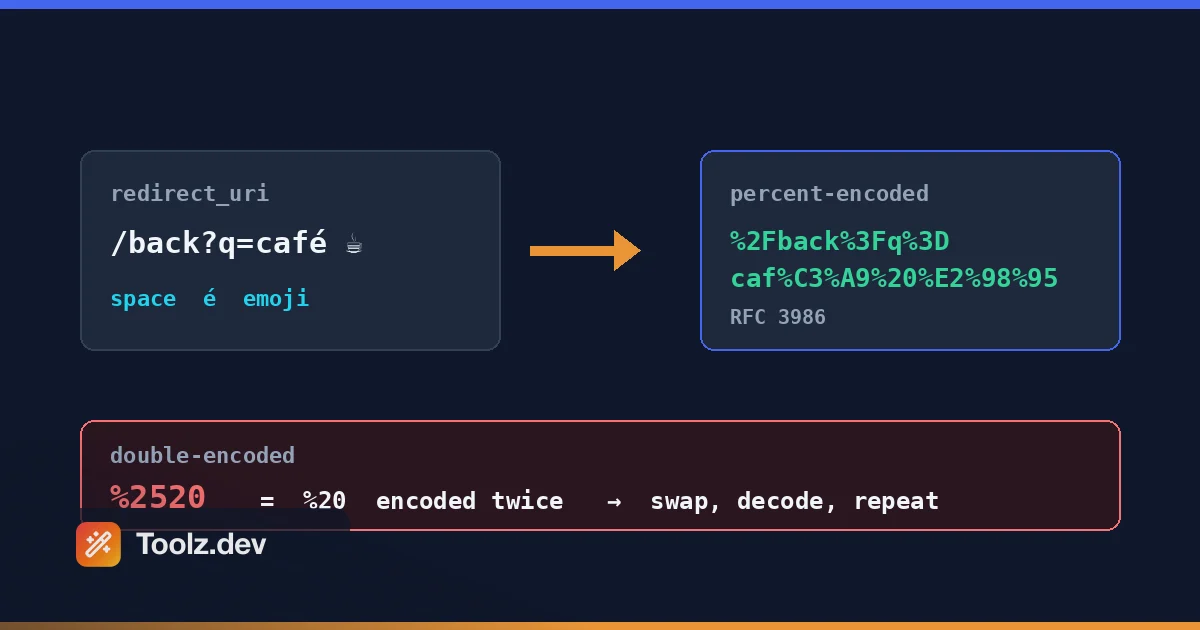
Il bug che mi ha insegnato a rispettare la codifica percentuale era un reindirizzamento OAuth che non è riuscito esattamente per un cliente WP Adminify aveva un'integrazione di Google Fonts autenticata tramite OAuth e un utente - un rivenditore di hosting che eseguiva una configurazione reverse-proxy che ancora non capisco e #39; non capisco appieno - continuava a ottenere redirect_uri_mismatch errori. Tutti gli altri stavano bene. Ho passato la maggior parte dei due giorni a incolpare la sua configurazione del server. Poi ho finalmente guardato l'URL effettivo che il suo browser stava inviando, carattere per carattere, ed eccolo lì: %2520 dove avrebbe dovuto essere uno spazio. Il suo proxy stava codificando il redirect_uri. Il mio plugin era anche codificandolo Google ha ricevuto un URL in cui lo spazio era stato codificato due volte - %20 divenire %2520- e ha rifiutato l'intera stretta di mano Due righe di codice l'hanno riparata Due giorni per trovarla.
Quello era't anche il mio primo disastro di codifica Anni prima I'd ha costruito un link di campagna per un lancio di plugin con un parametro UTM che conteneva una e commerciale grezza - qualcosa come utm_campaign=black&friday. La dashboard di analisi ha mostrato una misteriosa campagna chiamata black e un parametro fantasma chiamato friday che non corrispondeva a niente. La e commerciale aveva diviso silenziosamente il mio parametro in due. Nessun errore. Nessun avviso. Dati silenziosamente errati per undici giorni prima di notare che i numeri non tornavano.
Qui's il problema della codifica URL: it's uno di quei problemi che sembra banale fino a quando non è't. Le regole vivono in una specifica del 2005 (RFC 3986), la realtà del browser vive in una specifica diversa (il WHATWG URL Standard), JavaScript ti offre tre diverse funzioni che fanno tutte cose leggermente diverse e PHP te ne offre altre due Sbaglia e non fai' t ottenere un arresto anomalo: ottieni parametri troncati, flussi OAuth interrotti e collegamenti che funzionano in Chrome ma muoiono in un client di posta elettronica.
Quindi ho costruito l'encoder/decoder in cui ho sempre voluto Toolz.dev. Questa guida illustra come utilizzarla e, cosa più importante, come funziona effettivamente la codifica percentuale, quindi la successiva %2520 Nei tuoi registri ti ci vogliono due minuti invece di due giorni.
tl; dr: Per URL di codifica o decodifica online, incolla la tua stringa in Encoder/decoder URL Toolz.dev, scegli una modalità e premi ENCODE o decodifica. Gestisce correttamente UTF-8 ed emoji e il pulsante di scambio riporta l'uscita nell'ingresso in modo da poter staccare i valori con doppia codifica (
%2520) separare uno strato alla volta. Tutto viene eseguito dal lato client, quindi i token e gli ID sessione negli URL non toccano mai un server. codificare il parametro valori con la modalità componente; codificare gli URL completi solo quando si sa perché.
Caratteristiche principali
Codifica e decodifica in un unico strumento
La metà delle volte ho bisogno di codificare un valore L'altra metà I & #39; m fissando un URL nodoso da un file di registro e bisogno di decodificarlo in qualcosa di leggibile Lo strumento fa entrambi da una casella di input - Codifica e decodifica si siedono uno accanto all'altro come due pulsanti, quindi there's non a caccia di una pagina separata Incolla una stringa codificata e premi Decodifica; digita un valore di query grezzo e premi Codifica Inoltre effettua viaggi di andata e ritorno in modo pulito: codifica, decodifica e ottieni la tua stringa originale indietro, byte per byte. Sembra ovvio, ma I & #39; ha utilizzato strumenti online che hanno distorto più segni durante il viaggio di andata e ritorno perché potevano & #39;t decidere quali specifiche stavano seguendo Questo è esplicito su cosa stanno facendo & #39; che è esattamente quello che vuoi quando tu & #39; debugging re.
Modalità di codifica componente vs Full-URL
Questa distinzione è dove la maggior parte dei bug di codifica sono nati La modalità componente codifica tutto ciò che è & #39; t senza riserve - tra cui /, ?, &, e =- che è quello che vuoi per un singolo valore di parametro La modalità URL completo lascia i caratteri strutturali da soli quindi l'URL funziona ancora come URL, che è quello che vuoi quando tu' stai ripulendo un indirizzo completo Usando quello sbagliato o rompe la struttura dell'URL o lascia caratteri pericolosi non codificati Lo strumento mette entrambe le modalità a un clic di distanza in un unico menu a discesa, etichettato con la funzione JavaScript a cui ciascuna corrisponde - encodeURIComponent, encodeURI, application/x-www-form-urlencoded. Sono andato avanti e indietro su quella denominazione. Le etichette intenti (" codificano un valore ", "codificano un intero URL") leggerebbero meglio il freddo, ma i nomi delle funzioni significano che il pannello di riferimento sotto le mappe uno a uno sul codice che stai per scrivere, e questo è il momento in cui la maggior parte delle persone si trova effettivamente. Se hai mai digitato encodeURI Quando intendevi encodeURIComponent- Ho, più di una volta - il pannello è lì per catturarlo prima della spedizione.
Gestisce UTF-8, emoji e personaggi internazionali
tipo café E tu ottieni caf%C3%A9- il é correttamente espanso nei suoi due byte UTF-8. Digita un emoji e ottieni quattro percento byte codificati. È qui che gli strumenti più vecchi e il JavaScript obsoleto escape() Funzione va in pezzi: presuppongono latino-1 o producono non standard %uXXXX sequenze che nessun server può analizzare Se tu' stai costruendo URL con contenuti generati dagli utenti: nomi, query di ricerca, nomi di città in qualsiasi lingua che sia' t inglese: la corretta gestione dell'UTF-8 è' t un bel testo bengalese, lumache arabe, termini di ricerca cinesi: tutti codificano per sequenze percentuali valide della RFC 3986 che decodificano in modo identico dall'altra parte.
Un pulsante di scambio per valori con doppia codifica
la %2520 trap: una già codificata %20 ottenere codificato di nuovo - mi costa due giorni una volta, quindi questo è personale La decodifica è un'operazione a strato singolo: %2520 decodifica a %20, non a uno spazio, perché %25 è la codifica di %. Un passaggio ti dà uno strato. il pulsante di scambio (⇄) sposta l'output nuovamente nella casella di input in modo che il passaggio successivo sia a un clic di distanza I & #39; hai scartato gli URL a tre livelli di profondità dopo che sono passati attraverso un proxy, un servizio di reindirizzamento e un link-wrapper di posta elettronica - scambia, decodifica, scambia, decodifica, finché la stringa non smette di cambiare Quel & quot; smette di cambiare& quot; il momento è il segnale reale che stai cercando. Sii onesto su cosa sia: it' è un ciclo manuale, non un rilevatore Lo strumento lo fa' t flag %25XX per te, e vado avanti e indietro se dovrebbe - la decodifica automatica fino a quando la stabilità sarebbe conveniente fino a quando non distrugge silenziosamente un valore che conteneva legittimamente un segno percentuale.
Tre modalità, un pannello di riferimento esplicito
Il selettore di modalità trasporta tre opzioni - componente, URL completo e codificato in forma - e il pannello sottostante spiega esattamente quali caratteri sfugge a quella modalità, che preserva, e mostra un esempio funzionante L'ho aggiunto perché non riuscivo mai a ricordare se encodeURIComponent foglie ~ da solo (lo fa) o se ! e * Sopravvivi (lo fanno, il che sorprende le persone, poiché RFC 3986 le classifica come sub-delim piuttosto che non riserve). Invece di memorizzare tre funzioni JavaScript, scegli la modalità intento e rileggi cosa sta per fare. Quel testo di riferimento è la parte che uso di più, ed è la cosa che voglio se stessi atterrando sulla pagina fredda all'una di notte.
100% Client-Side - Niente lascia il tuo browser
Pensa a cosa's effettivamente all'interno degli URL decodifichi: codici di autorizzazione OAuth, token di reimpostazione della password, ID di sessione, indirizzi e-mail nei collegamenti di cancellazione, chiavi API alcuni framework inseriti utilmente in una stringa di query Incolla quelli in uno strumento lato server e atterrano in qualcuno's registri di accesso, legati al tuo IP, conservati per chissà quanto tempo Il codificatore Toolz.dev viene eseguito interamente nel tuo browser: la conversione è costituita da poche righe di JavaScript eseguite localmente e non viene effettuata alcuna richiesta con i tuoi dati Apri DevTools e guarda la scheda di rete se non lo fai' non credimi Per qualsiasi cosa adiacente alla sicurezza, lato client is't una funzionalità, it' la barra minima.
Gratuito, nessuna registrazione, nessun limite
Nessun wall dell'account, nessun problema di quota giornaliera per uno strumento che esegue la trasformazione delle stringhe, nessun "aggiornamento a Pro per decodificare più di 1.000 caratteri". Ho creato Toolz.dev perché ero stanco dei siti di utilità indeterminati con gli annunci che interrompono un'attività di dieci secondi con un popup di newsletter. Aggiungilo ai segnalibri, usalo cinquanta volte al giorno, fatto.
Come utilizzare l'encoder e il decoder URL
Passaggio 1: apri lo strumento e scegli la tua direzione
ricorrere Toolz.dev/tools/URL-encoder e lascia cadere la corda nella casella di sinistra. Ci sono due pulsanti di azione, codifica e decodifica, e ne scegli uno dopo averlo incollato anziché impostare prima una direzione. Se stai partendo da qualcosa di leggibile (una query di ricerca, un URL di reindirizzamento che stai per incorporare), premi Encode. Se stai partendo da qualcosa di pieno di segni percentuali (una voce di registro, un'intestazione del referrer), premi decodifica. L'output atterra nel riquadro di destra con un pulsante di copia nell'intestazione e scambia e si siede accanto ai due pulsanti di azione.
Passaggio 2: scegli la modalità Componente, URL completo o modulo
codificante a valore ciò si troverà all'interno di un parametro: un redirect_uri, un termine di ricerca, qualsiasi cosa dopo un = firmare? Utilizzare la modalità componente. codifica /, ?, &, e = Quindi il tuo valore non può rompere l'URL circostante. codificante a URL completo che hanno solo bisogno di spazi e personaggi non ASCII ripuliti? Utilizzare la modalità URL completo, che preserva i caratteri strutturali. La terza modalità, modulo-urlencoded, è la codifica del componente con spazi scritti come + invece di %20- sceglilo quando tu're handbuilding an application/x-www-form-urlencoded corpo. Si noti che la modalità influisce anche sulla decodifica: in modalità modulo, + viene riconvertito in uno spazio prima della decodifica; negli altri due rimane un plus letterale. In caso di dubbio: modalità componente per pezzi, modalità URL completo per interi.
Passaggio 3: leggi l'output e fai attenzione ai segni di percentuale residui
L'output viene visualizzato nel riquadro destro. Per la decodifica, guarda se il risultato contiene ancora %XX sequenze - se lo fa, il valore è stato codificato più di una volta Hit Swap per spostare nuovamente quell'output nell'input, decodificare nuovamente e ripetere fino a quando la stringa smette di cambiare Se l'input non è valido (un randagio) % non seguito da due cifre esadecimali, come un letterale 100%), otterrai un errore esplicito piuttosto che un semidecodifica silenzioso, che è il comportamento che desideri quando stai debug.
Passaggio 4: copia e verifica
Premi il pulsante di copia e incolla il risultato a cui appartiene Per qualsiasi cosa importante - reindirizza OAuth in particolare - fai un ultimo controllo di integrità: incolla nuovamente il valore codificato in modalità decodifica e confermalo viaggi di andata e ritorno esattamente a quello con cui hai iniziato Trenta secondi di verifica battono due giorni di redirect_uri_mismatch.
Codifica percentuale, RFC 3986 e perché gli spazi diventano %20 o +
Gli URL possono contenere solo un insieme limitato di caratteri. Tutto il resto deve essere contrabbandato come byte codificati in percentuale. Il regolamento è RFC 3986 (2005), e divide i personaggi in due campi.
Personaggi non riservati Non è mai necessario codificare: le lettere A–Z e a–z, cifre 0–9e quattro simboli: trattino -, periodo ., sottolineatura _, e tilde ~. La codifica di questi è legale ma inutile.
Personaggi riservati Avere lavori strutturali all'interno di un URL: : / ? # [ ] @ (i delimitatori generali) e ! $ & ' ( ) * + , ; = (i sottodelimitanti). Il due punti separa lo schema dall'host. Il punto interrogativo avvia la stringa di query. Il e commerciale separa i parametri. Se un carattere riservato ha bisogno di una codifica dipende interamente da dove appare. un' / nel percorso è struttura; a / all'interno di un valore del parametro Redirect_Uri ci sono dati e deve diventare %2F Oppure il server analizzerà il tuo URL in modo errato.
La meccanica: prendi il personaggio, prendi i suoi byte UTF-8 e scrivi ogni byte come % seguito da due cifre esagonali I caratteri ASCII sono un byte - lo spazio è %20, e commerciale è %26. Ma UTF-8 è una codifica multibyte, quindi é è di due byte: %C3%A9. Un'emoji tipica è di quattro byte: codifica come %F0%9F%9A%80. Questo è il motivo per cui gli strumenti che presuppongono un carattere equivalgono a un byte corromperanno qualcosa al di fuori dell'inglese semplice.
Ora, il problema dello spazio - la singola cosa più confusa nella codifica URL Per RFC 3986, uno spazio diventa %20. Ma gli invii dei moduli HTML utilizzano una serializzazione diversa, application/x-www-form-urlencoded, definito oggi nel Whatwg URL standard, e la quale Formatta codifica spazi come +. Entrambi sono corretti - nei loro contesti Che significa + In una query la stringa è ambigua: potrebbe essere un segno più letterale (lettura RFC 3986) o uno spazio codificato (lettura con codifica del modulo). Se hai mai visto arrivare un numero di telefono come 1234 5678 Quando qualcuno ha mandato +1234..., hai incontrato questo bug. Il mio consiglio: emetti sempre %20 per spazi e %2B Per segni letterali più. Nessuno li analizza male.
JavaScript ti dà tre funzioni e non sono intercambiabili. Data la stringa a=b&c d:
const s = "a=b&c d";

encodeURIComponent(s); // "a%3Db%26c%20d"  — encodes =, &, and space
encodeURI(s);          // "a=b&c%20d"      — leaves = and & alone
escape(s);             // "a%3Db%26c%20d"  — deprecated; breaks on Unicode
encodeURIComponent codifica tutto tranne i caratteri non riservi (più !'()*- una stranezza legacy), che lo rende sicuro per i valori dei parametri. encodeURI conserva i caratteri riservati in modo che un URL completo rimanga funzionale, ma ciò significa anche che WON'T proteggere un & all'interno dei tuoi dati. e escape() è obsoleto per una buona ragione: produce non standard %uXXXX Sequenze per caratteri non latini-1. Non usarlo mai nel nuovo codice.
PHP rispecchia la stessa divisione con una svolta: urlencode() Produce la codifica in stile forma (gli spazi diventano +), mentre rawurlencode() segue RFC 3986 (gli spazi diventano %20). Se stai creando URL per qualcosa di diverso da un corpo di posta, rawurlencode() è quello che vuoi. ho spedito WP Adminify Code con quello sbagliato all'inizio; WordPress add_query_arg() mi ha salvato più volte di quanto vorrei ammettere.
Infine, la trappola a doppia codifica. %20 è uno spazio, codificato. codificare quella stringa ancora e il % stesso diventa %25, dandoti %2520. decodificalo una volta e ottieni %20 indietro - ancora codificato Questo accade ogni volta che due strati di un sistema ogni & quot;helpfully" codificare: il tuo codice più un proxy, un servizio di reindirizzamento più un link-wrapper di posta elettronica La regola che lo impedisce: codificare esattamente una volta, all'ultimo momento possibile prima che il valore vada nell'URL, e non codificare mai qualcosa che hai fatto' t solo decodificare o generare raw.
Casi d'uso comuni
Costruzione di stringhe di query con input utente
Ogni volta che il testo digitato dall'utente entra in un URL - caselle di ricerca, filtri, valori del modulo passati tramite GET - deve essere codificato da un componente Un utente che cerca Q&A tips diventa ?q=Q%26A%20tips; non codificato, il server vede una ricerca Q e un parametro misterioso A tips. Durante lo sviluppo, utilizzo il codificatore URL per generare valori attesi prima di scrivere il codice, quindi ho un riferimento corretto noto per testare. È anche il modo più veloce per risolvere e quot;dovrebbe essere codificato questo carattere?" in Revisione del codice: incollalo in modalità componente e guarda. API moderne come JavaScript URLSearchParams gestiscilo automaticamente e dovresti usarli, ma devi comunque farlo verificare la loro produzione quando qualcosa si rompe, e questo è un lavoro decodificante.
Debug di link UTM e campagna
I link di marketing stanno codificando campi minati Valori UTM con spazi, pipe o ampersand; collegamenti che passano attraverso un abbreviatore URL, quindi un tracker di clic di e-mail service's, quindi un reindirizzamento - ogni livello ha la possibilità che la codifica venga aggiunta o maciullata Quando una campagna si presenta sbagliata nell'analisi, la mia prima mossa è sempre la stessa: incolla il link completo in modalità decodifica e leggi ciò che il server di analisi ha effettivamente ricevuto Nove volte su dieci il colpevole è visibile in secondi - un raw & dividendo un parametro, a + doveva essere un vantaggio letterale, o a %2520 Tradimento della doppia codifica. mio black&friday L'incidente sarebbe stato una soluzione di undici secondi invece di un buco di dati di undici giorni se l'avessi fatto il primo giorno.
OAUTH Redirect_uri e URL di richiamata
OAuth è il luogo in cui gli errori di codifica diventano costosi, perché i fornitori lo fanno Corrispondenza esatta sugli URI di reindirizzamento Il redirect_uri è un URL completo incorporato come valore di parametro all'interno di un altro URL - quindi deve essere codificato in componente, esattamente una volta Sottocodificarlo e il ? oppure & Al suo interno rompe l'URL di autorizzazione esterna. codificare a doppio file e il provider confronta https%3A%2F%2F... contro il tuo registrato https://... e ritorna redirect_uri_mismatch con zero ulteriori dettagli. Quando viene visualizzato quell'errore, decodifica l'URL di autorizzazione effettivo dalla barra degli indirizzi del tuo browser e confronta il carattere per carattere reindirizzato_uri con il valore registrato della tua app. Abbinalo al Decoder JWT Per ispezionare i token che tornano e puoi eseguire il debug di un intero flusso OAuth senza lasciare il browser.
Decodifica degli URL nodosi da log e intestazioni di referrer
I registri del server e le intestazioni del referrer sono pieni di zuppa codificata in percentuale: %D0%9F%D1%80%D0%B8%D0%B2%D0%B5%D1%82 in un referrer di ricerca, percorsi con codifica tripla dal traffico bot, payload codificati in richieste sospette Decodificando questi è il modo in cui scopri cosa è realmente accaduto - se quello strano 404 era un utente con una query cirillica o uno script che sondava per ../../etc/passwd Dietro tre strati di codifica. Questa è anche esattamente la situazione in cui l'angolo della privacy è più importante: gli URL di registro contengono regolarmente token di sessione e indirizzi e-mail. Decodificali in uno strumento lato client, non su un server casuale che mantiene i propri registri. Ho scritto di più su questo flusso di lavoro nel Guida agli strumenti di debug dell'API.
Test API con ricciolo
La tua shell e l'arricciatura formano un secondo campo minato sopra la codifica dell'URL. & sfondi un processo in bash, ? attiva l'espansione glob in zsh - quindi un URL non quotato e non codificato fallisce in modi confusi prima ancora di raggiungere la rete Il mio flusso di lavoro: codifica ogni valore di parametro nello strumento, assembla l'URL, avvolgilo tra virgolette singole, quindi esegui curl Quando un'API restituisce un 400 per una richiesta che & quot; guarda a destra, & quot; decodifico l'URL esatto dall'output verboso ("verboose output")curl -v) per vedere cosa è stato veramente inviato - più di una volta il bug era il mio terminale, non la mia API. curl's --data-urlencode Flag gestisce la codifica per i corpi dei post, ma per ottenere stringhe di query sei per lo più da solo e un codificatore affidabile batte indovinare.
Condivisione di link con testo non ASCII
Articoli di Wikipedia in altre lingue, collegamenti di Google Maps con nomi di luoghi locali, URL di documenti con lumache bengalesi o arabe: copiane uno dalla barra degli indirizzi e potresti ottenere il bello Unicode forma o un muro di %E0%A6%ACbyte - Style, a seconda del browser's mood Alcune app di chat e client di posta elettronica troncano o mangano il modulo Unicode grezzo La codifica dell'URL prima della condivisione produce una stringa puro-ASCII che sopravvive a ogni messenger, mailing list e renderer Markdown I & #39; ho provato Andando dall'altra parte, la decodifica trasforma di nuovo un collegamento condiviso illeggibile in qualcosa che un essere umano può verificare prima di cliccare - vale la pena fare prima di inoltrare qualsiasi cosa arrivata con l'aspetto di rumore di linea.
encodeuriComponent vs encodeuri vs escape(): quale dovresti usare?
Tre funzioni, una corretta predefinita. Ecco il confronto onesto:
encodeURIComponent() |
encodeURI() |
escape() |
|
|---|---|---|---|
| codifica | Tutto tranne A-Z a-z 0-9 - . _ ~ ! ' ( ) * |
Tutto tranne non riservato + tutti i caratteri riservati (: / ? # [ ] @ ! $ & ' ( ) * + , ; =) |
Tutto tranne A-Z a-z 0-9 @ * _ + - . / |
| Lo spazio diventa | %20 |
%20 |
%20 |
& e = |
codificato (%26, %3D) |
non codificato | codificato |
| Gestione Unicode | Corretto byte UTF-8 | Corretto byte UTF-8 | Rotto - non standard %uXXXX |
| addurre a | Valori dei parametri, segmenti di percorso, qualsiasi cosa all'interno di un URL | Un URL completo che non vuoi ristrutturare | nessuna cosa |
| stato | Standard, consigliato | Standard, nicchia | obsoleto |
la mia posizione, e morirò su questa collina: maneggiare encodeURIComponent Per i valori, quasi sempre. Il modello mentale è semplice - se la corda sta andando interiore un URL (un valore di query, un segmento di percorso, un reindirizzatore_uri), è un componente e ottiene encodeURIComponent. I casi in cui encodeURI è davvero giusto sono rari: hai un URL completo e già strutturato contenente spazi o caratteri non ASCII e vuoi igienizzarlo senza toccarne la struttura. Questo è forse il 5% delle chiamate di codifica del mondo reale. e escape() semplicemente non dovrebbe mai apparire nel codice scritto dopo il 2010 circa: il suo output Unicode è & #39; t codifica percentuale valida e ogni linter moderna la contrassegnerà comunque.
Un'altra sfumatura: encodeURIComponent foglie ! ' ( ) * non codificato per ragioni storiche, anche se RFC 3986 li elenca come sotto-delimitatori riservati Per OAuth e le API di analisi rigorosa, alcune librerie aggiungono un secondo passaggio per codificare anche quei cinque Se un'API esigente rifiuta i tuoi valori, quel & #39; è un posto dove guardare - e il codificatore di URL La modalità Componente mostra esattamente quali caratteri sono stati convertiti in modo da poter confrontare.
Domande frequenti
Che cos'è la codifica URL?
La codifica URL (percent-encoding) è il meccanismo per rappresentare i caratteri in un URL che altrimenti non sarebbe sicuro o strutturalmente significativo Ogni carattere problematico viene convertito nei suoi byte UTF-8, e ogni byte viene scritto come segno percentuale seguito da due cifre esadecimali - uno spazio diventa % 20, una e commerciale diventa % 26. le regole sono definite nella RFC 3986. esiste perché gli URL consentono solo un set di caratteri limitato e caratteri come ? e & amp; hanno lavori da fare all'interno della struttura URL.
Perché gli spazi si trasformano in %20 a volte e + altre volte?
Due diverse specifiche RFC 3986, che governa gli URL stessi, codifica uno spazio come % 20 L'applicazione/x-www-form-urlencoded formato utilizzato da HTML form submissions, definito nel WHATWG URL Standard, codifica uno spazio come + Entrambi sono validi nel proprio contesto, motivo per cui + in una stringa di query è ambigua La pratica sicura: produrre sempre % 20 per gli spazi e % 2B per i segni letterali più - ogni parser li gestisce correttamente.
Qual è la differenza tra encodeuri ed encodeuricomponent?
encodeURIComponent codifica quasi tutto, incluso /, ?, & amp; e =, rendendolo sicuro per i singoli valori inseriti all'interno di un URL. encodeURI preserva quei caratteri riservati in modo che un URL completo mantenga la sua struttura Usa encodeURIComponent per i valori dei parametri e i segmenti di percorso - che è quasi ogni caso del mondo reale - e encodeURI solo quando disinfetti un URL completo senza ristruttuarlo Usare encodeURI su un valore contenente & amp; interromperà silenziosamente la tua stringa di query.
Come posso correggere un URL con doppia codifica?
La doppia codifica avviene quando una stringa già codificata viene codificata di nuovo - % 20 diventa % 2520 perché la % stessa si trasforma in % 25 Per risolverla, decodifica la stringa ripetutamente finché non rimangono sequenze % XX e l'output smette di cambiare Quindi trova quale livello del tuo sistema codificato due volte - comunemente il tuo codice più un proxy, un servizio di reindirizzamento o un link-wrapper di posta elettronica - e rimuovi uno dei passaggi di codifica La regola: codifica esattamente una volta, all'ultimo momento prima che il valore entri nell'URL.
È sicuro decodificare gli URL in uno strumento online?
Solo se lo strumento esegue lato client Gli URL contengono frequentemente codici OAuth, token di reimpostazione della password, ID di sessione e indirizzi e-mail Uno strumento lato server riceve tutto ciò e può mantenerlo nei registri di accesso a tempo indeterminato L'URL Encoder/Decoder Toolz.dev esegue tutte le conversioni nel browser con JavaScript: nessun dato viene trasmesso da nessuna parte, che è possibile verificare nella scheda di rete del browser' Per qualsiasi cosa contenga credenziali o token, l'elaborazione lato client dovrebbe non essere negoziabile.
devo codificare l'intero URL o solo i parametri?
Solo le parti di dati - i valori dei singoli parametri e, occasionalmente, i segmenti di percorso I caratteri strutturali dell'URL stesso (il :// dopo lo schema, il ? che avvia la query, il & amp; tra i parametri) devono rimanere non codificati o l'URL smette di funzionare Codifica ogni valore separatamente con la codifica in stile componente, quindi assembla l'URL attorno ad essi La codifica di un URL completo end-to-end è corretta solo quando quell'URL sta diventando esso stesso un valore all'interno di un altro URL, come un redirect_uri di OAuth.
La codifica URL può gestire emoji e caratteri non inglesi?
Sì - la moderna codifica percentuale opera su byte UTF-8, quindi qualsiasi carattere Unicode funziona Un carattere a due byte come é diventa % C3% A9, e un'emoji a quattro byte diventa quattro sequenze percentuali, come % F0% 9F% 9A% 80. sorgono problemi solo con strumenti legacy o JavaScript' s funzione escape () deprecata, che presuppone codifiche a byte singolo e produce output non valido Il codificatore Toolz.dev gestisce correttamente UTF-8 completo in entrambe le direzioni.
Perché il mio URL si interrompe quando un parametro contiene una e commerciale?
Perché & amp; è il delimitatore tra i parametri Se un valore contiene una e commerciale grezza - diciamo utm_campaign=black& venerdì - il server lo analizza come un parametro denominato utm_campaign con valore nero, più un secondo parametro denominato venerdì Non viene sollevato alcun errore; i tuoi dati sono semplicemente silenziosamente errati Codifica la e commerciale come % 26 all'interno del valore e il parametro arriva intatto Questo è uno dei bug URL più comuni e meno visibili.
cosa significa %2f in un URL?
% 2F è la barra in avanti codificata in percentuale You' lo vedrete quando un valore che contiene una barra - un percorso di file, una data come 07/07 o un URL annidato - viene codificato correttamente prima di essere inserito in un parametro di query o in un segmento di percorso Tieni presente che alcuni server e proxy (Apache, versioni precedenti di Tomcat, vari gateway API) rifiutano o decodificano silenziosamente % 2F nel percorso per motivi di sicurezza, quindi se una richiesta con una barra codificata restituisce un 404, la configurazione lato server è solitamente il colpevole, non la tua codifica.
Come faccio a codificare in URL in Python, PHP o sulla riga di comando?
python: urllib.parse.quote() per i segmenti di percorso e quote_plus() per i valori di query in stile modulo. php: rawurlencode() produce un output RFC 3986 con %20 per gli spazi, mentre urlencode() produce un output in stile modulo con +. Riga di comando: jq -rr @uri o flag di curl's -data-urlencode. Ognuno di questi corrisponde al comportamento in stile componente di questo strumento, in modo da poter prototipare la codifica qui e verificare che il tuo codice produca un output identico al byte.
incasso
La codifica URL è una piccola abilità con un guadagno smisurato. Una volta che puoi leggere %C3%A9 Come un é e un posto %2520 come odore a doppia codifica, un'intera categoria di & quot; funziona sulla mia macchina& quot; bug - flussi OAuth interrotti, campagne UTM fantasma, API che rifiutano richieste dall'aspetto perfettamente ragionevole - passa da misterioso a meccanico Le regole si adattano a una scheda indice: i caratteri senza prenotazione passano, tutto il resto diventa byte UTF-8 come % HH, codifica valori non struttura e codifica esattamente una volta.
Tieni il Encoder/decoder URL contrassegnato accanto ai suoi fratelli - il convertitore base64 Per l'altro schema di codifica ti incontrerai in ogni intestazione di autenticazione (ho scritto un intero Guida alla codifica Base64 su quando utilizzare quale), il Entità HTML/Decoder Per il terzo livello di codifica che il contenuto Web ama impilare in alto (il Guida all'entità HTML copre la versione in doppia fuga della stessa trappola con cui ho colpito %2520), e il Formattatore JSON per qualunque cosa punti l'URL decodificato.
E se stai assemblando un kit di debug più ampio basato su browser, il Guida agli strumenti di codifica attraversa come questi strumenti si incastrano in un vero e proprio flusso di lavoro Tutto su Toolz.dev funziona lato client, non costa nulla e fa bene un lavoro. That' è l'intero passo, lo stesso che vorrei che qualcuno mi avesse fatto prima di trascorrere due giorni su un singolo % 25 fuori posto.