
De eerste JSON-naar-CSV-converter die ik ooit schreef, duurde drie dagen in productie.
Het was een & quot; export naar spreadsheet" knop in een Laravel-beheerderspaneel, en mijn conversielogica was - I' ben hier niet trots op - values.join(","). Het zeilde door middel van testen. Vervolgens exporteerde een gebruiker een klantenlijst waar één bedrijf "Smith, Jones & Partners" heette, en elke kolom daarna verschoven één positie naar rechts. Hun accountant importeerde 340 rijen verkeerd uitgelijnde gegevens voordat iemand merkte dat de telefoonnummers in de kolom E-mail stonden.
De komma in CSV is geen scheidingsteken dat je kunt stron- je een weg te banen. Het is een grammatica, gedefinieerd in RFC 4180, met daadwerkelijke ontsnappingsregels. Die bug is waarom de JSON naar CSV-converter Ik bouwde later voor Toolz.dev behandelt ontsnappen als niet-onderhandelbaar - en waarom deze gids realtime op de randgevallen doorbrengt, niet alleen op het gelukkige pad.
Hier zijn de vijf methoden die ik daadwerkelijk gebruik, wanneer ze allemaal wint en waar ze bijten.
tl;dr: Plak uw JSON voor eenmalige conversies in de Toolz.dev JSON naar CSV-converter- het maakt geneste objecten plat met puntnotatie, ontsnapt correct volgens RFC 4180 en draait 100% in uw browser. Voor terugkerende taken kunt u het script schrijven:
pd.json_normalize()in Python of dejson2csvPakket in knooppunt. valideren met de JSON-formatter ten eerste, en houd de originele JSON - CSV-afvlakking in één richting.
Waarom heb je CSV nodig als je JSON al hebt?
Omdat de mensen die uw gegevens nodig hebben, niet in uw terminal wonen. Elk conversieverzoek dat ik ooit heb gekregen, wordt gereduceerd tot een van de vijf situaties:
Analisten werken in spreadsheets. Excel, Google Spreadsheets, Tableau, Power BI - ze inhaleren allemaal CSV native en stikken in geneste JSON. Het converteren van API-uitvoer naar CSV is hoe technische gegevens de zakelijke kant bereiken.
Databases bulk-importeren platte bestanden. Postgresql's COPY en mysql's LOAD DATA Wilt u input in tabelvorm. JSON-kolommen bestaan, maar laden in echte relationele tabellen betekent eerst afvlakken.
Migraties hebben een lingua franca nodig. Het verplaatsen van gegevens tussen een NoSQL-opslag en een relationele, of tussen twee SaaS-platforms, CSV is het formaat aan beide uiteinden betrouwbaar.
Compliance houdt van platte bestanden. Sommige archiveringsvereisten specificeren voor mensen leesbare formaten. Een CSV opent in alles, decennia vanaf nu.
Belanghebbenden kunnen JSON niet lezen. Een productmanager die vraagt "Kan ik dat als spreadsheet krijgen?" is de meest voorkomende trigger. Het was de trigger voor mijn kapotte exportknop.
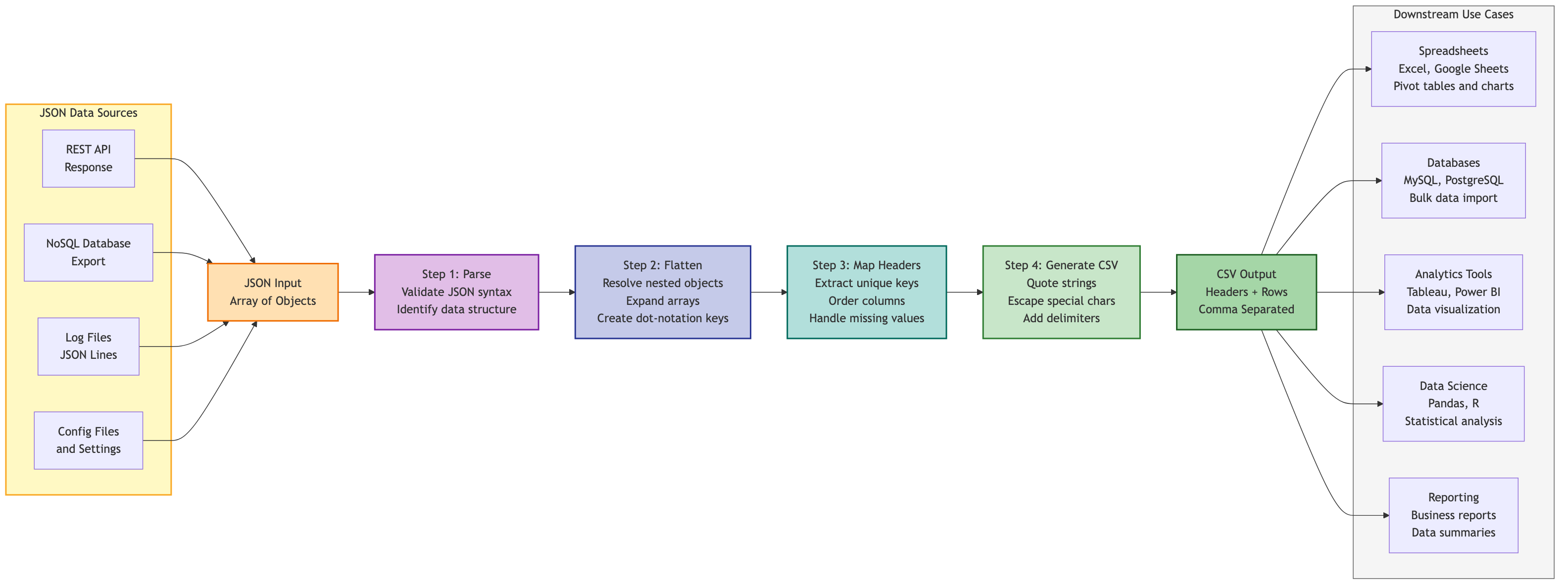
Wat maakt JSON-naar-CSV-conversie moeilijk?
Flat JSON is triviaal. deze:
[
  {"id": 1, "name": "Alice", "email": "[email protected]", "age": 30},
  {"id": 2, "name": "Bob", "email": "[email protected]", "age": 25}
]
Wordt dit, sleutels tot kopteksten, elementen tot rijen:
id,name,email,age
1,Alice,[email protected],30
2,Bob,[email protected],25
Maar echte API-reacties zijn nooit plat. Ze zien er zo uit:
[
  {
    "id": 1,
    "name": "Alice",
    "address": {"street": "123 Main St", "city": "San Francisco", "state": "CA"},
    "skills": ["JavaScript", "Python", "Go"]
  }
]
CSV heeft geen idee van "inside".
Puntnotatie afvlakken- geneste sleutels worden samengestelde headers:
id,name,address.street,address.city,address.state,skills
1,Alice,123 Main St,San Francisco,CA,"JavaScript; Python; Go"
Geïndexeerde kolommen voor arraysteneinde skills.0, skills.1, skills.2. Voorspelbaar, maar een record met 14 vaardigheden levert 14 kolommen voor iedereen op.
JSON-gecodeerde cellen- stop de rauwe JSON in de cel, dubbel geciteerd. Verliesloos, onleesbaar, en het maakt analisten verdrietig.
Puntnotatie met samengevoegde arrays is de juiste standaard voor menselijke consumptie - it's wat de Toolz.dev-converter produceert. Geïndexeerde kolommen winnen wanneer downstreamcode elk element adresseerbaar nodig heeft. JSON-in-Cells is een laatste redmiddel voor round-tripping.
Methode 1: Hoe converteer je JSON online naar CSV?
Het beste voor: Eenmalige conversies, niet-ontwikkelaars, alles onder enkele tientallen MB.
- Open de JSON naar CSV-converter.
- Plak uw JSON - een reeks objecten of een enkel object.
- De tool detecteert de structuur, maakt geneste objecten plat tot puntnotatie en maakt de CSV onmiddellijk weer.
- Kopieer het of download de
.csv.
De reden dat ik standaard hiervoor over een script voor iets dat niet terugkeert: nul instellen, correcte RFC 4180 ontsnappen (die les geleerd), automatische sleutel-union over inconsistente objecten, en - omdat het ' s client-side - de API-reactie vol met klant e-mails die u zojuist geplakt nooit verlaat uw machine Bekijk het tabblad Netwerk als je don't geloof me; dat ' is de test die ik op elke online converter toepas, en de meeste falen het.
Waar het de verkeerde tool is: terugkerende conversies (script it) en diep pathologische nesting waar je de afvlakkingsstrategie met de hand wilt plukken.

Methode 2: Hoe converteer je JSON naar CSV in JavaScript?
Het beste voor: Bouw pijplijnen, node-services, aangepaste transformatielogica.
Here' s de minimaal correcte versie - let op de ontsnapping, dat is het deel dat mijn driedaagse ramp oversloeg:
function jsonToCsv(jsonArray) {
  if (!jsonArray.length) return "";

  const headers = Object.keys(jsonArray[0]);
  const csvRows = [
    headers.join(","),
    ...jsonArray.map(row =>
      headers.map(header => {
        const value = row[header] ?? "";
        // RFC 4180: double embedded quotes, wrap anything containing , " or newline
        const escaped = String(value).replace(/"/g, '""');
        return /[,"\n\r]/.test(escaped) ? `"${escaped}"` : escaped;
      }).join(",")
    )
  ];

  return csvRows.join("\n");
}
Voor geneste invoer, eerst platter en de toetsen samenvoegen - het nemen van headers van alleen het eerste object is de op een na meest voorkomende bug bij handgerolde converters:
function flattenObject(obj, prefix = "") {
  const result = {};
  for (const [key, value] of Object.entries(obj)) {
    const newKey = prefix ? `${prefix}.${key}` : key;
    if (value && typeof value === "object" && !Array.isArray(value)) {
      Object.assign(result, flattenObject(value, newKey));
    } else if (Array.isArray(value)) {
      result[newKey] = value.join("; ");
    } else {
      result[newKey] = value;
    }
  }
  return result;
}

function nestedJsonToCsv(jsonArray) {
  const flattened = jsonArray.map(item => flattenObject(item));
  // Union of ALL keys, not just the first object's
  const headers = [...new Set(flattened.flatMap(Object.keys))];
  // ...then emit rows exactly as in jsonToCsv above
}
Of sla het handrollen over - de json2csv Pakket heeft deze randen al jaren verwerkt:
import { Parser } from "json2csv";

const parser = new Parser({ flatten: true });
const csv = parser.parse(data);
Methode 3: Hoe converteer je JSON naar CSV in Python?
Het beste voor: Data Science-workflows, alles wat al panda's raakt.
De Panda's one-liner dekt platte JSON:
import pandas as pd

df = pd.read_json("data.json")
df.to_csv("output.csv", index=False)
De echt nuttige functie is pd.json_normalize()- speciaal gebouwd voor geneste API-reacties:
import pandas as pd
import requests

response = requests.get("https://api.example.com/users")
df = pd.json_normalize(response.json())
print(df.columns.tolist())
# ['id', 'name', 'skills', 'address.street', 'address.city', 'address.state']

# Arrays still need a decision — join them explicitly:
df["skills"] = df["skills"].apply(lambda x: "; ".join(x) if isinstance(x, list) else x)
df.to_csv("output.csv", index=False)
Merk op dat json_normalize plat wordt genesteld doelen Maar bladeren invallen zoals Python vermeldt: als u de join-stap overslaat, bevatten uw CSV-cellen: ['JavaScript', 'Python'] letterlijk. Iedereen slaat dit een keer.
Geen panda's beschikbaar? De standaard bibliotheek behandelt platte JSON fijn:
import json, csv

with open("data.json") as f:
    data = json.load(f)

with open("output.csv", "w", newline="") as f:
    writer = csv.DictWriter(f, fieldnames=data[0].keys())
    writer.writeheader()
    writer.writerows(data)
Methode 4: Hoe converteer je JSON naar CSV vanaf de opdrachtregel?
Het beste voor: Shell-scripts, CI-pijplijnen, servers waar het installeren van Panda's overkill is.
jq doet het native met @csv, die correct ontsnapt:
cat data.json | jq -r '
  (.[0] | keys_unsorted) as $keys |
  ($keys | @csv),
  (.[] | [.[$keys[]]] | @csv)
'
csvkit's in2csv is de laaggedachte optie:
pip install csvkit
in2csv data.json > output.csv
en molenaar (mlr) Schijnt als je wilt filteren in dezelfde pas:
mlr --json2csv filter '$age > 25' data.json > output.csv
De samenstelbaarheid is het punt - curl -s api.example.com/data | jq ... > report.csv is een volledige API-naar-Spreadsheet-pijplijn in één regel van Cron.
Methode 5: Kunt u JSON rechtstreeks in Excel of Google Spreadsheets importeren?
Het beste voor: Niet-ontwikkelaars, live-verfrissende gegevens, eenmalige import.
Excel: Gegevens → Gegevens ophalen → van web, plak de API-URL en Power Query geeft u een visuele editor om geneste records uit te vouwen voordat u deze laadt. Echt goed voor herhaalde vernieuwingen van dezelfde bron.
Google-bladen: Extensies → Apps-script en vervolgens een kleine ophaalfunctie:
function importJSON(url) {
  const response = UrlFetchApp.fetch(url);
  const data = JSON.parse(response.getContentText());
  if (!Array.isArray(data) || data.length === 0) return [["No data"]];
  const headers = Object.keys(data[0]);
  const rows = data.map(item => headers.map(h => item[h] ?? ""));
  return [headers, ...rows];
}
gebruikt in een cel als =importJSON("https://api.example.com/data").
Eerlijke take: voor eenmalige invoer, converteren met de Online gereedschap En het openen van de CSV is sneller dan een van beide. De routes voor het in de spreadsheets verdienen alleen de installatiekosten als de gegevens volgens een schema worden vernieuwd.
Welke methode moet je kiezen?
| werkwijze | instelling | Geneste JSON | Terugkerende gebruik | Gegevens blijven lokaal |
|---|---|---|---|---|
| Online converter | niet een | zelfwerkend | elke keer handmatig | Ja - client-kant |
| JavaScript / JSON2CSV | npm installeren | exemplaar flatten |
voortreffelijk | ja |
| Python / Panda's | pip installeren | json_normalize |
voortreffelijk | ja |
| JQ / CSVKIT / MLR | pakketbeheerder | Handmatige paden | Uitstekend (Cron/CI) | ja |
| Excel / bladen | account/app | UI-query-ui | Goed (auto-vernieuwing) | Excel: Ja; Spreadsheets: Google-servers |
Mijn regel: reik naar de browsertool tot de derde keer I'm dezelfde vorm van gegevens converteren - dan wordt het een script.
Welke Edge-gevallen breken JSON-naar-CSV-conversie?
Vier vallen zijn goed voor bijna elke kapotte export die ik heb gedebugd:
inconsistente sleutels. Object 1 heeft email, object 2 heeft phone, object 3 heeft beide Neem alleen headers van het eerste object en je laat in stilte gegevens vallen De oplossing is een sleutel-union voor alle objecten, met ontbrekende waarden als lege cellen - wat goede tools automatisch doen.
Unescaped speciale tekens. De "Smith, Jones & Partners" probleem. Per RFC 4180: Wikkelwaarden met komma's, aanhalingstekens of nieuwe regels tussen dubbele aanhalingstekens en verdubbel eventuele ingesloten aanhalingstekens ("He said ""hello""").
grote bestanden. Na ongeveer 100 MB wordt het parseren van hele bestanden pijnlijk. Stream in plaats daarvan - jq Streams, Pandas leest in Chunks en JSON-lijnen-indeling (één object per regel) maakt beide gemakkelijker. Voor bestanden tot enkele tientallen MB is de browsertool prima, omdat er geen upload is.
coderen. Namen en adressen bevatten niet-ASCII-tekens. Houd alles UTF-8 van begin tot eind en wees wantrouwend tegenover Excel op Windows, die historisch gezien een stuklijst wilde om UTF-8 correct te detecteren.
En een praktijk die niet optioneel is: valideren voordat u converteert. Een afgeknot JSON-bestand mislukt verwarrend halverwege de conversie, maar duidelijk in de JSON-formatter. Dertig seconden validatie verslaat tien minuten van "Waarom is mijn CSV leeg."
Veelgestelde vragen
Hoe converteer ik JSON gratis naar CSV online?
Plak je JSON in de JSON naar CSV-converter op Toolz.dev- het genereert direct CSV met geneste objecten platgedrukt en ontsnappen afgehandeld, en laat u vervolgens het resultaat kopiëren of downloaden Geen aanmelding en de verwerking is 100% clientzijde, dus uw gegevens verlaten uw browser nooit.
Kan ik geneste JSON converteren naar CSV?
Ja. Geneste objecten plat tot puntnotatiekoppen (koppen)address.city), en arrays worden ofwel samengevoegd tot een begrensde tekenreeks of worden opgesplitst in geïndexeerde kolommen. de Toolz.dev-converter past dot-notatie automatisch toe; in Python, pd.json_normalize() doet hetzelfde.
Hoe converteer ik een JSON-bestand naar CSV in Python?
import pandas as pd; pd.read_json("data.json").to_csv("output.csv", index=False) voor platte json. Gebruik voor geneste structuren pd.json_normalize(data) eerst - en vergeet niet om zelf deel te nemen aan array-kolommen, aangezien u bladerenlijsten intact normaliseert.
Wat is de beste manier om zeer grote JSON-bestanden te converteren?
Stream in plaats van laden: jq op de commandoregel, of panda's met chunked reads. Het converteren van het bestand naar JSON-lijnen (één object per regel) maakt het streamen veel eenvoudiger. Browsertools zijn comfortabel tot enkele tientallen MB; meer dan ~ 100 MB, gebruik de opdrachtregel.
Hoe converteer ik CSV terug naar JSON?
de CSV naar JSON-converter keert de trip om - elke rij wordt een object dat door de koprij wordt getoetst Programmatisch: pd.read_csv("data.csv").to_json(orient="records").
Waarom heeft mijn CSV aanhalingstekens over enkele waarden?
Dat is het juiste gedrag, geen bug. RFC 4180 vereist dubbele aanhalingstekens rond elke waarde die komma's, nieuwe regels of citaattekens bevat, waarbij ingesloten aanhalingstekens zijn verdubbeld. Spreadsheets en parsers strippen ze bij het lezen.
Is JSON-naar-CSV-conversie verliesloos?
Voor platte JSON wel. Voor geneste JSON overleven de waarden, maar de hiërarchie niet 't - puntnotatieheaders zijn afgeplat protest, en je kunt niet altijd het exacte originele nest van hen reconstrueren. Bewaar de bron JSON; behandel de CSV als een afgeleide weergave.
Waarom worden mijn kolommen verkeerd uitgelijnd na het converteren?
Bijna altijd een escaping failure: een waarde met een komma was' t geciteerd, dus parsers zien vanaf dat moment extra kolommen It' s de exacte bug van mijn Laravel exportknop Gebruik een converter die RFC 4180 implementeert in plaats van string-joining waarden - en als je je eigen hebt geschreven, test het dan met een waarde als Smith, Jones & Partners.
Hoe converteer ik JSON naar CSV in Excel of Google Spreadsheets?
Beide apps importeren JSON via een helper in plaats van een pasta. Gebruik in Excel Data → Gegevens ophalen → uit Bestand → Van JSON, en vervolgens de query afvlakken in Power Query en sluiten & laden. Plak in Google-bladen kleine arrays via een tijdelijk app-script of converteer met de JSON naar CSV-converter open eerst het resulterende bestand - meestal het snellere pad voor een eenmalige.
Welke JSON naar CSV-methode moet ik gebruiken?
Voor een snelle eenmalige is een client-side converter het snelst en houdt gegevens privé. Voor herhaalbare pijpleidingen, gebruik Python met panda's; voor enorme bestanden, stream met jq op de opdrachtregel en bereik alleen voor het importeren van spreadsheets wanneer niet-ontwikkelaars de workflow bezitten. Match de tool met hoe vaak u de taak herhaalt, niet met alleen de grootte van het bestand.
Match de methode met de taak
JSON-TO-CSV ziet eruit als een opgeloste one-liner totdat een komma in een bedrijfsnaam 340 rijen klantgegevens één kolom naar rechts verschuift. De methode is minder belangrijk dan het formaat te respecteren: Escape per RFC 4180, verenig je sleutels, bepaal je afvlakkingsstrategie expres en behoud de originele JSON.
Voor de volgende eenmalige conversie is de JSON naar CSV-converter is het pad van vijftien seconden. eerst valideren met de JSON-formatteren wanneer de gegevens terug moeten reizen, CSV naar JSON-converter sluit de lus - alle drie in uw browser, geen van hen ziet ooit uw dataserverzijde.
Verwante artikelen:
- De ultieme gids voor JSON-tools (2026)
- Hoe JSON online te formatteren: complete gids met voorbeelden
- Gratis gids voor online teksttools