Ik leerde de waarde van metatags op de beschamende manier Jaren geleden heb ik een landingspagina verzonden waar ik trots op was, de link op een paar plaatsen geplaatst en overal gezien als een kale URL zonder titel, zonder beschrijving en met een gebroken beeldpictogram. De pagina zelf was prima - maar ik had het nooit toegevoegd grafiek openen tags, dus elk sociaal platform viel terug op raden, en elk van hen raadde verkeerd De inhoud was goed en de presentatie van de link was vuilnis, wat in de praktijk veel minder klikken betekende dan de pagina verdiende.
Metatags zijn het kleine blok HTML dat beslist hoe je pagina er overal uitziet behalve op de pagina zelf: in Google' s resultaten, in een Slack unfurl, in een Facebook of LinkedIn kaart, in een tweet Ze zijn gemakkelijk om fout te raken omdat er drie overlappende standaarden zijn - standaard SEO tags, Open Graph, en Twitter Cards - en elk wil iets andere eigenschapsnamen voor wat vaak dezelfde informatie is Ik bouw Toolz.dev en schrijf er veel inhoud omheen, dus ik zette constant metadata op en ik bouwde de Meta-tag-generator om een correct, compleet, kopieerklaar tagblok te produceren uit één set invoer - met lengtewaarschuwingen, zodat ik nooit meer een titel verzend die wordt afgekapt.
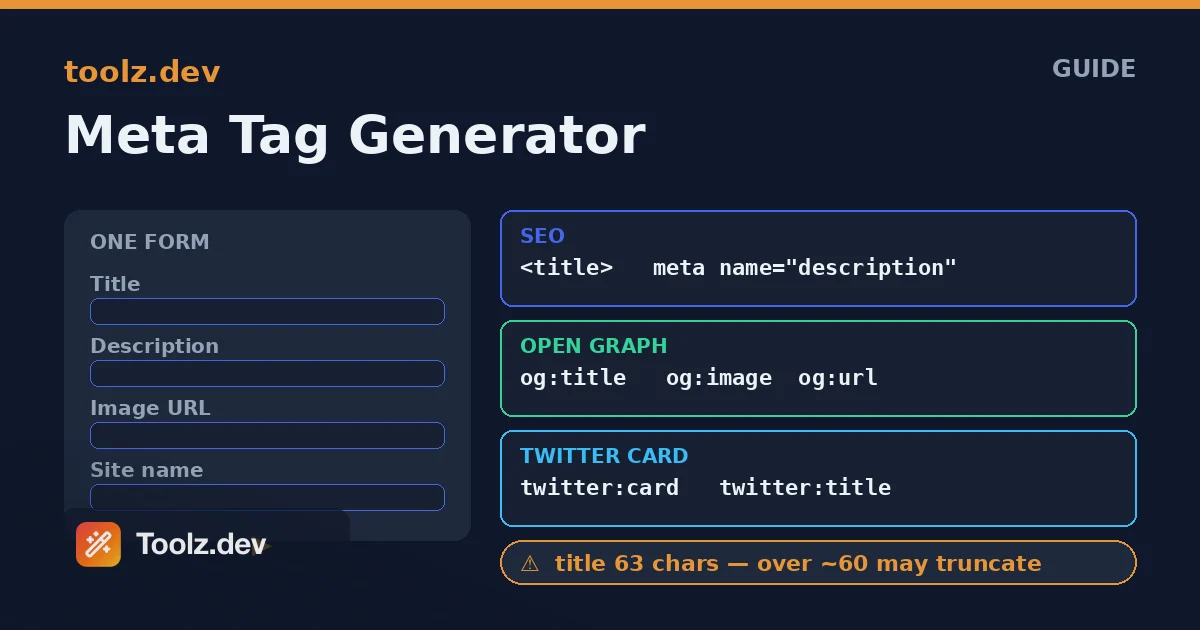
tl;dr: Metatags beheren uw zoekfragment en uw previews van sociale links U hebt drie overlappende sets nodig - standaard SEO-tags, Open Graph voor de meeste platforms en Twitter Cards - en ze delen het grootste deel van hun inhoud, maar gebruiken verschillende attribuutnamen De Meta-tag-generator Bouwt alle drie op basis van één formulier, waarschuwt je wanneer je titel ~60 tekens doorgeeft of de beschrijving ~160 passeert, veilig aan je tekst ontsnapt en een bijpassend JSON-LD-blok kan uitzenden, allemaal in je browser.
Wat zijn metatags en waarom doen ze er toe?
Metatags zijn elementen die in een pagina leven <head> en draag informatie over de pagina in plaats van inhoud die erop wordt getoond. de <title> taggen en de <meta name="description"> Tag zijn de twee oudste en belangrijkste: samen vormen ze meestal de klikbare kop en de grijze samenvattingsregel in een Google-zoekresultaat. Zorg dat ze goed zijn en uw resultaat leest goed en verdient klikken; laat ze weg en zoekmachines synthetiseren iets uit uw paginatekst, vaak onhandig.
Voorbij die basisprincipes zitten twee sociale normen. Open grafiek, oorspronkelijk van Facebook maar nu geëerd door LinkedIn, Slack, Discord, Pinterest, WhatsApp en nog veel meer, gebruikt tags zoals og:title, og:description, en og:image Om te bepalen hoe een gedeelde link als kaart wordt weergegeven. Twitter-kaarten doen hetzelfde werk voor Twitter/X met twitter: tags. Er is een grote overlap - de titel en beschrijving zijn meestal identiek voor alle drie - maar elk platform leest zijn eigen naamruimte, dus je moet ze alle drie ter beschikking stellen om overal te dekken waar je link gedeeld kan worden.
De reden dat dit ertoe doet, is een hefboomwerking. Dezelfde inhoud krijgt dramatisch meer betrokkenheid wanneer het linkvoorbeeld compleet en aantrekkelijk is versus kaal. Een goede titel en beschrijving Lift click-through van zoeken; een goede open grafiekkaart tilt klikken op van elk sociaal aandeel. Metatags zijn een eenmalige setup per pagina die elke keer dat de pagina wordt gevonden of gedeeld wordt, blijft afbetalen, wat precies het soort werk is dat de moeite waard is om zorgvuldig te doen. de Meta-tag-generator bestaat zodat de setup een invultaak is in plaats van een kopie-paste-van-geheugentaak.
Hoe bouwt de Meta Tag-generator de tags?
De generator neemt een enkele gestructureerde set invoer - titel, beschrijving, afbeelding, URL, sitenaam en een handvol opties - en waaiert deze uit in drie gecoördineerde HTML-blokken. Als je de fan-out begrijpt, wordt uitgelegd waarom één formulier zoveel tags produceert.
Vanuit uw kernvelden schrijft het eerst de Primaire tags: de <title>, de meta-beschrijving en optionele trefwoorden, auteur, robots, taal, themakleur en een canonieke link. Vervolgens hergebruikt het dezelfde titel, beschrijving en afbeelding om de grafiekblok openen met de og: Eigenschapsnamen, toevoegen og:type, og:url, en og:site_name. Eindelijk schrijft het Twitter-kaartblok van twitter: namen, waaronder de kaartstijl en uw handvat dat is toegewezen aan twitter:site en twitter:creator. Omdat ze alle drie uit dezelfde invoer putten, blijven ze automatisch synchroon - je kunt Facebook niet per ongeluk de ene titel geven en Twitter een andere.
Twee details maken de uitvoer veilig om te plakken. Ten eerste, alleen velden die u daadwerkelijk invult, maakt tags voor het invullen, zodat u nooit leeg verzendt content="" attributen. Ten tweede is elke waarde HTML-ontsnapt: een citaat, ampersand of hoekhaak in uw beschrijving wordt omgezet in zijn entiteit, zodat het niet uit het attribuut kan breken en uw markeringen kan beschadigen. de Meta-tag-generator Ook zendt optioneel een overeenkomend JSON-LD gestructureerd datablok uit, wat een aparte maar complementaire manier is om de pagina te beschrijven aan zoekmachines.
Hoe lang moet een titel en metabeschrijving zijn?
Dit is de vraag die de meeste mensen doet struikelen, en het antwoord gaat over de weergavebreedte, niet over een harde karakterdop. Zoekmachines kappen titels en beschrijvingen die de ruimte die ze toewijzen overschrijden, dus de praktische limieten zijn de punten waarboven uw tekst wordt afgesneden met een ellips.
Voor titels, mikken op ruwweg 50 tot 60 tekens Google geeft titels tot ongeveer 600 pixels breed, wat neerkomt op ongeveer 60 tekens voor typische tekst, en voorbij dat het hakt het einde Voor meta beschrijvingen, mikken op ongeveer 120 tot 160 tekens; beschrijvingen kunnen lopen tot ongeveer 160 vóór afknotting op desktop, en mobiel is soms korter Geen van beide limieten is exact omdat beide worden gemeten in pixels, niet karakters - een titel vol brede letters eerder afknot dan een vol smalle - maar de karakterrichtlijnen zijn dicht genoeg om rond te ontwerpen.
de Meta-tag-generator telt personages live en waarschuwt je als je de drempels overschrijdt: een titel boven de 60 of een beschrijving boven de 160 wordt gemarkeerd zodat je hem kunt trimmen voordat hij wordt verzonden Het duwt je ook als een titel erg kort is, omdat een titel van 20 tekens ruimte verspilt die je voor trefwoorden zou kunnen gebruiken Dit zijn eerder richtlijnen dan regels - een iets lange titel is geen catastrofe - maar als je de telling ziet terwijl je schrijft, blijf je eerlijk Als je titels en beschrijvingen veel afstemt, dan is de woord teller is handig voor een langere kopie die een lengtedoel moet raken.
Wat is het verschil tussen SEO-tags, open grafiek en Twitter-kaarten?
Ze bedienen verschillende consumenten, en wetende wat je ervan weerhoudt te denken dat je klaar bent als je er maar één hebt gedekt. Hier is hoe de drie sets in lijn zijn met de velden die ze delen.
| voornemen | seo-tag | grafiek openen | Twitter-kaart |
|---|---|---|---|
| Paginatitel | <title> |
og:title |
twitter:title |
| overzicht | meta name="description" |
og:description |
twitter:description |
| Voorbeeld afbeelding | teneinde | og:image |
twitter:image |
| canoniek adres | link rel="canonical" |
og:url |
twitter:url |
| Kaartstijl | teneinde | og:type |
twitter:card |
| aantrekkingskracht | meta name="author" |
og:site_name |
twitter:site |
De SEO kolom is wat Google leest voor het zoekresultaat De Open Graph kolom is wat de meeste sociale en chat platformen lezen voor hun link kaarten De Twitter kolom is wat Twitter/X leest De overlap is duidelijk - titel en beschrijving herhalen over alle drie - maar omdat elk platform alleen kijkt in zijn eigen naamruimte, weglaten van een kolom betekent dat platform terugvalt naar raden De Meta-tag-generator Vult alle drie de kolommen uit één formulier precies, zodat je nooit een platform gissen verlaat.
Heb ik nog steeds JSON-LD gestructureerde gegevens nodig?
Metatags en gestructureerde gegevens beantwoorden verschillende vragen, dus de nuttige vullen elkaar aan in plaats van elkaar te vervangen. Meta tags vertellen platforms hoe u uw pagina kunt weergeven; JSON-LD vertelt zoekmachines waar uw pagina over gaat op een machineleesbare manier die rijke resultaten kan ontgrendelen.
JSON-LD is een blok van JSON, verpakt in een <script type="application/ld+json"> tag, die uw pagina beschrijft als een getypte entiteit - een WebSite, een Artikel, een Product, een Recept, enzovoort - met benoemde eigenschappen Zoekmachines gebruiken het om relaties te begrijpen en, in de juiste gevallen, om verbeterde resultaten zoals artikelbijregels, sterbeoordelingen of FAQ-accordeons direct in zoek weer te geven Het heeft geen controle over uw fragment zoals de titel en beschrijving dat doen; het voegt er een betekenislaag aan toe.
de Meta-tag-generator zendt een starter JSON-LD blok uit naast de metatags, getypt als een WebSite of Artikel op basis van uw Open Graph type en ingevuld vanuit dezelfde velden Het is een solide basis die u kunt uitbreiden met typespecifieke eigenschappen Gestructureerde gegevens zijn de moeite waard om toe te voegen wanneer u in aanmerking wilt komen voor rijke resultaten, hoewel het geen magische rangschikkingshendel is - het maakt functies mogelijk, het dwingt ze niet Voor het bredere beeld van hoe deze stukken in elkaar passen, de Webontwikkelaar Toolkit Roundup dekt de omringende tools die ik gebruik.
Veelvoorkomende use-cases voor een meta-taggenerator
Een nieuwe pagina of site starten
de voor de hand liggende. Elke nieuwe pagina heeft een titel, een beschrijving en een sociale kaart nodig, en het met de hand typen van de volledige set SEO, open grafiek en Twitter-tags is vervelend en foutgevoelig. Het formulier één keer invullen en een compleet, correct blok kopiëren, verandert een lastige taak in een tweede van een 32e, en de lengtewaarschuwingen betekenen dat de pagina wordt gestart met een fragment dat volledig wordt weergegeven in plaats van afgekapt te worden op de eerste dag.
Voorbeelden van slechte of ontbrekende linken repareren
Wanneer een gedeelde link verschijnt zonder afbeelding of verkeerde tekst, ontbreekt de oorzaak bijna altijd of zijn er misvormde Open Graph-tags. De tags opnieuw bouwen met de generator - zorgen voor og:image, og:title, en og:description zijn allemaal aanwezig en correct - repareert de preview Na het updaten moet de relevante platform' s cache soms worden vernieuwd via de foutopsporingstool, maar de tags zelf komen er goed uit.
Standaardiseren van metadata in een team
Op een project met verschillende bijdragers, drift metatags: de ene pagina heeft Twitter-tags, de andere niet, een derde heeft een beschrijving die twee keer de aanbevolen lengte is. Door een enkele generator als referentie te gebruiken voor hoe een complete tagset eruitziet, blijft iedereen dezelfde vorm van metadata produceren. De output verdubbelt als documentatie van welke tags het project precies verwacht.
Metadata voorbereiden voor een raamwerk
In next.js, nuxt, react of vergelijkbaar, plak je niet raw <meta> tags - je voert waarden in een head of metadata API De generator is nog steeds nuttig als bron van waarheid voor welke tags en waarden je nodig hebt: vul het formulier in, lees de volledige set af en vertaal deze naar je framework' s metadata object Het verwijdert het giswerk waarover og: en twitter: velden op te nemen.
Waarom metatags genereren in de browser?
de Meta-tag-generator draait volledig client-side De titels, beschrijvingen, URL's en afbeeldingslinks die u invoert, blijven in uw browser en worden nooit geüpload, en de tool werkt offline zodra deze is geladen Die privacy is belangrijk omdat u vaak metadata voorbereidt voor pagina's die nog niet openbaar zijn - een nog niet uitgebracht product, een client' s conceptcampagne, een interne tool Dat in een generator aan de serverzijde plakken betekent dat u uw onaangekondigde plannen aan iemand anders overhandigt' s logs; als u het in-browser doet, betekent dit dat het uw machine nooit verlaat De Gegevensprivacy in online tools Gids legt uit waarom ik dit als niet-onderhandelbaar behandel.
Metadatawerk maakt ook verbinding met een paar naburige taken. de slotenprogramma Bouwt de schone URL die uw canonieke en og:url tags wijzen naar. de HTML-entiteitencodeerder is handig als je een koppig personage met de hand moet ontsnappen. en de URL-encoder/decoder Handelt codering voor de queryparameters die soms aan een canonieke URL hangen. Samen bestrijken ze de kleine, veeleisende taken die een pagina correct omgeven.
FAQ
Welke metatags maakt de generator?
Het maakt de standaard SEO-tags - titel, beschrijving, trefwoorden, auteur, robots, taal, themakleur en canoniek - plus Open Graph-tags zoals og: title, og: description, og: image en og: url, en de bijpassende Twitter Card-tags. Het kan ook een JSON-LD-blok met gestructureerde gegevens uitzenden. Alleen de velden die u invult produceren tags, zodat de uitvoer schoon blijft.
Hoe lang moet mijn titel en metabeschrijving zijn?
Streef naar een titel van ongeveer 50 tot 60 tekens en een beschrijving van ongeveer 120 tot 160 tekens. Google slaat tekst voorbij die punten af omdat het de breedte in pixels meet, niet de exacte tekens. De generator telt terwijl u typt en waarschuwt u wanneer een titel of beschrijving waarschijnlijk wordt afgesneden in de zoekresultaten.
Wat zijn open grafiektags en heb ik ze nodig?
Open grafiektags bepalen hoe uw pagina eruitziet wanneer ze worden gedeeld op Facebook, LinkedIn, Slack, Discord en vele andere platforms. Zonder hen kan een gedeelde link geen afbeelding of onhandige fallback-tekst laten zien. Als u aantrekkelijke, voorspelbare linkvoorbeelden wilt waar uw inhoud wordt gedeeld, worden open grafiektags sterk aanbevolen en de generator bouwt ze voor u.
Wat is het verschil tussen de twee typen Twitter-kaarten?
De samenvattingskaart toont een kleine vierkante miniatuur naast de titel en beschrijving, terwijl samenvatting_large_image een grote bannerafbeelding boven hen toont. Gebruik de kaart met grote afbeeldingen wanneer u een brede afbeelding van hoge kwaliteit heeft die u wilt domineren en samenvatting wilt gebruiken voor een compactere kaart. Met de generator kun je tussen hen schakelen en schrijft de juiste Twitter:Card-waarde.
Waar plaats ik de gegenereerde metatags?
Plak het blok in het hoofdelement van uw HTML-pagina, idealiter bovenaan voor andere scripts. Voeg in een raamwerk zoals next.js, React of Vue de equivalente tags toe via de head- of metadata-API van het framework met behulp van de gegenereerde HTML als referentie voor welke tags en waarden precies moeten worden opgenomen.
Heb ik nog steeds een canonieke URL nodig als ik open grafiektags heb?
Ja. De canonieke link vertelt zoekmachines welke URL de gezaghebbende versie van een pagina is om problemen met dubbele inhoud te voorkomen, terwijl OG:URL de URL instelt die in sociale previews wordt gebruikt. Ze dienen verschillende doelen, ook al zijn de waarden meestal identiek, dus het instellen van beide is een goede gewoonte.
Is de Meta Tag Generator gratis en privé?
Ja. Het is volledig gratis zonder limieten en elke tag is ingebouwd in JavaScript in uw browser. De tekst-, URL's en afbeeldingslinks die u invoert, worden nooit naar een server verzonden, zodat u metadata veilig kunt voorbereiden voor niet-gepubliceerde of interne pagina's.
Verbetert het toevoegen van metatags mijn zoekrangschikking?
Meta tags helpen zoekmachines en sociale platforms om uw pagina correct weer te geven, maar ze zijn een van de vele factoren. Een sterke titel en beschrijving kunnen de doorkliksnelheid verhogen, en gestructureerde gegevens kunnen rijke resultaten mogelijk maken, maar toch zorgen kwaliteit voor inhoud, links en sitegezondheid nog steeds voor de rankings. Behandel goede metatags als noodzakelijke basis in plaats van een ranking-snelkoppeling.