I asked for a wooden shop sign reading OPEN TODAY. What came back is a photograph of a door with a sign on it, and the sign carries two lines of confident, well-lit, correctly weathered letters that spell AXORRVO TOONVVN.
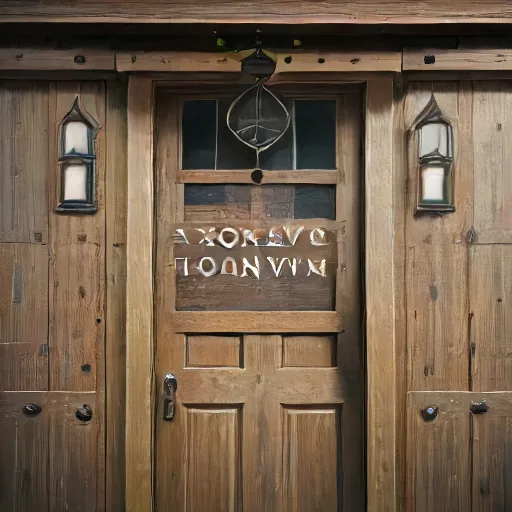
Nothing about the image looks like a mistake. The wood grain is right, the lanterns match, the lighting is consistent. The model understood "wooden shop sign" completely and has no concept of spelling at all, because it was never taught letters as symbols, only as shapes that tend to appear on signs.
TL;DR: This generates 512x512 PNGs from a text prompt, on the site's own hardware. Measured: the first image takes about 22 seconds because the text model has to be evicted from memory first, and each one after that takes about 10.6 seconds while the image model stays resident. Six images per ten minutes. It handles a described scene well, failed completely on text in the picture, and handled hands fine, which is the opposite of the usual warning. The image generator is free with no account.
What does it produce?
A single 512 by 512 PNG, between about 330 and 410 KB, from a prompt of up to 400 characters.
format     PNG, 8-bit RGB, non-interlaced
size       512 x 512
file       333,990 bytes (the fox below) to 408,966 bytes (the sign above)
One image per request. No batch of four to choose from, no aspect ratio control, no seed, no negative prompt, no upscaling, no image-to-image. The prompt and one of eight style presets is the whole interface.
512 pixels square is small by current standards and is the model's native size. Asking for more would mean a larger model, and the section on timing explains why that is not free here.
How good is it, honestly?
Good at a described scene, which is most of what people ask for. Here is "a small red fox in a snowy pine forest" with the Photo preset:
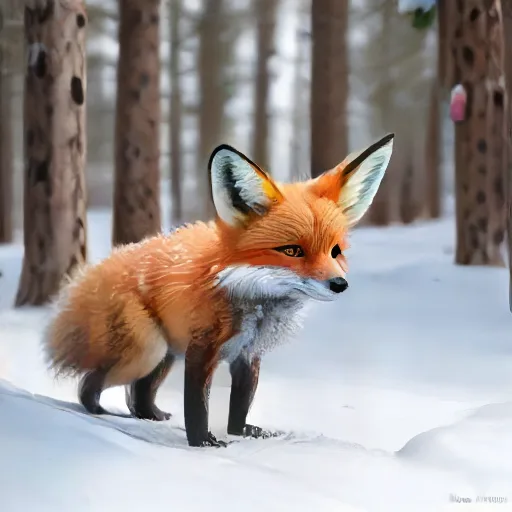
The fox is anatomically coherent, the fur has direction, the snow takes a believable shadow, and the depth of field is consistent with the implied lens. For a thumbnail, a slide background, a placeholder or a blog header, this is finished work.
Look closer and the usual signs are there. A pale smear in the bottom right corner sits exactly where a stock photographer's watermark would be, because the model learned from images that had them. There is a pink blob on a trunk at the top right that is not anything. The fox's front legs merge into one dark shape where they cross.
That is the honest summary of this class of model: convincing at a glance, imprecise under inspection, and the imprecision clusters in exactly the places you stop looking.
Why can it not write words?
Because it never learned that letters are symbols.
A diffusion model learns what regions of an image look like given a description. It has seen millions of signs, and it knows that a sign has a rectangular field with high-contrast angular marks arranged in rows. What it does not have is any representation of "O" as a thing distinct from "Q", or any mechanism that spells a word one letter at a time. It generates the texture of text.
So the output is letter-shaped, correctly spaced, correctly lit, correctly perspective-warped onto the sign, and meaningless. AXORRVO TOONVVN has the right number of words and roughly the right number of characters for OPEN TODAY, which is the giveaway: it matched the shape of the request and not the content.
The practical consequence is a rule rather than a workaround: generate the picture without the text, then add the text yourself. Add text to an image does that in the browser and gives you a font that spells things.
Bigger commercial models have improved at this, through architectural changes rather than more data, and still fail on anything longer than a few words. A small model running on a shared VPS is not where that gets solved.
What about hands?
They came out fine, which surprised me and is worth reporting rather than repeating the cliché.
"Close-up of two hands holding a coffee cup" produced a plausible pair of hands with the right number of fingers in sensible positions, a thumb where a thumb goes, and a believable grip on the cup. The hand further from the camera is vague, but it is vague in the way an out-of-focus hand is vague.
The "AI cannot do hands" line comes from an earlier generation of models and has stuck around past its usefulness. It is still a place to look, because hands are high-detail and low-contrast and the model has less signal there. It is no longer a guaranteed failure.
The reliable failures in this model are text, small repeated objects, anything with a count in the prompt, and any specific real person or logo.
Why is the first image so much slower than the next one?
Because the server cannot hold both models at once, and making an image evicts the text one.
| Request | Time |
|---|---|
| First image | 22,352 ms |
| Second | 10,584 ms |
| Third | 10,677 ms |
The first request waits for text jobs to finish, tells the language model to unload, and then loads the image model. The second and third find it already resident and cost only the generation.
This is also the hidden cost of an image: while one renders, the writing tools queue behind it, and the next text request pays to load the language model back. Six images per ten minutes per visitor and a queue of three are what keep that from being everyone else's problem. If the generator says it is busy, that is the queue doing its job rather than an error.
Ten seconds for a 512 pixel image on a CPU is respectable. It is slow against a hosted service with a GPU, and the trade is the one that runs through this whole site: it is our hardware, so there is no account, no credit balance and no upload.
What do the style presets do?
Append a phrase to your prompt. That is the entire mechanism, and seeing it written out makes the tool easier to use.
| Preset | What is appended |
|---|---|
| Photo | realistic photograph, natural light, sharp focus, high detail |
| Illustration | digital illustration, clean lines, vibrant colors |
| Watercolor | watercolor painting, soft washes, paper texture |
| Anime | anime style, cel shading, expressive |
| 3D render | 3D render, soft studio lighting, octane render |
| Pixel art | pixel art, 16-bit, crisp pixels |
| Oil painting | oil painting, visible brush strokes, rich color |
| Line art | black and white line art, ink drawing, minimal |
There is no separate model per style and no fine-tune. Choosing Watercolor is exactly as powerful as typing "watercolor painting, soft washes, paper texture" yourself, and no more.
Which means two things. You can get any of these by writing it in the prompt, so the presets are a convenience rather than a capability. And you can go beyond them: "linocut print, two colours, visible registration offset" is a style the dropdown does not offer and the model will attempt.
How should you write the prompt?
Describe the picture, not the request, and put the subject first.
The model weights the beginning of the prompt more heavily, so "a small red fox in a snowy pine forest" puts the fox at the centre. "A snowy pine forest with a small red fox" produces a landscape with a fox somewhere in it, which may be what you wanted and often is not.
What works:
- Concrete nouns with one or two adjectives each. "A cracked leather armchair beside a tall window" rather than "a cozy atmosphere".
- Light, named. Golden hour, overcast, single lamp, harsh noon. Lighting does more for a picture than any other single word.
- A viewpoint. Close-up, wide shot, from above, eye level.
What does not:
- Negations. "A street with no cars" tends to produce cars. The model has no operator for absence; it has only things it can draw, and you just named cars.
- Counts. "Three cats" gives you some cats.
- Named people, brands or logos. Either nothing recognisable, or something close enough to be a problem.
- Instructions. "Make it look professional" is not a thing in an image.
Why does the same prompt never give the same picture?
Because every generation starts from fresh random noise, and there is no way to ask for the previous one back.
A diffusion model works by starting with a field of noise and removing it step by step, steered by the prompt. The noise it starts from is the seed, and a different seed with an identical prompt produces a different picture. Services that expose a seed let you reproduce an image exactly or explore variations around one you liked. This tool does not expose it.
The practical consequence is that the image you have is the only copy of that image. Generate something you like and do not save it, and it is gone: regenerating gives you a different fox in different snow.
So the workflow is to download as you go rather than at the end. That also sits badly with the six-per-ten-minutes budget, which is another reason to save the ones that work rather than planning to recreate them.
It cuts the other way too. If a picture comes back with a growth where a paw should be, running the same prompt again is a real fix rather than a superstition, and it costs ten seconds.
Can you use the images commercially?
The output, probably. The question you should ask is about the model, and this one is worth checking rather than assuming.
Images generated by a model are generally treated as usable by the person who made them, and in several jurisdictions a purely machine-generated image attracts no copyright at all, which means you can use it and so can everyone else. The US Copyright Office's registration guidance for works containing AI-generated material is explicit that material produced by a machine from a prompt is not protected, because the prompt is an instruction rather than authorship of the output. For a blog header that is a non-issue. For a logo or anything you need to own exclusively, it is the wrong tool.
The separate risk is resemblance. A model trained on the web can reproduce a composition, a watermark shape, or something close to a recognisable character. The faint watermark-like smear in the fox image is a mild example of that tendency. For commercial work, look at what you generated rather than assuming novelty.
Neither of those is advice. For anything commercially consequential, the licence of the specific model and your own jurisdiction are what matter, and both are outside what a tool page can settle for you.
What happens to your prompt before it reaches the model?
Three things, all small and worth knowing because two of them can bite.
Whitespace is collapsed. Every run of spaces, tabs and newlines becomes a single space. If you have composed a prompt across several lines, it arrives as one line, which is what the model wants anyway.
It is cut at 400 characters. Not rejected, cut. A longer prompt is truncated and the request proceeds with whatever fitted, so the last clause of a long description can be silently missing. If you are writing a detailed prompt, the end of it is the part at risk, which is an argument for putting the subject first that has nothing to do with how the model weights words.
The style phrase is appended last. Your text, then a comma, then the preset's phrase. So the style modifiers sit at the end, where the model weights them least, which is why Watercolor nudges the picture rather than transforming it. If you want a style to dominate, write it into the start of your own prompt instead of relying on the dropdown.
None of this is visible in the interface. The prompt you typed and the prompt the model received are different strings, and the difference is a comma, a phrase and possibly a truncation.
What is it good for?
Anything where "a picture of roughly this" is the requirement.
| Works well | Use something else |
|---|---|
| Blog headers, slide backgrounds | A logo or brand asset |
| Placeholder art in a prototype | Anything containing words |
| Mood and concept exploration | A specific person or product |
| Textures and backdrops | Print, where 512px is too small |
| Illustrating a point in a post | Anything needing a precise count |
The first row is where it is genuinely a time saver. The alternative for a blog header is a stock site, a search, a licence check and a download, which is fifteen minutes for a picture nobody will look at closely. This is ten seconds.
The right column is not a list of things it does badly. It is a list of things it cannot do, which is a different and more useful kind of limit to know.
Why not use one of the big services?
Because they are better and this one is here.
A hosted service with a GPU gives you higher resolution, better prompt adherence, seeds, negative prompts, aspect ratios, and several images to choose between. If image generation is central to what you are doing, use one.
What this gives you is a picture in ten seconds without an account, a credit balance, a queue position behind paying users, or your prompt going to a company that keeps it. Prompts are more revealing than people expect: they describe what you are working on, often before you have told anyone.
The comparison is the same one running through this whole site. This is the version that is already here, costs nothing, and does not ask who you are.