La scorsa primavera, gli utenti hanno iniziato a disconnettersi da Toolz.dev. Non a volte - costantemente Accedi, fai clic su uno strumento, boom: torna alla schermata di accesso Il backend emette token di accesso di 15 minuti e token di aggiornamento di 7 giorni, e I & #39; d ha testato quel flusso cento volte Quindi naturalmente ho pensato che l'endpoint di aggiornamento fosse rotto e ho trascorso un'ora e quaranta minuti a leggere il middleware Express che non aveva nulla di sbagliato.
Poi finalmente ho fatto la cosa ovvia. Ho preso un token di accesso live dall'intestazione di autorizzazione, l'ho incollato in un decoder e ho guardato le attestazioni. la exp stava bene. la iat andava bene Il token era valido per altri 14 minuti Il che significava che il server andava bene - e il bug doveva essere sul client Abbastanza sicuro: il mio frontend stava controllando payload.exp < Date.now(). exp è secondi dall'epoca. Date.now() è millisecondi Ogni token appena coniato sembrava scaduto da qualche parte intorno al 1970, quindi il client & quot;helpfully" disconnesso tutti fuori prima che il server mai avuto voce in capitolo Tre caratteri di correzione - /1000- dopo quasi due ore di caccia.
That's l'intera presentazione per avere un decoder JWT nella tua cassetta degli attrezzi. Un JWT sembra rumore di linea - tre pezzi di gibberish base64url incollati insieme con punti - ma it' è solo JSON che indossa un trench Nel momento in cui puoi leggere le affermazioni, metà dei tuoi bug di autenticazione smettono di essere misteri Pubblico sbagliato, gettone scaduto, ruolo mancante, inclinazione dell'orologio, millisecondi contro secondi - loro're tutti seduti proprio lì in testo normale una volta decodificato.
Ma - e questo conta - dove decodifichi non è una scelta neutra Un token di accesso reale è una credenziale live Incollalo in un sito di decoder che spedisce token a un server, e tu' ho appena depositato una chiave funzionante della tua API in un registro delle richieste stranger's That's il motivo specifico per cui ho costruito il Decoder Toolz.dev JWT per eseguire interamente nel tuo browser. Maggiori informazioni su questo di seguito.
tl; dr: Per decodificare un JWT online, incollalo in Decoder Toolz.dev JWT- divide intestazione, payload e firma istantaneamente, traduce
exp/iatin date umane, e funziona al 100% lato client in modo che il token non lasci mai la tua macchina Una cosa da bruciare in memoria: la decodifica NON è la verifica Un JWT è solo JSON codificato in base64url che chiunque può leggere - solo la verifica della firma con la chiave lo dimostra' è affidabile.
Caratteristiche principali
Intestazione istantanea, payload e divisione della firma
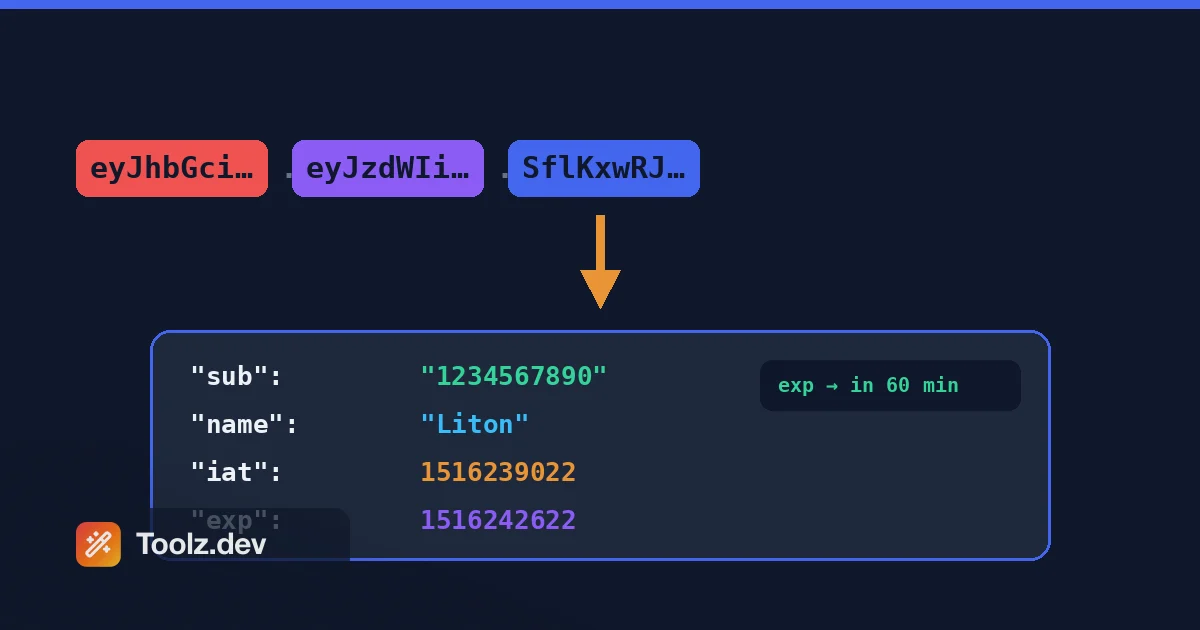
Incolla un token e il decoder lo suddivide immediatamente nelle sue tre parti: l'intestazione (tipo algoritmo e token), il payload (le tue affermazioni) e la firma (codificata a sinistra, perché it' è un MAC o una firma grezza - there' non c'è nulla di leggibile dall'uomo lì dentro) Nessun pulsante di invio, nessun ricaricamento di pagina Questo rispecchia esattamente ciò che la tua libreria di autenticazione fa internamente prima della verifica: dividi su ., base64url-decodificare i primi due segmenti, analizzare come JSON Vedere le parti disposte fianco a fianco è il modo più veloce per costruire l'intuizione per il formato Dopo alcune decine di token, you' inizierò a riconoscere un token RS256 Auth0 rispetto a un token HS256 Laravel a colpo d'occhio - l'intestazione lo dà via ogni volta.
Timestamp EXP, IAT e NBF leggibili dall'uomo
La caratteristica più utile, punto. exp, iat, e nbf sono valori NumericDate - secondi dall'epoca Unix - e nessuno, me compreso, può leggere 1783430700 E dirti se questo è martedì prossimo o la morte calda dell'universo. Il decoder converte ogni reclamo di timestamp in una data e ora effettive, nel fuso orario locale e UTC. Qui è dove il classico bug milliseconds vs-seconds diventa immediatamente visibile: se il tuo decodificato exp rende come una data nell'anno 56.000 qualcosa, qualcuno ha riempito un javascript Date.now() in un campo che si aspetta secondi. Ho spedito quel bug. Vedere la data assurda è la diagnosi. Per un'archeologia più profonda, il Convertitore di timestamp è a una scheda di distanza.
Conto alla rovescia e stato di scadenza
Oltre al semplice rendering della data, il decoder ti dice lo stato corrente del token: valido, scaduto o non ancora attivo (quando nbf è nel futuro). Se il token' è ancora vivo, ottieni un conto alla rovescia fino alla scadenza. Sembra una piccola comodità finché tu' non esegui il debug di un 401 intermittente e devi rispondere a & quot; questo token specifico è morto quando la richiesta è stata attivata?& quot; ancora e ancora Confrontando il conto alla rovescia con il tuo server's configurato TTL cattura anche rapidamente la configurazione errata: se i tuoi token di accesso dovrebbero vivere 15 minuti e il conto alla rovescia dice 6 giorni, il tuo codice di emissione sta leggendo il valore di configurazione errato.
Algoritmo e ispezione dell'i
L'intestazione decodificata ti mostra alg e typ (Più kid e amici quando presenti), che risponde alle domande che contano per la sicurezza, non solo il debug. è questo token HS256 o RS256? fa il kid Abbina una chiave che serve effettivamente il tuo endpoint JWKS? E quello grande: è alg qualcosa che non dovrebbe mai essere, come none? Token che rivendicano "alg": "none" sono o apparecchi di prova o qualcuno che sondano il tuo verificatore - in ogni caso, vuoi vederlo immediatamente Controllo l'intestazione prima su ogni token non familiare, prima di leggere un singolo reclamo.
Affermazioni JSON formattate dalla sintassi
I payload decodificati grezzi sono BLOB JSON a riga singola e i fornitori di identità amano impacchettarli: oggetti nidificati, attestazioni personalizzate con spaziatura dei nomi, array di ambiti. Il decoder stampa tutto con l'evidenziazione della sintassi così roles, scope, aud Gli array e gli oggetti di autorizzazione nidificati sono effettivamente scansionabili. È lo stesso trattamento il Formattatore JSON dà JSON arbitrario, applicato automaticamente alle tue affermazioni Quando tu' stai confrontando due token - diciamo, uno di un utente che può accedere a un endpoint e uno di un utente che può' t - l'output formattato trasforma un esercizio di strizzacervelli in un diff di dieci secondi.
100% Client-Side - Il tuo Token non lascia mai il Browser
Questa è la funzionalità per cui I' d combattono. Un token di accesso incollato non è un dato di esempio: it' è una credenziale live che si autentica come utente reale fino al exp. Qualsiasi decoder che invii il tuo token a un backend ha appena scritto una chiave funzionante nei registri del server, nell'analisi, forse un tracker di errori di terze parti. Il decoder Toolz.dev esegue tutte le decodificazioni in JavaScript, nella tua scheda. Nulla viene trasmesso, nulla è memorizzato. Non credermi sulla parola: apri DevTools, guarda la scheda Rete, incolla un token. Zero richieste. Ho scritto perché questa architettura è importante per ogni strumento di input sensibile in Il mio pezzo sulla privacy dei dati negli strumenti online.
Funziona con qualsiasi JWT, da qualsiasi stack
Le JWT sono uno standard - RFC 7519- quindi il decodificatore non & #39; t importa chi ha coniato il tuo. gettoni Auth0 e Firebase con le loro affermazioni personalizzate namespaced, Laravel Sanctum-adjacent setups, Keycloak, Supabase, AWS Cognito, o il HS256 arrotolato a mano i miei segni di backend Express per Toolz.dev - se it's tre segmenti base64url uniti da punti, decodifica Ciò include quasi-JWT malformati: se il segmento due won't parse come JSON, il decodificatore ti dice quale parte è rotta invece di fallire silenziosamente, il che è di per sé diagnostico. I token troncati su copia sono più comuni di te'd pensa.
Come utilizzare il decoder JWT
Passaggio 1: prendi il token
Trova il token ovunque la tua app lo tenga. Più comunemente: DevTools → Scheda Rete → Fare clic su una richiesta → Copia il Authorization: Bearer eyJ... valore dell'intestazione (senza la parola & quot; Bearer"). Oppure controlla l'applicazione → Archiviazione locale/Cookie, poiché molte app nascondono i token lì. Nel backend, registralo o estrailo dalla tua suite di test Copia l'intera stringa: un JWT che perde i suoi ultimi caratteri decodifica ancora ma non verificherà mai, e quell'ora confusa non è necessaria.
Passaggio 2: incollalo
Apri il Decoder JWT e incolla La decodifica avviene mentre digiti - nessun pulsante Se tu' sei nervoso all'idea di incollare un token di produzione ovunque (buon istinto), apri prima la scheda Rete e conferma che non viene trasmesso nulla. È' t. Quel controllo della paranoia richiede dieci secondi e it' è esattamente quello che I' fare su qualcun altro's strumento.
Passaggio 3: leggi le tre parti
Intestazione prima: conferma alg è ciò che il tuo sistema si aspetta e typ è JWT. Poi il carico utile: iss (chi l'ha coniato), aud (a chi è rivolto), sub (quale utente), più qualunque ruolo, ambito o reclamo personalizzato aggiunga il tuo stack La firma rimane codificata - it's output crittografico, non dati Se dice l'intestazione none, fermati e vai a controllare la lista degli allow del tuo verificatore prima di ogni altra cosa.
Passaggio 4: controlla exp e le affermazioni che mordono
Guarda il decodificato exp data e lo stato di scadenza. Scaduto? C'è il tuo 401. Valido ma rifiutato comunque? Ora confronta aud e iss contro il tuo verificatore's config - disallineamenti ci sono la seconda causa più comune dopo la scadenza. E se qualsiasi timestamp viene visualizzato come un anno a cinque cifre, congratulazioni: you' ho trovato un bug millisecondi contro secondi e con la presente ti do il benvenuto in un club molto grande.
Cosa c'è effettivamente all'interno di un JWT? Anatomia delle tre parti
Un token Web JSON, definito in RFC 7519, è composto da tre segmenti codificati per base64URL uniti da periodi: header.payload.signature. (In senso stretto, la varietà firmata è una JWS secondo RFC 7515 - there's un cugino crittografato, JWE, ma quasi ogni token che tu' incontrerai in natura è una JWS firmata.)
La parola chiave è codificato. Base64url è una codifica di trasporto - un modo reversibile per rendere i byte sicuri per l'URL - non la crittografia Chiunque abbia in mano un JWT può leggere tutto nell'intestazione e nel payload con zero chiavi, zero segreti, zero sforzo Gioca con la codifica grezza nel convertitore base64 E vedrai che è l'alfabeto standard con + e / scambiato per - e _, imbottitura caduta. Ho scritto di più sulla codifica stessa nel Guida alla codifica Base64.
Decodifica un'intestazione tipica e ottieni:
{ "alg": "HS256", "typ": "JWT" }
E un payload costruito dai sinistri registrati RFC 7519 definisce:
{
  "iss": "https://toolz.dev",
  "sub": "user_8f3a2c",
  "aud": "toolz-api",
  "exp": 1783431600,
  "nbf": 1783430700,
  "iat": 1783430700,
  "jti": "b4d1f0e2"
}
iss è l'emittente, sub l'oggetto (di solito il tuo ID utente), aud il pubblico previsto, jti un ID token univoco. exp, nbf, e iat sono valori numerici: bis Dall'epoca di Unix. non millisecondi JavaScript Date.now() restituisce millisecondi e confonde i due token che scadono istantaneamente (il mio bug di disconnessione Toolz.dev) o i token con exp date nell'anno 56.000 che di fatto non scadono mai - che è silenziosamente il fallimento più pericoloso.
HS256 vs RS256. HS256 firma con un HMAC su un segreto condiviso - veloce, semplice, ma ogni servizio che verifica i token detiene anche il segreto, e chiunque detenga il segreto può zecca gettoni. Va bene per un monolito come il mio backend, dove emittente e verificatore sono lo stesso processo. RS256 firma con una chiave privata e verifica con una pubblica, in modo da poter pubblicare la chiave pubblica (tramite JWKS) e lasciare che una dozzina di microservizi verifichi senza che nessuno di loro sia in grado di forgiare. I sistemi distribuiti e gli sfollati di controllo di terze parti dovrebbero essere su RS256 o suoi fratelli ECDSA/EDDSA.
la alg: none attacco. RFC 7519 consente JWT non garantiti dove alg è none E la firma è vuota. Le prime biblioteche si fidavano dell'intestazione alg Ciecamente, quindi gli aggressori hanno spogliato la firma, impostato alg a nonee navigato attraverso la verifica con affermazioni completamente controllate dagli attacchi. un relativo trucco swap RS256 per HS256 in modo che il verificatore utilizzi il pubblico chiave come segreto HMAC Questo è il motivo per cui RFC 8725 - JSON Web Token Best Current Practices - è smussato: il verificatore deve appuntare i suoi algoritmi consentiti nel codice e non lasciare mai che il token scelga Se la tua libreria chiama & #39; t includere un esplicito algorithms Elenco, aggiustalo oggi.
Decodifica vs verifica - la linea che conta. La decodifica è leggere, verificare è fiducioso. La differenza di codice:
// Decoding: no secret, no trust. Anyone can do this.
const payload = JSON.parse(
  Buffer.from(token.split('.')[1], 'base64url').toString()
);

// Verifying: proves the signature AND pins the algorithm.
const verified = jwt.verify(token, secret, { algorithms: ['HS256'] });
Un decoder online fa la prima cosa Può mostrarti le affermazioni; non può - e non dovrebbe pretendere di - dirti che il token è autentico Solo verify, con la chiave, lo fa. Non prendere mai decisioni di autorizzazione su sinistri decodificati ma non verificati.
che porta all'ultima regola: Non mettere mai segreti in un carico utile JWT. Nessuna password, nessuna chiave API, nessun dato tu'd mente una lettura di un utente malintenzionato Il payload è pubblico per costruzione - firmato contro la manomissione, ampiamente aperto alla lettura Se it's nel token, supponiamo che l'intera internet possa vederlo.
Casi d'uso comuni
Debug di 401 durante lo sviluppo delle API
Il 401 è il codice di stato meno informativo in HTTP Il server ha detto no - ma il token era scaduto? pubblico sbagliato? firmato con una chiave stantia? mancante del tutto perché il tuo intercettore ha fatto' t fire? decodificare il token effettivo dalla richiesta fallita fa crollare lo spazio di ricerca in pochi secondi Metà del tempo exp risponde da solo. l'altra metà, confrontando iss e aud Contro il tuo verificatore di configurazione dell'ambiente, trova un token di sviluppo che viene riprodotto contro la messa in scena o viceversa. Tengo il decoder appuntato accanto al mio client HTTP esattamente per questo ciclo; è una voce di base nel mio Toolkit di debug dell'API. Decodificare prima, leggere il middleware secondo - l'ordine inverso mi è costato un'ora e quaranta minuti una volta, e intendo continuare a raccogliere interesse su quella lezione.
Spiegare i logout a sorpresa
Quando gli utenti segnalano "continua a disconnettermi," i timestamp dei token sono la tua dichiarazione di testimone. decodifica un nuovo token di accesso e controlla il divario tra iat e exp- sono in realtà i 15 minuti che hai configurato, o un env var lo ha sovrascritto a 60 secondi? quindi controlla se il token di aggiornamento's 7 giorni window è quello che pensi che sia Clock skew si presenta anche qui: se il tuo server di emissione's clock gira un paio di minuti velocemente, i token arrivano già antichi secondo il client's che calcola. E, naturalmente, il bug di confronto secondi contro millisecondi - quello che ha bit Toolz.dev - si annuncia nel momento in cui vedi un sistema perfettamente valido exp Su un token il tuo cliente giura che è scaduto.
Verifica di cosa mette il tuo provider di identità nei token
La maggior parte dei team non ha mai letto i token che i loro mentine IdP, e vale la pena fare it' Decodificarne uno e potresti trovare indirizzi email, nomi completi, URL di immagini, identificatori di tenant - PII che viaggiano in ogni singola richiesta API, archiviati in localStorage e leggibili da qualsiasi cosa metta le mani sul token. Qui's la mia posizione supponente e I'lo discuterò con chiunque: don't metti le email degli utenti nei payload JWT. Il sub L'affermazione esiste esattamente in modo da poter portare un identificatore opaco e cercare il lato server dei dettagli umani. Ogni reclamo aggiuntivo è un dato che stai trasmettendo e byte che stai pagando su ogni richiesta. Decodifica, verifica, quindi ritaglia le mappature delle richieste del tuo IDP.
Verifica dei ruoli e degli ambiti durante il debug delle autorizzazioni
L'autenticazione dice chi sei; l'autorizzazione dice cosa puoi fare - e quando l'autorizzazione si comporta male, la risposta è nelle affermazioni L'utente giura che & #39; sono un amministratore ma ottiene 403? decodifica il loro token Se role dice user, il token è stato coniato prima della promozione e devono ri-accedere - una classica conseguenza dei token stateless che trasportano snapshot stantii Se il ruolo è presente ma l'accesso fallisce ancora, controlla il nome e la forma esatti del reclamo: roles contro role, array vs stringa, scope Come stringa delimitata da spazio vs scp come array. Controllo middleware payload.roles.includes('admin') contro un carico utile che ha role: "admin" fallisce silenziosamente e in modo esasperante Due token decodificati fianco a fianco - uno funzionante, uno no - di solito lo sistemano in meno di un minuto.
Confronto di accesso e aggiornamento dei contenuti del token
In una configurazione a doppio token come la mia, i due token dovrebbero apparire significativamente diversi e la decodifica di entrambi è l'audit. Il token di accesso: breve exp, oltre a qualsiasi affermazione di cui l'API ha bisogno per richiesta. Il token di aggiornamento: lungo exp, a jti per il monitoraggio delle revoche, e il più vicino possibile a nient'altro Se il tuo token di aggiornamento sta trasportando ruoli e dati del profilo, qualcosa's off - it's solo mai presentato a un endpoint e dovrebbe't duplicare il token di accesso's job Questo controllo side-by-side cattura anche l'imbarazzante classe di bug in cui entrambi i token ottengono accidentalmente lo stesso TTL, che trasforma il tuo & quot; finestra di accesso di 15 minuti& quot; in teatro di sicurezza Chiedimi come so controllare per quello.
JWT vs Opaque Session Tokens: un confronto onesto
| JWT | Token di sessione opaco | |
|---|---|---|
| apolide | Autonomo; qualsiasi server con la chiave verifica senza una ricerca | Il server (o l'archivio condiviso come Redis) deve cercare ogni richiesta |
| revoca | Difficile - valido fino al exp A meno che tu non costruisca un denista, che reintroduce lo stato |
Banale: elimina il record lato server e il token muore istantaneamente |
| Taglia per richiesta | centinaia di byte a oltre un kilobyte, su ciascuno domanda | ~32–64 byte |
| Dove avviene la convalida | Ovunque si tenga la chiave (pubblica), ottimo per i microservizi | Ovunque viva il negozio di sessione |
| rivendicare la freschezza | Snapshot al momento del problema; le modifiche al ruolo attendono la riedizione | Sempre attuale - legge i dati in tempo reale |
| debugllabilità | Decodifica e leggi istantaneamente le affermazioni | opaco per progettazione; richiede l'accesso al negozio |
Uso JWTS per Toolz.dev e ti dirò ancora che sono sovraprescritti. La storia della revoca è davvero pessima: quando bani un utente, il suo token di accesso continua a funzionare fino a quando exp- che è esattamente il motivo per cui i miei token di accesso vivono 15 minuti e il token di aggiornamento di 7 giorni è la cosa che posso uccidere lato server Quell'ibrido è il modello onesto: JWT stateless di breve durata per la verifica a buon mercato, un checkpoint statale per il controllo Se tu' eseguiamo un monolite con un database, le sessioni semplici sono più semplici, più piccole e immediatamente revocabili: JWT's superpotere della verifica distribuita è risolvere un problema che non fai't avere.
Mentre noi'ri confrontando - HS256 vs RS256 in uno sguardo:
| HS256 | RS256 | |
|---|---|---|
| modello chiave | Uno condivisi segni segreti e verifica | Segni chiave privata, verifica della chiave pubblica |
| Chi può coniare i token | chiunque detenga il segreto | Solo il titolare della chiave privata |
| migliore in forma | Servizio singolo, Emittente = Verifier | Microservizi, IDP di terze parti, JWK |
| Dimensioni della firma / Velocità | Più piccolo, più veloce | Più grande, più lento, più sicuro da distribuire |
Domande frequenti
È sicuro incollare un JWT in un decoder online?
Solo se il decoder esegue lato client Un token reale è una credenziale live - inviarlo a qualcuno' s server pianta una chiave funzionante nei loro registri Il decoder JWT Toolz.dev fa tutte le decodifica nel browser e non trasmette nulla; è possibile confermarlo da soli guardando la scheda Rete mentre si incolla Per i decoder è possibile' t verificare, utilizzare solo token scaduti o test.
Puoi decodificare un JWT senza il segreto?
Sì - that's il punto che le persone perdono di più L'intestazione e il payload sono JSON codificati in base64url e la codifica non è crittografia Chiunque può leggere ogni reclamo senza alcuna chiave Il segreto (o la chiave privata) è necessario solo per creare o verificare la decodifica non richiede nulla; la fiducia richiede la verifica.
Qual è la differenza tra la decodifica e la verifica di un JWT?
La decodifica legge il contenuto: diviso su punti, decodifica base64url, analizza JSON. La verifica dimostra l'autenticità: ricalcolare o controllare la firma utilizzando la chiave segreta o pubblica, confermare l'algoritmo, controllare la scadenza. Un decoder ti mostra cosa afferma un token; solo la verifica, eseguita sul lato server con la chiave, ti dice se crederci. Non autorizzare mai sulla base di affermazioni decodificate ma non verificate.
Perché il mio JWT viene visualizzato come non valido o scaduto?
Il più delle volte il exp è veramente passato - decodificalo e controlla la data Prossimi sospetti: un token troncato da un copia-incolla sciatto, un aud oppure iss Ciò non corrisponde alla configurazione del tuo verificatore, all'inclinazione dell'orologio tra i server o alla firma di una chiave ruotata. Se il decodificato exp Sembra a posto ma il tuo codice rifiuta il token, controlla se stai confrontando i secondi con i millisecondi.
I JWT sono crittografati?
I JWT standard - tecnicamente JWS, per RFC 7515 - sono firmati, non crittografati La firma rileva manomissioni ma non nasconde nulla; il payload è leggibile da chiunque Esiste una variante crittografata (JWE) ma è rara nella tipica autenticazione web Regola pratica: tratta ogni payload JWT come pubblico e non inserire mai password, chiavi API o dati sensibili in uno.
In che formato è l'affermazione EXP?
exp è un numero di dati: secondi dall'epoca di Unix (1 gennaio 1970 UTC), come definito in RFC 7519. lo stesso per iat e nbf. Il bug classico è l'utilizzo di JavaScript Date.now(), che restituisce millisecondi - producendo token che sembrano scaduti istantaneamente o portano date di scadenza intorno all'anno 56.000. Se un timestamp decodificato mostra un anno a cinque cifre, quello' è il tuo bug.
Qual è l'attacco di Alg None?
RFC 7519 consente JWT non protetti con "alg": "none" e una firma vuota. Le vecchie librerie si fidavano del campo dell'algoritmo dell'intestazione, quindi gli aggressori hanno spogliato le firme, impostato alg a none, e verifica superata con reclami contraffatti. RFC 8725, le migliori pratiche correnti del JWT, richiede che i verificatori fissino un elenco di algoritmi di permesso esplicito nel codice e ignorino qualsiasi cosa il token richiede.
Dovrei usare HS256 o RS256?
HS256 utilizza un segreto condiviso per la firma e la verifica - semplice e veloce, giusto per un singolo servizio che emette e controlla i propri token RS256 firma con una chiave privata e verifica con una pubblica, così molti servizi possono verificare senza essere in grado di forgiare Regola pratica: monolite, HS256; microservizi o provider di identità di terze parti, RS256.
incasso
Ho costruito il Decoder JWT perché continuavo ad averne bisogno mentre costruivo Toolz.dev stesso - gli stessi token di accesso di 15 minuti e token di aggiornamento di 7 giorni I & #39; sono stati dissezionati in tutta questa guida Decodifica istantaneamente, traduce i timestamp che causano il 90% della confusione e non invia mai il tuo token da nessuna parte Quell'ultima parte è & #39; t una casella di controllo delle funzionalità; per uno strumento che gestisce le credenziali live, it& #39;s l'intero design.
Se i token fanno parte del tuo debug giornaliero, anche i vicini guadagneranno la loro mantene: il Convertitore di timestamp Per l'archeologia epocale, il convertitore base64 Per colpire i segmenti grezzi, il Formattatore JSON per reclami BLOB e il Generatore di hash Quando lavori con i diges. Per il flusso di lavoro più ampio, il mio Guida agli strumenti di debug dell'API Coperture in cui un decoder si inserisce nel loop.
E mantieni la versione di una frase registrata sul tuo monitor: la decodifica ti dice cosa dice un token, la verifica ti dice se crederci. Confondi i due e spedirai il tipo di bug che finisce come aneddoto di apertura nel post sul blog di qualcuno. Questa volta era mio.