La primera versión del convertidor Base64 que envié en Toolz.dev tenía un error I' todavía me da un poco de vergüenza. Funcionó perfectamente en cada prueba que escribí: codificada, decodificada, ida y vuelta, realizada. Luego alguien pegó un texto que contenía un emoji y obtuvo esto:
Uncaught DOMException: InvalidCharacterError:
Failed to execute 'btoa' on 'Window': The string to be
encoded contains characters outside of the Latin1 range.
Construí una herramienta de codificación de texto y olvidé que el texto incluye, ya sabes, La mayoría de los textos. Cada escritura no latina, cada carácter acentuado, cada emoji roto. Mis pruebas fueron todas ASCII porque creo que en ASCII. Ese error me enseñó más sobre Base64 que cualquier lectura de especificaciones, y I' Te mostraré la solución más tarde porque hace tropezar a casi todos los que tocan btoa().
Base64 es una de esas cosas que los desarrolladores usan a diario: dentro de cada JWT, cada archivo adjunto de correo electrónico, cada data: URI, aunque rara vez mira debajo del capó. Let's mira debajo del capó.
TL;Dr: La codificación Base64 convierte datos binarios en 64 caracteres ASCII seguros para que puedan viajar a través de canales de solo texto como JSON, URL y correo electrónico, a un costo de ~33% de sobrecarga de tamaño. Es no Cifrado; cualquiera puede revertirlo al instante. Para codificar o decodificar en este momento, use el lado del cliente gratuito Convertidor Base64 en Toolz.dev, sus datos nunca salen del navegador, lo cual importa cuando usted & 39;re decodifican tokens.
¿Qué es la codificación Base64?
Base64 es un esquema de codificación binario a texto: representa bytes arbitrarios que utilizan solo 64 caracteres que sobreviven a cada sistema de texto jamás creado. La especificación autorizada es RFC 4648 (2006), aunque la codificación se remonta a RFC 1421 y Privacy Enhanced Mail en 1993, Base64 es más antiguo que el navegador web.
El alfabeto:
A–Z→ Valores 0–25a–z→ Valores 26–510–9→ Valores 52–61+→ 62,/→ 63=→ Relleno (no un valor, solo relleno)
¿Por qué estos 64? Porque sobreviven sin problemas en ASCII, EBCDIC y todos los Email Gateway jamás construidos. Base64 es un tratado de paz con décadas de infraestructura de solo texto.
El costo del tratado: cada 3 bytes de entrada se convierten en 4 caracteres de salida, un impuesto fijo del tamaño del 33%. Mantén ese número en tu cabeza; decide preguntas reales de arquitectura.
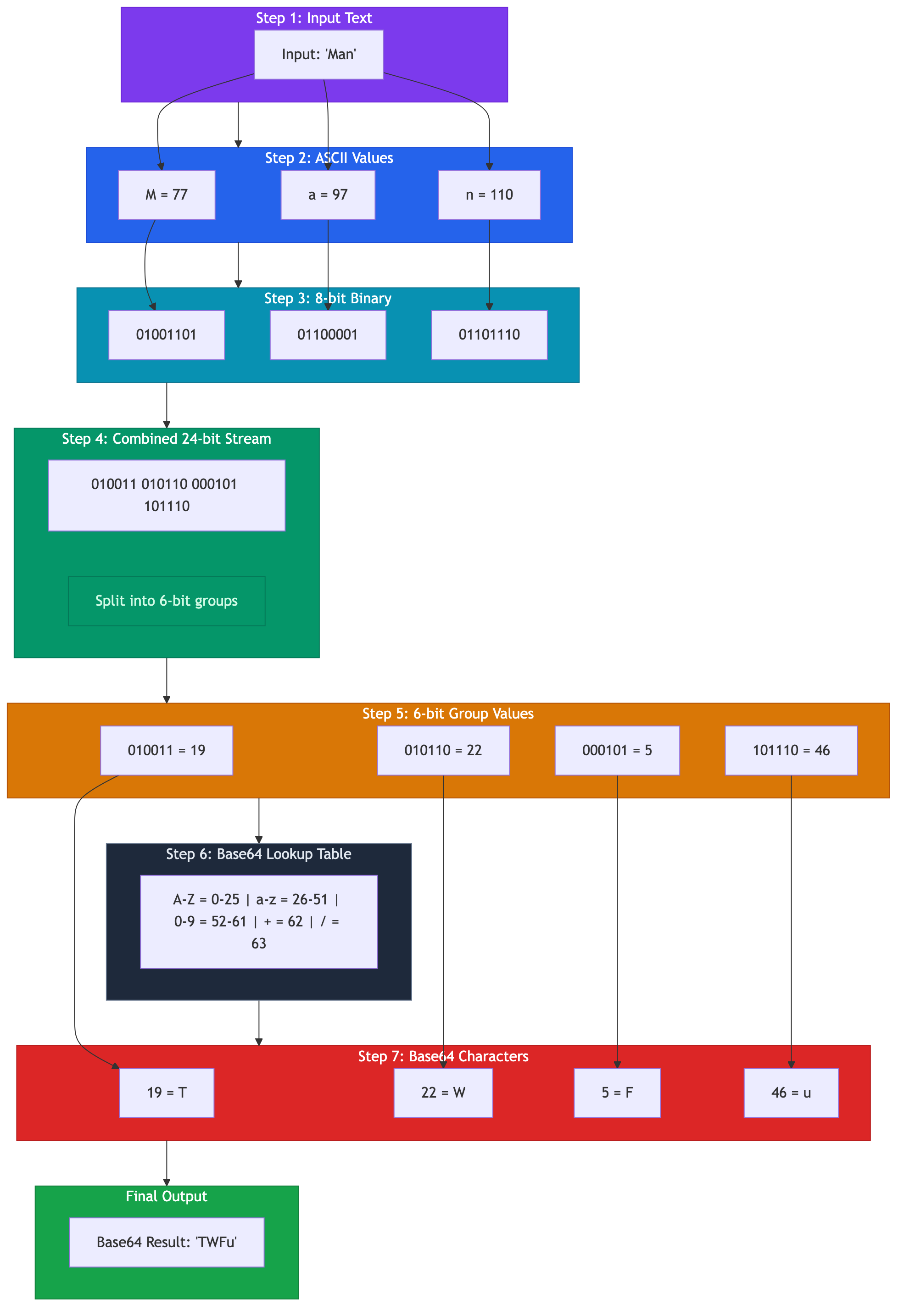
¿Cómo funciona el algoritmo base64?
Respuesta más corta que tú'd expect: reagrupa bits de 8s en 6s, luego búscalos en una tabla. 26 = 64 - eso's de donde viene el nombre.
codificación Hi!:
Paso 1: bytes a bits.
| carácter | ASCII | binario |
|---|---|---|
| marido | 72 | 01001000 |
| yo | 105 | 01101001 |
| ¡¡ | 33 | 00100001 |
concatenado: 010010000110100100100001- 24 bits.
Paso 2: reagrupar en fragmentos de 6 bits.
010010 | 000110 | 100100 | 100001
  18   |   6    |   36   |   33
Paso 3: busque cada valor en el alfabeto.
18 → S, 6 → G, 36 → k, 33 → h. de esta manera Hi! codifica para SGkh.
Ese es el algoritmo completo. No hay matemáticas más allá de una tabla de búsqueda.
acolchado Maneja las entradas que no son múltiplos de 3 bytes. Codificar solo Hi (2 bytes = 16 bits) y solo puede llenar grupos de 6 bits de dos y un bit; el codificador pone a cero los bits y los agrega = Para señalar cuánto es el relleno:
Hi  → SGk=    (2 bytes remaining → one '=')
H   → SA==    (1 byte remaining  → two '==')
Hi! → SGkh    (multiple of 3     → no padding)
Cuando implementé esto para el convertidor Toolz.dev, el relleno era donde vivían todos mis errores uno por uno. Si alguna vez hace rodar manualmente Base64, para una entrevista de codificación, digamos, escriba primero las pruebas de relleno.
La decodificación es la imagen especular: los caracteres vuelven a valores de 6 bits, se reagrupan en bytes de 8 bits, suelta el relleno.
¿Dónde te encuentras realmente con base64?
JWT - el grande
Cada token web JSON es tres segmentos codificados en base64URL unidos por puntos: encabezado, carga útil, firma. La depuración de la autenticación es 50% decodificando estos.
eyJhbGciOiJIUzI1NiIsInR5cCI6IkpXVCJ9.eyJzdWIiOiIxMjM0NTY3ODkwIn0.dozjgNryP4J3jVmNHl0w5N_XgL0n3I9PlFUP0THsR8U
Decodifica el primer segmento y obtienes {"alg":"HS256","typ":"JWT"}. El segundo te da las reclamaciones. Mi flujo de trabajo Cuando un token se porta mal: dividir en los puntos, decodificar cada parte en el Convertidor Base64, luego pegue el JSON en el Formateador JSON para leerlo correctamente. dos pastas, y sabes si el exp Reclamar es tu problema.
Vale la pena decirlo claramente: las cargas útiles de JWT son Legible por cualquiera que tenga el token. La firma deja de manipular, no de leer. He revisado bases de código que rellenan datos confidenciales en reclamos porque el galimatías parece implicar privacidad. no lo hace.

URI de datos
<img src="data:image/png;base64,iVBORw0KGgoAAAANSUhEUgAA..." />
La inclusión de activos pequeños en línea guarda una solicitud HTTP. Mi regla general de la creación de imágenes de administración de WordPress pesadas en imágenes: vale la pena en ~5 KB, más allá de 10 KB. Estás hinchando el documento en un 33 % para guardar una solicitud HTTP/2 multiplexes de todos modos.
Secretos de Kubernetes y una perorata
apiVersion: v1
kind: Secret
data:
  password: cGFzc3dvcmQ=   # decodes to "password"
Los secretos de Kubernetes están codificados en Base64 y la seguridad falsa que esto implica es alarmante. Ese valor decodifica en un solo pegado. Base64 aquí existe para que los valores binarios sobrevivan YAML - a formateo Decisión, no de seguridad. Si su historia de secretos termina en "ellos'resentan64 en etc., no ha comenzado.
el resto de la lista
Encabezados de autenticación básica HTTP (Authorization: Basic dXNlcjpwYXNz Decodifica a llano user:pass- de ahí solo HTTPS). Adjuntos de correo electrónico a través de MIME. Blobs binarios dentro de cargas útiles JSON, porque JSON no tiene tipo binario.
¿Es el cifrado base64? (No. Por favor, no.)
Vale la pena su propia sección porque el concepto erróneo se niega a morir.
base64 es un representación, como escribir un número en hexadecimal. Sin llave. Sin secreto. La decodificación no requiere nada más que la tabla del alfabeto impresa públicamente en RFC 4648. Cualquier cosa base64-"protegido" está protegida de la misma manera que se protege una carta al escribirse en cursiva.
Si los datos necesitan confidencialidad: encriptar correctamente (AES-GCM o libsodium), de entonces Base64: codifica el texto cifrado si el canal necesita texto. La codificación y el cifrado se componen bien, simplemente son 't sustitutos. Y si necesita integridad en lugar de secreto, ese ' es un trabajo hash's - el generador de hash Cubre SHA-256 y amigos.
¿Cómo se compara Base64 con Hex, Codificación de URL y Base85?
| base64 | Hexágono (Base16) | Codificación de URL/porcentaje | ASCII85 | |
|---|---|---|---|---|
| Sobrecarga de tamaño | +33% | +100% | 0–200%, dependiente del contenido | +25% |
| alfabeto | 64 caracteres | 16 caracteres | ASCII + %XX escapada |
85 caracteres |
| Salida legible por el ser humano | prohibido | Una especie de límites de bytes visibles | En su mayoría, para la entrada ASCII | prohibido |
| Seguro de URL por defecto | no (+, /, =) |
sí | Sí, por definición | prohibido |
| lo encontrarás en | JWTS, Mimo, URI de datos | Hashes, direcciones MAC, códigos de color | Cadenas de consulta | Internos en PDF |
Cómo elijo: aojo cuando los humanos lean o comparen la salida: sumas de verificación, resúmenes, cualquier cosa depurada a simple vista. Codificación porcentual Para el texto de URL, nunca binario. base64 para cruzar binariamente un canal de texto, la mayoría de los casos reales. ASCII85 Nunca voluntariamente; el ahorro del 8% aún tiene que justificar las preguntas de compatibilidad.
¿Qué es Base64 seguro de URL y por qué existe?
Base64 estándar tiene un problema: + significa "espacio" en cadenas de consulta, / es el separador de rutas, = delimita parámetros. Coloque un token estándar de Base64 en una URL y algún middleware, en algún lugar, lo alterará, de forma intermitente y solo en producción. Pregúntame cómo lo sé.
RFC 4648 La sección 5 define la solución, generalmente llamada base64URL:
| estándar | seguro para URL |
|---|---|
+ |
- |
/ |
_ |
= acolchado |
Por lo general, solo se omite |
Mismo algoritmo, dos caracteres intercambiados, relleno eliminado. Los JWT usan Base64URL exclusivamente, razón por la cual pegar un segmento JWT en un decodificador estándar estricto de Base64 a veces falla en un extraviado - investigaciones operacionales _. los Convertidor de Toolz.dev Maneja ambas variantes, porque un decodificador que rechaza la mitad de Base64 del mundo real no es un decodificador.
Regla general: si la cadena codificada alguna vez tocará una URL, un nombre de archivo o un encabezado HTTP, utilice la variante segura para URL desde el principio. La modernización es un hallazgo y reemplazo más una oración.
¿Cómo se codifica y decodifica en el código?
JavaScript: la trampa en la que caí
Aquí está la versión ingenua, la que envié:
btoa('Hello')      // "SGVsbG8=" — great!
btoa('café ☕')    // InvalidCharacterError — the bug from my intro
btoa Es anterior al manejo Unicode moderno y solo acepta latin-1. El enfoque moderno correcto pasa por bytes UTF-8 explícitamente:
// Encode: string → UTF-8 bytes → Base64
const bytes = new TextEncoder().encode('café ☕');
const encoded = btoa(String.fromCharCode(...bytes));   // "Y2Fmw6kg4piV"

// Decode: Base64 → bytes → string
const decoded = new TextDecoder().decode(
  Uint8Array.from(atob(encoded), c => c.charCodeAt(0))
); // "café ☕"
(En Node.js, omite la ceremonia: Buffer.from(str, 'utf8').toString('base64').)
pitón
import base64

encoded = base64.b64encode('café ☕'.encode('utf-8')).decode('ascii')
decoded = base64.b64decode(encoded).decode('utf-8')

# URL-safe variant — note -_ instead of +/
token = base64.urlsafe_b64encode(b'binary\xfb\xff').decode('ascii')
Python hace que lo correcto sea obvio: usted moho Pasa bytes, por lo que no se puede olvidar el paso de codificación a UTF-8. yo deseo btoa había sido diseñado con la misma espina dorsal.
feb
$encoded = base64_encode('café ☕');   // handles bytes as-is — PHP strings ARE bytes
$decoded = base64_decode($encoded);

// URL-safe requires manual translation — a WordPress-plugin-developer classic:
$urlSafe = rtrim(strtr($encoded, '+/', '-_'), '=');
aquello strtr/rtrim La línea ha aparecido en todos los códigos de PHP en los que he trabajado, incluida la administración de WP. PHP nunca obtuvo una variante segura de URL integrada, por lo que todos seguimos escribiendo las mismas dos líneas.
Preguntas frecuentes
¿Para qué se utiliza la codificación Base64?
Convierte datos binarios en texto ASCII para que pueda pasar a través de sistemas que solo manejan texto: cargas de pago de JSON, URL, correo electrónico (MIME), encabezados HTTP. Lo encuentras con más frecuencia en tokens JWT, data: URI para imágenes en línea, secretos de Kubernetes y cargas útiles de API que llevan archivos. Es un formato de transporte, no un formato de almacenamiento o seguridad.
¿Es Base64 lo mismo que el cifrado?
No, y confundir los dos provoca verdaderos incidentes de seguridad. Base64 no tiene clave: la decodificación solo requiere la tabla del alfabeto público y toma un pegado en cualquiera descifrador. Cifrar primero con un algoritmo real (AES-GCM), luego codificar el texto de cifrado si el canal necesita texto.
¿Por qué Base64 hace que los datos sean un 33% más grandes?
Cada carácter Base64 transporta 6 bits de información pero ocupa un byte completo de 8 bits, por lo que 3 bytes de entrada siempre se convierten en 4 caracteres de salida - 4/3 ¦ 1.33. It' es un costo fijo del formato, inevitable por diseño. Si el tamaño importa, comprima antes de codificar, nunca después: la salida codificada parece aleatoria y se comprime terriblemente.
¿Cuál es la diferencia entre base64 y base64url?
Base64Swaps de URL + en - y / en _, y por lo general deja caer el = relleno, de modo que la salida sobreviva URL, nombres de archivos y encabezados sin escapar. El mismo algoritmo, definido en RFC 4648 sección 5. Los JWT usan Base64URL exclusivamente, razón por la cual los decodificadores estándar estrictos de Base64 a veces se ahogan con ellos.
¿Por qué btoa() arroja invalidchacActerError?
Su cadena contiene caracteres fuera de Latin-1: un emoji, un carácter acentuado, cualquier escritura no occidental. btoa es una API de los 90 que es anterior al manejo sensato Unicode. Codifique en bytes UTF-8 primero con TextEncoder, luego base64 los bytes; envié este error exacto en una herramienta de producción, por lo que no hay juicio.
¿Cómo puedo saber si una cadena es base64?
Solo usos válidos de Base64 A–Z, a–z, 0–9, +, / (o -, _ Para URL-safe), opcional de seguimiento =, con una longitud que ' es múltiplo de 4 cuando está acolchado. Pero muchas palabras ordinarias también coinciden con ese patrón cafe es válido base64 que decodifica a bytes basura. La prueba real es decodificarlo y verificar si la salida es significativa.
¿Por qué mi cuerda Base64 tiene una nueva línea perdida al final?
porque echo agrega uno antes base64 alguna vez lo ve, así que echo "hunter2" | base64 Codifica ocho bytes, no siete. printf investigaciones operacionales echo -n en cambio. Esta es la causa número uno de los secretos de Kubernetes que se ven bien en el manifiesto y fallan en el tiempo de ejecución: la contraseña decodificada lleva un final invisible. \n. los base64 el comando también envuelve la salida en 76 columnas en algunos sistemas: pase -w 0 en los coreutils de GNU para suprimirlo.
¿Cómo decodificar una ficha JWT a mano?
Divida el token en sus dos puntos, tome el primer segmento (encabezado) y el segundo (carga útil) y ejecute cada uno a través de un Decodificador Base64- ellos're Base64URL, así que use una herramienta que acepte - y _. Luego formatee el JSON resultante en un Formateador JSON para leer las reclamaciones. Nunca pegue tokens de producción en herramientas del lado del servidor; solo del lado del cliente.
¿Cómo codifico una imagen o archivo a base64?
Lea el archivo como bytes, luego base64 esos bytes y prepare un encabezado de URI Data-URI como data:image/png;base64, Entonces, un navegador puede representarlo en línea. En JavaScript, FileReader.readAsDataURL() hace ambos pasos por usted; en la línea de comando, base64 logo.png imprime la codificación sin procesar. Manténgalo en activos pequeños: el impuesto sobre el tamaño del 33% hace que Base64 no se ajuste bien a nada grande, y los URI de big data hinchan su HTML o CSS.
¿Cómo decodificar base64 en JavaScript, Python o la terminal?
En JavaScript moderno, decodifique Unicode de forma segura con new TextDecoder().decode(Uint8Array.from(atob(str), c => c.charCodeAt(0))) en lugar de desnudo atob. En pitón, base64.b64decode(str) devuelve bytes - llamada .decode('utf-8') para texto. En una terminal, echo "aGk=" | base64 -d (o --decode). Los tres esperan base64 estándar, así que traduce -/_ volver a +// Primero si manejas una cadena Base64URL.
la comida para llevar
Base64 es un truco de mezcla de bits de hace 30 años que silenciosamente contiene la mitad de la web moderna: tokens de autenticación, archivos adjuntos, activos en línea, secretos que son 't-secret. Comprenda la reagrupación de 6 bits, respete el impuesto del 33%, nunca lo confunda con cifrado y busque la variante segura para URL en cualquier lugar donde esté involucrada una URL. Eso's 95% del dominio práctico de Base64.
Para la parte práctica, la Convertidor Base64 en Toolz.dev ¿la codificación estándar y segura para URL está completamente en su navegador, creada por alguien que aprendió la lección de Unicode de la manera más difícil, por lo que no es necesario.
Más en esta serie: El completo Guía de herramientas de codificación Cubre el resto de las utilidades diarias del conductor, el Guía de constructor de expresiones regulares aborda las otras habilidades que los desarrolladores pretenden tener, y dado que la mitad de la depuración de Base64 termina en JSON, el Guía de herramientas de JSON definitiva es la siguiente lectura natural.
Artículos relacionados: