Rond 2021 landde een WP Adminify support ticket met een screenshot waar ik nog steeds van huiverde Een gebruiker had een aangepaste admin footer tekst ingesteld - een perfect onschuldige copyright lijn met een © en een link naar hun bureau. Op hun scherm werd het weergegeven als © 2021 — Bright & Co. Drie zichtbare entiteiten, nul weergegeven tekens. De boosdoener was ik. Mijn opslagroutine ontsnapte aan de tekst, mijn renderroutine ontsnapte er weer aan, en ergens tussenin een filter ontsnapte er een derde keer aan. Tegen de tijd dat het in de browser kwam, was die arme ampersand vier keer ontsnapt. ik telde.
De oplossing duurde tien minuten. Het vinden van het duurde twee avonden, omdat ontsnapte tekst eruit ziet haast juist. jij skim © in een database dump en je hersenen corrigeren het om het te autoriseren ©. Uiteindelijk plakte ik strings in een scratch-HTML-bestand keer op keer om te zien wat de browser eigenlijk zou weergeven op elke laag. Dat is een ellendige workflow, en dat is precies waarom een HTML-entiteitscodecoder een van de eerste tools is die ik in Toolz.dev heb ingebouwd.
De keerzijde van dezelfde medaille is enger. Een paar maanden voor dat ticket, tijdens een codebeoordeling van mijn eigen plug-in, vond ik een instellingenveld dat de gebruikersinvoer in een beheerdersbericht echode zonder esc_html(). Iedereen met toegang tot dat veld had kunnen worden opgeslagen <script> en liet het uitvoeren voor elke admin die de pagina laadde Opgeslagen XSS, in mijn eigen code, één ontbrekende functie call away Niemand heeft het uitgebuit - ik heb geluk gehad Maar het heeft permanent veranderd hoe ik denk over ontsnappen: it' is geen opmaakklus, it' is de grens tussen "text" en "code."
Dus deze gids behandelt beide richtingen Codering, dus niet-vertrouwde tekst blijft tekst Decoderen, zodat je kunt lezen wat een over-gretige pijplijn verminkte En genoeg theorie - genaamd vs numerieke referenties, de vijf tekens die er eigenlijk toe doen, waarom volgorde van bewerkingen dubbele ontsnapping veroorzaakt - dat je dit spul kunt debuggen in plaats van te raden.
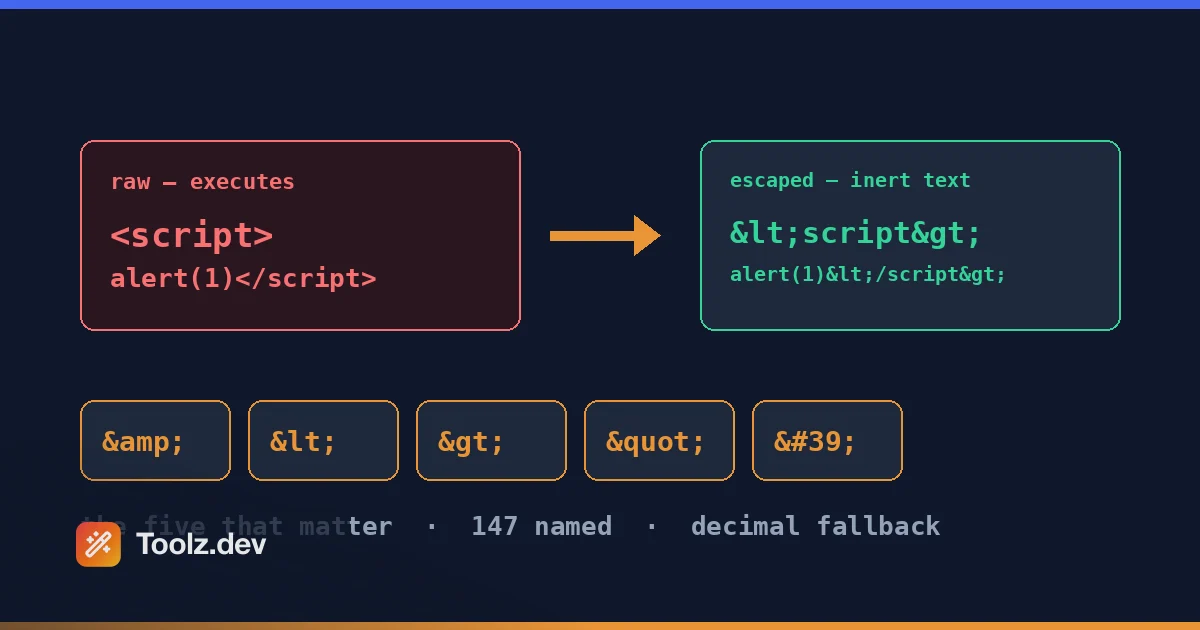
tl;dr: Plak uw tekst in de Toolz.dev HTML-entiteiten encoder/decoder om te converteren tussen onbewerkte tekens en entiteiten in beide richtingen - genaamd, decimaal of hex. Het draait 100% client-side, dus gebruikersinhoud en PII verlaten nooit uw browser Vuistregel: ontsnap altijd aan de vijf specials (het draait 100% client-side, zodat gebruikersinhoud en PII nooit uw browser verlaten
& < > " ') in niet-vertrouwde input en coderen&eerst of je zult dubbel ontsnappen.
Belangrijkste kenmerken
Codeer en decodeer in beide richtingen
De helft van de tijd die ik moet draaien <script> per <script> dus het wordt weergegeven als tekst in een blogpost. De andere helft I' Ik ga de tegenovergestelde kant op: een geschraapt exemplaar draaien &#8217;s terug naar een leesbare apostrof Het gereedschap verwerkt beide Tekst plakken, pick encoderen of decoderen, klaar Geen modus-jagen, geen aparte tools voor elke richting Dat klinkt triviaal totdat u ' tools hebt gebruikt die alleen decoderen, en u merkt dat u een tweede tabblad opent om een codevoorbeeld voor uw documenten te coderen Rond-uitstappen is ook een geweldige controle op gezond verstand: coderen, decoderen en bevestigen dat u uw originele tekenreeks terugkrijgt Als u don't, is er al gedeeltelijk iets in uw invoer ontsnapt - wat op zichzelf nuttige informatie is.
Genoemde entiteiten: &, &lt;, &copy; en vrienden
Genoemde karakterreferenties zijn de voor mensen leesbare - & voor &, < voor <, © Voor ©, — voor een EM-Dash. De tool bevat een samengestelde tabel met 147 namen, niet alleen de beroemde vijf: typografie ( , …, ’, “), valuta, wiskunde en pijlen, Griekse letters, het volledige Latin-1-accentbereik en een paar kansen zoals kaartpakken. Dat bereik is wat inhoud uit de echte wereld eigenlijk nodig heeft - WordPress zendt uit , …, en ’ Door constant WPTexturize, en een decoder die slechts een dozijn namen kent, laat de helft van uw tekst bezaaid met onopgeloste referenties.
Wees duidelijk over wat 147 niet is: de WHATWG HTML Standard definieert meer dan 2.200 benoemde referenties, dus dit is een praktische subset in plaats van de volledige tabel Als een naam is' t erin, laat decodering de referentie onaangeroerd in plaats van te raden - &bogus; komt eruit als &bogus;. Codering heeft het complementaire gedrag en het is des te nuttiger de helft: elk personage buiten Een naam in de tabel valt automatisch terug naar een decimale numerieke referentie, dus er wordt nooit stilletjes gedropt. Een emoji codeert als 🌍, Chinese tekst als 你好. namen waar ze bestaan, overal nummers.
Nog een afwijking van het browsergedrag dat het waard is om te weten: de decoder is hoofdlettergevoelig en vereist de puntkomma. Browsers worden opgelost © En zelfs een kale & zonder een achterliggende puntkomma in sommige parseercontexten, dankzij oudere compatibiliteitsregels; deze decoder lost geen van beide op. In de praktijk is dat ' prima - alles een modern hulpmiddel genereert is kleine letters en beëindigd - maar als u ' opnieuw decoderen geschraapte HTML van een oud CMS, that' is de rand u'll hit.
Numerieke referenties: decimaal en hexadecimaal
Any Unicode teken kan worden geschreven als een numerieke tekenreferentie - decimaal — of hex zoals — (beide zijn een em-dash). De decoder lost beide vormen op. Dit is het ontsnappingsarcé voor personages die geen naam in de standaard hebben, en het is de vorm die je constant zult ontmoeten in API-reacties en RSS-feeds, waar ’ (rechtse enkele quote) is praktisch een handtekening Hex verwijst rechtstreeks naar Unicode codepunten - U+2014 is —- daarom geef ik er de voorkeur aan als I' Ik verwijs naar een Unicode-diagram.
Eerlijke beperking, aangezien u het binnen een minuut na het gebruik van de tool zult opmerken: de numerieke coderen De modus zendt alleen decimaal uit. Er is geen hex-output-optie. decodering — werkt prima; de encoder vragen om het te produceren does't. De twee formulieren zijn semantisch identiek aan elke browser, dus dit kost je functioneel niets, maar als je codebase standaardiseert op hex you' zal met de hand converteren. It's op mijn lijst. Referenties buiten bereik worden eerder gepakt dan verminkt - � staat boven het unicode-maximum en retourneert een expliciete fout in plaats van een vervangend teken.
Volledige Unicode-dekking
Emoji, CJK karakters, Arabisch, combineren diakritische tekens, de werken Als het een codepunt heeft, kan de tool het uitdrukken als een entiteit en het terug oplossen Dit is belangrijker dan jij ' zou denken voor lokalisatiewerk - I' heb Duitse umlauten gedebugd die aankomen als ü van één vertaalleverancier en als RAW UTF-8 ü van een ander, in hetzelfde importbestand. Een tool die buiten Latijn-1 stikt, is daarvoor nutteloos. Tekens boven U+FFF (emoji wonen daarboven) worden correct behandeld als enkele codepunten, niet als verminkte surrogaatparen.
ontwarren dubbel-ontsnapte tekst
de &amp; probleem. Wanneer twee lagen van een pijplijn beide ontsnappen, & HALD &amp;- en drie lagen geeft je &amp;amp;. Decodering zodra de streep precies één laag wordt verwijderd, zodat u de decoder herhaaldelijk kunt laten draaien en de ui kunt zien uitpakken: &amp;amp; → &amp; → & → &. Het tellen van de passen vertelt je hoeveel lagen van je stapel ontsnappen, wat precies de diagnose is die ik nodig had tijdens die vier keer ontsnapte WP Adminify Footer-bug. Eén decodeer per laag. Het is de snelste manier die ik ken om te lokaliseren waar in een pijplijn het extra ontsnappen gebeurt.
Zij-aan-zij ruiten met karakteraantallen
Input links, output rechts, character telt boven beide Dat count pair doet meer werk dan het klinkt: ontsnappen is een uitbreidende bewerking, dus als je 40 tekens codeert en 44 terugkrijgt, is precies één speciaal personage aangeraakt Toen I'm controleerde of een sjabloon al ergens aan ontsnapte, vertelt de delta me vóór I' heb een enkel karakter van uitvoer gelezen Encode, Decodeer, Swap en Clear zijn knoppen - there' is geen live-as-you-type conversie, waarvan I' Ik geef toe dat het een opzettelijke afweging is. Expliciete acties betekenen dat je altijd weet in welke richting de tekst waar je naar kijkt #3 is verkennend
100% Client-Side - Niets geüpload
Alles draait in uw browser Geen verzoek, geen server, geen logs Dit is't een nice-to-have: de tekst you're escaping is vaak precies de tekst die u zou moeten't plakken in willekeurige websites - door gebruikers gegenereerde opmerkingen met echte namen, e-mailsjablonen met klantadressen, ondersteuning ticketinhoud I' heb eerder geschreven over waarom dit ertoe doet in Onze gids voor gegevensprivacy; De korte versie is dat een converter die uw invoer uploadt, een gegevensverwerker is die u nooit hebt doorgelicht. de Toolz.dev-entiteitstool werkt offline eenmaal geladen Vliegtuigmodus is een geldige test - probeer het.
Hoe de HTML-entiteitscodeerder en decoder te gebruiken
Stap 1: Open de tool en plak je tekst
gaan tot Toolz.dev/tools/html-entiteiten en plak je invoer - een codefragment, een verminkt RSS-fragment, een e-mailsjabloonfragment, wat dan ook. There' is geen maatplafond dat het waard is om je zorgen over te maken voor normaal gebruik; I' heb volledige verwisselbare plug-ins ingelast Omdat de verwerking aan de clientzijde plaatsvindt, is gevoelige inhoud hier prima.
Stap 2: Kies coderen of decodeer
Coding verandert onbewerkte tekens in entiteiten (< → <) - gebruik het wanneer u wilt dat opmaak als tekst wordt weergegeven Decodering lost entiteiten terug naar tekens (& → &) - gebruik het wanneer u ' ontsnapte inhoud opnieuw leest Als u ' niet zeker weet in welke staat uw tekst staat, decodeer dan eerst en kijk wat er verandert Ongewijzigde uitvoer betekent dat deze al duidelijk was.
Stap 3: Kies de referentiestijl (wanneer het coderen)
De vervolgkeuzelijst Mode heeft precies drie opties en de keuze is belangrijker dan het lijkt. naam codeert alles waar het een naam voor heeft en valt voor de rest terug naar decimaal - leesbaar in bron en diffs, maar het ontsnapt ook ©, —, é En elk ander niet-ASCII-personage, dat de output opzweet als je toch op UTF-8 bent. getal- doet dezelfde dekking in puur decimaal. Alleen speciale tekens raakt niets anders dan & < > " ' en laat je accenten, em-streepjes en emoji achter als rauwe UTF-8 - dit is degene die ik gebruik voor echte inhoud, en it' is de modus die overeenkomt met wat htmlspecialchars() doet in PHP. Merk op dat ' komt altijd uit als ', nooit ', in alle drie de modi; dat is opzettelijk, aangezien ' is niet gedefinieerd in HTML 4 en oudere e-mailclients stikken er nog steeds in.
Stap 4: controleer de output en kopieer dan
Druk op coderen of decoderen en lees het rechterdeelvenster. Kijk voor decodeertaken specifiek naar overgebleven & sequences - een overlevende betekent dat de tekst dubbel-ontsnapt was, dus druk op Swap en decodeer opnieuw Wanneer het schoon leest, kopieer het resultaat naar uw sjabloon, CMS of code Voor herhaalde taken, retour één keer (codeer dan decoderen) om te bevestigen dat er niets verlies is gebeurd; met de modus voor alleen speciale tekens is de retour exact.
Genoemd versus numerieke entiteiten - en de vijf karakters die er eigenlijk toe doen
Let's krijgen de terminologie recht, want "HTML entity" wordt losjes gebruikt De WHATWG HTML Standard - de levende spec die definieert hoe browsers HTML daadwerkelijk ontleden - specificeert een tabel van Genoemde karakterreferenties: meer dan 2.200 namen zoals , —, …, →, elke toewijzing aan een of twee Unicode-codepunten. Los daarvan, Numerieke karakterreferenties Laat u elk codepunt rechtstreeks adresseren: decimaal (decimaal) (—) of hexadecimaal (—). Dezelfde EM-Dash, drie spellingen.
Hier is mijn eigenwijze mening, aangescherpt door jaren van WordPress-werk: Van die meer dan 2.200 namen zijn slechts vijf karakters echt van belang voor correctheid en veiligheid. Al het andere is typografie, en op een UTF-8-pagina - dat is elke pagina die je in 2026 zou moeten verzenden - kun je gewoon het echte personage typen. Je don't nodig —; je hebt - nodig. De vijf die er toe doen, zijn degenen met een syntactische betekenis in HTML:
| hoedanigheid | wezen | Waarom het ertoe doet |
|---|---|---|
& |
& |
Start elke entiteit: het ontsnappingsteken zelf |
< |
< |
Opent tags |
> |
> |
Sluit tags |
" |
" |
Bepaalt dubbel geciteerde attributen |
' |
' |
Begrenst single-cited attributen |
Let op de laatste rij: ', niet '. de naam ' is geldig in HTML5, maar het was ' t onderdeel van HTML4, en oude tooling (en oude e-mailclients - meer op die later) kunnen erop struikelen Het numerieke formulier werkt overal Dit is het soort pedanterie dat je een verwarrend bugrapport bespaart.
Orde van de operaties is het hele spel. Bij het coderen, & moet worden ontsnapt liever. Als je ontsnapt < tegen < en ontsnap dan ampersands, je zult je eigen output omzetten in &lt;- gefeliciteerd, u've dubbel-escaped Decodering is het spiegelbeeld: & moet worden opgelost voldoende zijn, of &lt; HALD < HALD < en jij' heb ondergedecodeerd (of erger nog, live opmaak opnieuw geïntroduceerd op basis van tekst die opzettelijk is ontsnapt). Bijna elke met de hand gerolde ontsnappende bug I' hebben beoordeeld - inclusief de mijne - is een bestelbug.
Context is van belang, en dit is waar ontsnappen aan veiligheid ontmoet. De spiekbrief van OWASP Cross-Site Scripting Prevention is bot over: HTML-entiteitscodering is de juiste verdediging voor de HTML lichaam en eigenschap contexten, maar het is nee Voldoende voor JavaScript-strings, URL's of CSS. < Binnen een <script> blok doet't decoderen - scriptinhoud is't geparseerd voor entiteiten - dus entiteitscodering doet daar niets nuttigs Elke context heeft zijn eigen encoder nodig: entiteitscodering voor HTML, \uXXXX Ontsnappen voor JS-tekenreeksen, procentcodering voor URL's (dat is wat onze) URL-encoder/decoder is voor). Het gebruik van de juiste encoder in de verkeerde context is de klassieke manier waarop gezuiverd uitziende code kan worden gebruikt.
Aan de PHP-kant, ken je twee functies. htmlspecialchars() Ontsnapt alleen de vijf specials (Pass) ENT_QUOTES of je mist de enkele quote - een echte gotcha). htmlentities() ontsnappingskracht alles die een benoemde entiteit heeft, draaien ü per ü. Op UTF-8 pagina's, htmlentities() is bijna altijd de verkeerde keuze; het blaast de output en verminkt inhoud wanneer tekensets verkeerd worden aangegeven. WordPress wikkelt dit verstandig in:
echo esc_html( $footer_text );              // body context
echo '<a title="' . esc_attr( $title ) . '">'; // attribute context
esc_html() en esc_attr() beiden ontsnappen aan de vijf specials met de juiste vlaggen, gekozen per context - precies de laat-ontsnappende discipline die OWASP voorschrijft De regel die ik in elke code review inboor: ontsnap op outputtijd, in de output' s context, precies één keer.
die het naar huis brengt: met UTF-8, je zelden hoeven entiteiten voor typografische karakters. Je hebt ze nodig voor tekens die op markup-significante wijze en voor niet-vertrouwde invoer zijn. Al het andere is een legacy-gewoonte.
Veelvoorkomende gebruiksgevallen
Codefragmenten weergeven in blogberichten en documenten
Schrijf een tutorial met <script> of <?php en plak het in een CMS RAW, en de browser zal proberen om uitvoeren of slikken uw voorbeeld in plaats van het weer te geven. Elk codevoorbeeld in een HTML-context heeft nodig <, >, en & gecodeerd Ik doe dit constant voor plugin documentatie - readme HTML, knowledge-base artikelen, inline voorbeelden in admin UI help tabs De workflow: schrijf het fragment, voer het door de Encoder, plak de ontsnapte versie binnen <pre><code>. dertig seconden, en uw <script> wordt weergegeven als <script> in plaats van te verdwijnen in de Dom. Als u in het algemeen een Docs-workflow uitbouwt, zijn onze Handleiding voor coderingshulpmiddelen Dekt de rest van de toolbox hieromheen.
Dubbele ontsnapte tekst uit databases en feeds opschonen
de &amp; pest. Het verschijnt wanneer een CMS ontsnapt op save, een plugin ontsnapt op render, en een caching laag weer behulpzaam ontsnapt Ik heb ooit een WP Adminify changelog verzonden waar de wordpress.org readme parser en mijn eigen build script het oneens waren over wie ontsnapt - de gerenderde changelog had 23 zichtbaar &S erin voordat een gebruiker me een e-mail stuurde. RSS-feeds zijn slechter; feedcontent wordt vaak ontsnapt HTML binnenzijde XML, dus consumenten over - of onder-decoderen het routinematig De oplossing is diagnostisch decoderen: plak de gebroken tekst, decodeer één doorgang tegelijk, tel hoeveel passages totdat het & #39; s schoon is Die telling is gelijk aan het aantal ontsnappende lagen - nu weet je precies hoeveel stukken van je pijplijn de tekst raken, en je kunt de redundante vinden.
Door gebruikers gegenereerde inhoud veilig voor te bereiden
Opmerkingen, tekst bekijken, profielbio's, supporttickets - alles wat een gebruiker heeft getypt, is niet vertrouwd en bevat vaak PII: echte namen, e-mails, adressen. Twee zorgen botsen hier. Ten eerste, veiligheid: die inhoud moet entiteitsgecodeerd zijn bij uitvoer of jij ' zijn er één <img onerror=...> Weg van opgeslagen XSS (vraag me naar het instellingenveld dat ik bijna heb verzonden). Ten tweede, privacy: wanneer u debugging waarom een specifieke gebruiker' s bio breekt uw lay-out, u' zijn persoonlijke gegevens verwerken - plakken in een server-side converter betekent het verzenden van PII naar een derde partij De Toolz.dev tool verwerkt alles lokaal, dus het testen van echte probleemstrings is veilig Coderen van de steekproef, inspecteren wat uw sjabloon behoren hebben geproduceerd, diff tegen wat het heeft geproduceerd.
HTML-sjablonen voor e-
E-mail HTML is webontwikkeling met een 20 jaar oude rendering-engine Sommige clients gaan met ruwe UTF-8-fijn om; andere - afhankelijk van hoe uw ESP-sets coderingen overbrengen - knoflooktypografische tekens in mojibake De defensieve conventie die veel e-mailontwikkelaars nog steeds volgen: coderen niet-ASCII-typografie als entiteiten (—, ’, voor spating hacks) zodat de bytes op de draad pure ASCII zijn. en onthoud ' afgelopen '- Outlook' s oudere engines zijn precies de tooling die nooit HTML5 namen geleerd Aangezien sjablonen gepersonaliseerd worden met klantnamen en adressen, is dit weer inhoud I' d alleen draaien via een client-side tool Encodeer de sjabloon chrome een keer, houd samenvoegvelden onbewerkt, ontsnap ze op samenvoegtijd.
Decodering van geschraapte inhoud en API-antwoorden
schraap een pagina of consumeer een slordige API en je zult verdrinken in ’, “, &, en . Sommige API's retourneren entiteitsgecodeerde tekenreeksen binnen JSON - een formaat waarvoor helemaal geen HTML hoeft te ontsnappen - zodat je artefacten krijgt zoals "title": "Fish & Chips". Voordat die gegevens in uw eigen database gaan, decodeer deze om UTF-8 op te schonen; sla canonieke tekst op, ontsnap aan de uitvoer. Ik raakte dit constant bij het importeren van inhoud in Laravel-apps: eerst decodeertsenties, daarna Pretty-print en inspecteer de payload met de JSON-formatter. Het in de andere volgorde doen betekent JSON lezen waarbij elke apostrof zeven tekens lang is Als de payload daar bovenop is gewikkeld met basis64 - sommige webhookproviders doen dit - de Base64-converter verwerkt de buitenste laag en onze Base64-coderingsgids Legt uit waarom die wikkeling bestaat.
Inhoud met speciale tekens lokaliseren
Vertaalbestanden komen in elke denkbare staat aan. Een leverancier stuurt schone UTF-8 ü; een ander stuurt ü; een derde stuurt üidd af en toe krijg je ze alle drie in één PO bestand, voor het importeren normaliseer ik alles naar raw UTF-8 met een decodeerpas - canonieke opslag, consistent zoeken, sane diffs Hetzelfde geldt voor RTL interpunctie, CJK haakjes, en geaccentueerd Latijn in verzonden tekenreeksen Decodeer bij import, sla echte tekens op, en laat je uitvoerlaag ontsnappen alleen de vijf specials Uw vertalers zullen u ook bedanken über is geen woord dat iedereen zou moeten proeflezen.
Named vs Decimale versus Hex vs RAW UTF-8: welke moet u gebruiken?
| klasse | Voorbeeld (EM-Dash) | leesbaarheid | Browserondersteuning | Wanneer te gebruiken? |
|---|---|---|---|---|
| Benoemde entiteit | — |
Goed - zelfbeschrijvend | Universeel voor namen uit HTML4-tijdperk; HTML5-only namen (zoals ') Mislukt in oude tooling |
De vijf specials; verouderde contexten zoals e-mail html |
| Decimale referentie | — |
Arm - it' is een nummer | Universeel, inclusief oude parsers | tekens zonder namen; maximale compatibiliteit ontsnappen (') |
| Hex-referentie | — |
Slecht, maar wijst naar Unicode-codepunten | universeel in alles wat op afstand modern is | Bij kruisverwijzingen naar Unicode-diagrammen of specificaties |
| Rauwe UTF-8 | — |
voltooien | Universeel op correct verklaarde UTF-8-pagina's | Alles typografisch - dit zou uw standaard moeten zijn |
Mijn standpunt, duidelijk: Schrijf RAW UTF-8 voor typografie, reserve-entiteiten voor de vijf specials en niet-vertrouwde input. Een document vol — en … is een document dat niemand kan proeflezen, en het signaleert een workflow die ' sinds 2008 op de tekensetdeclaraties vertrouwt Moderne stapels - WordPress, Laravel, Next.js, elke database die u ' d vandaag kiest - zijn UTF-8 van begin tot eind Typ het echte personage.
Waar entiteiten hun houden verdienen: &, <, >, ", en ' voor alles wat als opmaak kan worden geïnterpreteerd, altijd, geen uitzonderingen, toegepast op het tijdstip van uitvoer En in vijandige rendering-omgevingen - e-mailclients, feeds die worden geconsumeerd door onbekende parsers - zijn numerieke referenties de paranoïde-maar-gerechtvaardigde keuze omdat ze dateren van vóór elk compatibiliteitsargument. Tussen decimaal en hex, it' s smaak; Ik leun hex omdat — Komt overeen met U+2014 en ik kan stoppen met het doen van basisconversies in mijn hoofd.
Veelgestelde vragen
Wat is een HTML-entiteit?
Een HTML-entiteit is een tekstreeks die een teken vertegenwoordigt in plaats van het teken rechtstreeks te schrijven. Het begint met een ampersand en eindigt met een puntkomma. Er zijn verwijzingen naar de naam & en ©, en numerieke referenties zoals © (decimaal) of © (hex) dat punt op een Unicode-codepunt. Browsers lossen ze op tijdens het ontleden, dus < wordt weergegeven als een minder dan teken in plaats van een tag te openen. Ze bestaan zodat je personages kunt laten zien die anders als opmaak zouden worden geïnterpreteerd.
Welke karakters moeten worden ontsnapt in HTML?
Vijf: de ampersand, minder-dan, groter-dan, dubbele aanhalingstekens, en enkele aanhalingstekens - geschreven als & amp;, & lt;, >, & quot;, en ' Ampersand, omdat het entiteiten start; de hoekhaken, omdat ze tags afbakenen; de aanhalingstekens, omdat ze attribuutwaarden afbakenen, In elementtekst kom je weg met alleen de eerste drie, maar overal ontsnappen aan alle vijf is de gewoonte die je nooit bijt Al het andere - accenten, streepjes, emoji - kan onbewerkte UTF-8 zijn op een correct gedeclareerde pagina.
Wat is het verschil tussen < geschreven als een benoemde entiteit en <?
Niets, zodra de browser ze parseert - beide produceren een minder-dan teken Het benoemde formulier is een opzoeking in de WHATWG-standaard & # 39; s tabel met benoemde referenties; & # 60; adressen Unicode code punt 60 direct, en & #x3C; is hetzelfde codepunt in hex Genoemde entiteiten zijn gemakkelijker te lezen voor mensen; numerieke referenties werken voor alle tekens, inclusief duizenden die geen naam hebben Voor de gebruikelijke specials kiest u welke uw team leesbaarder vindt - browsers kan het niets schelen.
Waarom toont mijn pagina &amp; in plaats van een ampersand?
Dubbel ontsnappen Een laag van uw stapel ontsnapte aan een reeds gevluchte string, waardoor & amp; in & amp; amp; De browser decodeert één niveau en geeft het restje weer. 't Betekent meestal twee componenten die beiden denken dat ontsnappen hun taak is - een CMS op opslaan plus een sjabloon op render is het klassieke paar Decodeer de string één pass voor één in een decoder; het aantal passages totdat deze schoon leest is gelijk aan het aantal lagen dat eraan ontsnapt Maak vervolgens precies één laag verantwoordelijk, op het tijdstip van de uitvoer.
Voorkomt het ontsnappen van HTML XSS?
In HTML-body- en attribuutcontexten is er, ja - entiteitscodering, niet-vertrouwde invoer de kernverdediging, omdat de payload wordt weergegeven als inerte tekst. Maar het is niet overal voldoende. Het OWASP XSS Prevention Cheat Sheet is expliciet dat JavaScript-strings, URL's en CSS elk hun eigen contextspecifieke codering nodig hebben; entiteitscodering binnen een scriptblok doet niets. Ontsnap aan de uitvoer, in de context waarin u uitvoert, met behulp van die context's-encoder Entiteitscodering is één hulpmiddel in die kit, niet de hele kit.
Wat is het verschil tussen htmlspecialchars en htmltenties in php?
htmlspecialchars () ontsnapt alleen aan de markup-significante tekens - en je moet ENT_QUOTES doorgeven, zodat het de enkele quote dekt. htmlentities () converteert elk teken dat een benoemde entiteit heeft, dus letters met accenten worden dingen als de uuml-referentie. Op UTF-8-pagina's is htmlspecialchars () bijna altijd wat je wilt; htmlentities () bloats-uitvoer en veroorzaakt mojibake wanneer charsets verkeerd zijn geconfigureerd WordPress-ontwikkelaars vermijden de vraag meestal door esc_html () en esc_attr () te gebruiken, die de juiste vlaggen per context toepassen.
Moet ik de Apos-naam entiteit gebruiken voor apostrofs?
Liever ' De apos naam is geldig in HTML5 maar maakte nooit deel uit van HTML4, dus oudere parsers - inclusief de rendering engines binnenin sommige e-mailclients - herkennen het niet en zullen het letterlijk weergeven De numerieke vorm ' betekent hetzelfde teken en werkt in alles wat ooit verzonden is Het is een lelijk-maar-veilige keuze, wat meestal de juiste afweging is om te ontsnappen Als u weet dat uw uitvoer alleen maar moderne browsers raakt, is apos prima; e-mail templates zijn precies waar u dat niet kunt weten.
Is het veilig om gebruikersgegevens in een online entiteitsconverter te plakken?
Alleen als de tool tekst verwerkt in uw browser Gebruiker-gegenereerde inhoud en e-mail templates bevatten routinematig namen, e-mails, en andere PII, en een converter die uw invoer op een server plaatst heeft zojuist die gegevens ontvangen zonder dat er een overeenkomst is. De Toolz.dev HTML Entities Encoder/Decoder draait 100% client-side - geen upload, geen logging, en het werkt offline zodra de pagina is geladen Als u niet kunt verifiëren hoe een tool omgaat met invoer, plak er dan geen productiegegevens in.
Ontsnap eenmaal, op de juiste plaats
Als je één ding uit een decennium van mijn ontsnappende fouten haalt, neem dan dit: precies één laag van je stapel zou moeten ontsnappen en het zou de uitvoerlaag moeten zijn. Bewaar schone UTF-8. Ontsnap aan de vijf specials tijdens het renderen, in de context waar je in rendeert. ieder &amp; in productie is een kaart van twee componenten vechten om die taak - en elke niet-ontsnapte gebruiker string is een opgeslagen XSS wachten op een code beoordeling die misschien niet gebeurt De mijne bijna deed 't.
houden HTML-entiteiten encoder/decoder in uw foutopsporingsrotatie naast zijn broers en zussen - de URL-encoder/decoder Voor percentcoderingscontexten (de URL-coderingsgids Loopt door %2520, de procent-coderend neef van &amp;), de Base64-converter voor ingepakte payloads en de doosomvormer Voor het identifier-renaming grunt werk tussen hen. de Handleiding voor coderingshulpmiddelen loopt de hele set.
En aangezien de tekenreeksen die u debugt zo vaak iemand zijn' s werkelijke naam of e-mail: alles hierboven draait client-side, niets geüpload, verifieerbaar in uw netwerk tab Dat' s niet marketing - it' s de reden dat ik deze hulpmiddelen heb gebouwd zoals ik deed Meer over die filosofie in de Gids voor gegevensprivacy.