The first time binary bit me for real, it was not in a computer-science class - it was in a production bug. A WordPress plugin I maintain was storing a short string in a way that mangled any non-English character, and to figure out where the corruption happened I had to look at the actual bytes. I pasted the broken string into a "text to binary" box I found online, got back a wall of ones and zeros, and immediately realized the tool had only handled the ASCII characters and quietly dropped the accented ones. The bytes it showed me were a lie, and I wasted an afternoon chasing the wrong layer of the stack.
That is the thing about binary conversion: it looks like a toy, and most of the free tools treat it like one. A proper translator has to encode the full range of characters people actually type - accents, emoji, Chinese, Arabic - through UTF-8, the encoding the modern web runs on, and it has to decode them back byte-for-byte. I build toolz.dev, the WP Adminify plugin, and a fair amount of Laravel and React, so I move between text and its byte representation more than I would like, and I built the Binary Translator to do the conversion correctly for every character, not just the easy 128.
TL;DR: A binary translator turns text into the ones and zeros a computer stores, and turns those ones and zeros back into text. The catch is character encoding: ASCII covers only 128 characters, while real text needs UTF-8, where one character can be one to four bytes. The Binary Translator encodes and decodes the full Unicode range - including emoji - in binary, hex, decimal, and octal, entirely in your browser, and tells you exactly which token is wrong when a paste fails to decode.
What is a binary translator, really?
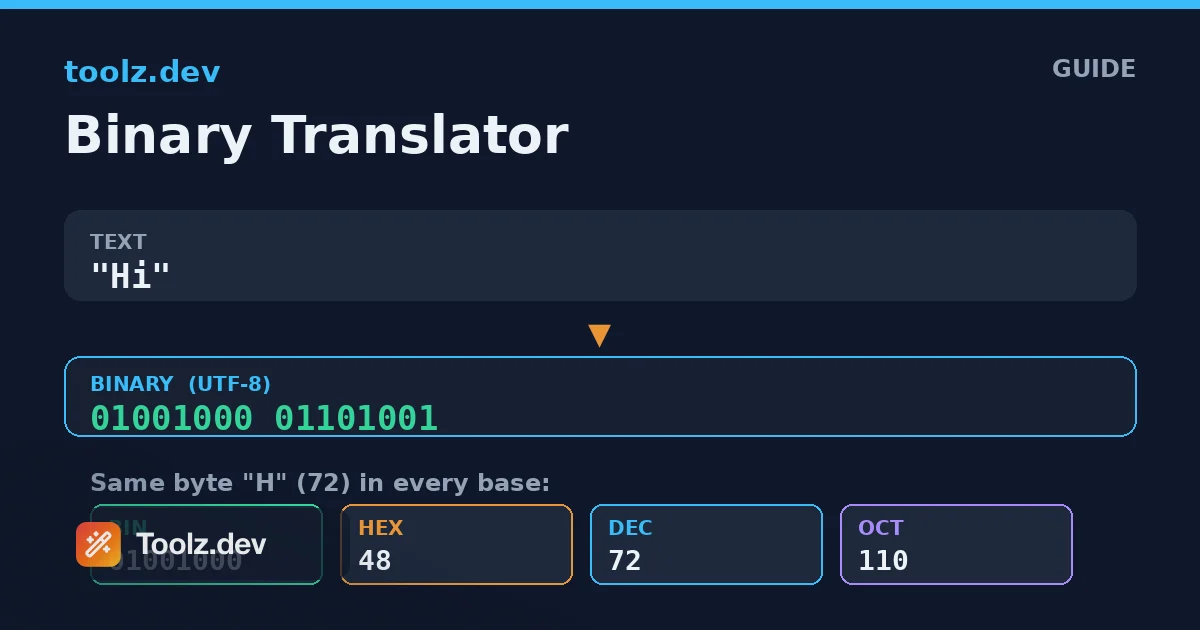
A binary translator is a converter between human-readable text and the numeric representation a computer uses to store that text. Every character you type is stored as one or more bytes - numbers from 0 to 255 - and each byte can be written in binary (base 2), hexadecimal (base 16), decimal (base 10), or octal (base 8). Translating "Hi" to binary gives 01001000 01101001; the two groups of eight bits are the two bytes for "H" and "i".
The word "translate" is doing real work here, because there is a translation table involved. A byte value of 72 does not inherently mean the letter "H" - it means "H" only because a character encoding says so. For the basic English letters, digits, and common punctuation, that mapping is ASCII, a standard from the 1960s that assigns 128 characters to the values 0 through 127. ASCII is why "H" is 72 and a space is 32, and it is the part of binary conversion that everyone gets right.
The problems start above value 127. The world types far more than 128 distinct characters, and the encoding that handles the rest - the one your browser, your database, and your JSON almost certainly use - is UTF-8. A good binary translator is really a UTF-8 codec with a base-conversion layer on top. The Binary Translator is built exactly that way, which is why it can round-trip a string containing an emoji and hand you back the identical character.
How does converting text to binary actually work?
Turning text into binary is a two-stage pipeline, and understanding the stages explains everything the tool does. The first stage is encoding the characters into bytes, and the second is writing each byte in your chosen base.
Encoding is where UTF-8 lives. UTF-8 is a variable-length encoding: a character takes one byte if it is a plain ASCII character, two bytes for most Latin-accented letters and many symbols, three bytes for the bulk of the world's scripts including Chinese, Japanese, and Korean, and four bytes for less common characters and emoji. So "A" is one byte, "é" is two, "中" is three, and a face emoji is four. The encoder walks through the string, and for characters outside the basic range it produces the correct multi-byte sequence, complete with the leading bits that mark how many bytes follow.
The second stage is pure arithmetic. Once you have a list of byte values, writing them in binary means expressing each number from 0 to 255 as eight bits, zero-padded so every byte is the same width. Hexadecimal writes each byte as exactly two characters (00 to ff), which is why hex is the compact favorite for viewing raw data. Octal uses three digits per byte, and decimal just shows the plain number. The Binary Translator lets you flip between all four bases instantly because the underlying bytes are the same - only the display format changes.
How does the translator decode binary back to text?
Decoding reverses the pipeline, and it is the direction where most tools quietly fail. First the tool has to read your input into byte values, then it has to decode those bytes as UTF-8 back into characters.
Reading the input means tokenizing. If you paste binary with spaces between the bytes, each group is one byte. If you paste one long continuous run of bits, the tool groups them into eights - which only works if the total length is a multiple of eight, so an odd length is flagged rather than silently misread. The same logic applies to hex: two characters per byte, so an odd number of hex digits is an error. Commas, spaces, tabs, and line breaks all work as separators, so you can paste whatever format you copied from without reformatting it first.
The second stage rebuilds characters from bytes, and this is where UTF-8's structure matters. A byte in the 0-127 range is a standalone character. A byte with a specific high-bit pattern signals the start of a two-, three-, or four-byte sequence, and the bytes that follow must have their own continuation pattern. If they do not - because a byte is missing, or the sequence was cut off, or the data was never valid UTF-8 to begin with - the Binary Translator reports that the byte sequence is not valid text rather than emitting replacement characters or garbage. That honesty is the point: when a decode fails, you want to know the data is wrong, not stare at mojibake wondering whether the tool broke.
Binary, hex, decimal, or octal - which should I use?
They all represent the same bytes, so the choice is about who is reading and what they are used to. Each base has a niche where it is the natural fit.
| Base | Digits per byte | Best for | Example for "H" (72) |
|---|---|---|---|
| Binary (2) | 8 | Learning, bit-level work, showing exact structure | 01001000 |
| Hexadecimal (16) | 2 | Viewing raw data, debugging, color and byte dumps | 48 |
| Decimal (10) | 1–3 | Human-friendly byte values, quick reference | 72 |
| Octal (8) | 3 | Unix file permissions, some legacy systems | 110 |
Binary is the most explicit and the best for teaching, because you can see every bit, but it is verbose - eight characters per byte adds up fast. Hexadecimal is what you will actually use most in practice: it is compact, it maps cleanly to bytes at two characters each, and it is the format hex editors, memory dumps, and color codes all speak. Decimal is handy when you just want to know a character's numeric value. Octal is a niche holdover, most familiar from Unix permission bits like 755, and it is here mainly so the tool is complete. The Binary Translator switches between all four without you re-entering anything, so you can compare representations side by side.
Why does UTF-8 matter so much for binary conversion?
Because "text to binary" is meaningless until you decide what encoding you are converting through, and for the modern web that answer is almost always UTF-8. A tool that only handles ASCII will appear to work - it will happily convert English text - and then betray you the moment real-world data shows up.
Consider the accented "é". In UTF-8 it is two bytes, 11000011 10101001, or c3 a9 in hex. A tool that treats every character as a single ASCII byte cannot represent it at all; at best it drops the character, at worst it produces one wrong byte. Now consider an emoji, which is four bytes in UTF-8. Naive tools mangle these completely. Because the Binary Translator is a real UTF-8 codec, "café" produces the correct five bytes, and pasting those five bytes back returns "café" exactly.
This is not academic. Anyone touching internationalized content, user-generated data, or anything with an emoji will hit multi-byte characters immediately. If you want the deeper background, the Base64 encoding guide covers the same byte-level thinking for a related encoding, and understanding one makes the other click. The short version: bytes are universal, but the mapping between bytes and characters is a choice, and UTF-8 is the choice the web made.
Common use cases where a binary translator earns its keep
Learning and teaching how computers store text
The most common reason people search for a binary translator is to understand the concept. Typing your name and watching it become bytes makes the abstraction concrete in a way a lecture cannot. Because the tool shows the exact eight-bit groups and lets you switch to hex and decimal, it doubles as a teaching aid for how encoding and number bases relate. Students can see that "A" is 65, 01000001, and 41 in hex all at once.
Debugging encoding problems
This is where I reach for it. When a string is corrupted - the classic "é shows up as é" mojibake - the fastest way to diagnose it is to look at the bytes. Encoding the broken string reveals whether the data was double-encoded, truncated mid-character, or mangled by a system that assumed the wrong encoding. Seeing the raw bytes turns a vague "the characters are wrong" into a specific, fixable diagnosis.
Working with low-level formats and protocols
Plenty of technical work involves reading bytes directly: network packets, file headers, binary protocols, and embedded systems all speak in hex and binary. Being able to quickly turn a snippet of text into its byte representation, or decode a captured hex string back into readable text, saves constant context-switching. The hex view in particular lines up with what hex editors and debuggers show.
Puzzles, CTFs, and hidden messages
Binary and hex are a staple of capture-the-flag competitions, escape rooms, and geeky puzzles. A string of ones and zeros is a common way to hide a short message, and being able to paste it and decode it - in any of the four bases, with continuous or spaced input - makes short work of these. The clear error messages help when the puzzle input has a typo or an unexpected separator.
Why convert in the browser instead of on a server?
The Binary Translator runs entirely client-side. The text you encode and the byte strings you decode never leave your machine, and the tool keeps working with your connection off once the page has loaded. That matters more than it first appears: the strings people convert are often tokens, internal identifiers, snippets of user data, or captured protocol bytes - exactly the kind of thing you should not paste into a random server. In-browser processing means there is no server to paste into. The data privacy in online tools guide makes the fuller case for insisting on this.
Binary conversion also sits alongside a cluster of related encoding tasks. The Base64 Encoder/Decoder handles the encoding used to move binary through text-only channels like email and data URLs. The URL Encoder/Decoder covers percent-encoding for query strings. And the Hash Generator turns text into fixed-length digests when you need a fingerprint rather than a reversible representation. For the broader kit I keep open while building, the web developer toolkit roundup is a good starting point.
FAQ
How do I convert text to binary?
Open the Binary Translator, choose "Text to Binary", keep the base set to Binary, and type your text. Each character is encoded to its UTF-8 byte value and shown as 8-bit groups, so "A" becomes 01000001. The output updates as you type and can be copied with one click, and you can switch to hex, decimal, or octal without re-entering anything.
How do I convert binary back to text?
Select "Binary to Text" and paste your binary. You can separate bytes with spaces, commas, or line breaks, or paste one continuous run of bits as long as the total length is a multiple of eight. The tool groups the bits into bytes and decodes them as UTF-8 to rebuild the original characters, and it reports an error if the length is wrong or a character is not valid.
What character encoding does the binary translator use?
It uses UTF-8, the encoding used by the modern web and most programming languages. ASCII characters take one byte, most accented letters take two, and many scripts and all emoji take three or four bytes. This means the tool correctly handles far more than plain English, unlike simple tools that only map the 128 ASCII characters.
Can it convert to hexadecimal, decimal, and octal too?
Yes. A base selector switches the output between binary, hexadecimal, decimal, and octal, and decoding accepts any of those bases as input. Hexadecimal shows two characters per byte, octal three digits, decimal the plain 0 to 255 value, and binary the full eight bits. All four represent the same underlying bytes.
Why won't my binary decode?
The two most common reasons are a bit length that is not a multiple of eight and stray characters that are not valid for the chosen base. The tool tells you exactly which token is invalid or that the length is wrong, so you can fix it. A byte sequence that is not valid UTF-8 - for example a multi-byte character that was cut off - is also flagged rather than decoded into garbage.
Does the binary translator support emoji and non-English text?
Yes. Because it encodes through UTF-8, characters outside the ASCII range are represented as the correct sequence of two, three, or four bytes, and decoding reassembles them into the original character. An emoji becomes four bytes and round-trips back to the same emoji, and Chinese, Arabic, or accented Latin text works the same way.
Is it safe to convert sensitive text here?
Yes. Every conversion runs in JavaScript inside your browser, so nothing you enter is uploaded, logged, or stored, and the tool keeps working with no internet connection once loaded. You can safely convert tokens, internal identifiers, or private messages without them leaving your device.
What is the difference between ASCII and UTF-8 in this tool?
ASCII is a 7-bit set covering 128 English characters, while UTF-8 is a variable-length encoding that includes all of ASCII plus every other Unicode character. Because UTF-8 is a superset of ASCII, English text produces exactly the bytes an ASCII table would predict, while accented letters, other scripts, and emoji get the correct multi-byte sequences that ASCII simply cannot represent.