The bug that taught me to stop diffing JSON as text cost me most of a weekend. A payment webhook on a Laravel SaaS I run started failing silently after a provider "non-breaking" API update - their words, from the changelog. I pulled a payload from before the update out of our logs, grabbed a fresh one, and threw both into a regular text diff. Every line lit up. The provider had switched their serializer, which reordered every key alphabetically and changed the indentation from four spaces to two. Six hundred changed lines, and somewhere in there, one real difference. I read that diff top to bottom twice before I found it: amount had changed from the number 1099 to the string "1099". Same characters on screen. Different type. Our strict comparison rejected it, the queue retried it into the ground, and the text diff had buried the one meaningful change under 599 cosmetic ones.
That's the fundamental problem: JSON is a data format, but a text diff treats it as prose. Key order, whitespace, indentation, trailing newlines - none of it means anything to a JSON parser, and all of it shows up as changes in a line-based comparison. Per RFC 8259, a JSON object is an unordered collection of name/value pairs. Two documents can be byte-for-byte different and semantically identical. A tool that compares JSON line-by-line is answering the wrong question.
A JSON diff tool answers the right one. It parses both documents into trees and compares the values: this key was added, that key was removed, this value changed from X to Y, and - the one that saved my weekend, had it existed in my browser tab then - this value changed type. When I built the diff checker for toolz.dev, type-change detection was the first feature on the list, because it's the class of change that text diffs are structurally incapable of surfacing and that breaks real systems most often.
This guide covers how structural comparison works, when array order should and shouldn't matter, and the debugging workflows - API regressions, config drift, package-manifest audits - where a JSON diff pays for itself weekly.
TL;DR: Paste two JSON documents into the toolz.dev JSON Diff Checker and get a structural comparison: added, removed, and changed keys with exact paths like
features.rateLimitorusers[3].email- plus separate flagging when a value changes type (the3000→"3000"bug). Key order and formatting never produce false positives. Everything runs in your browser; nothing is uploaded. Pair it with the JSON Formatter to clean documents first and the Text Diff tool for content where lines actually matter.
What Does It Mean to Diff JSON Structurally?
A structural diff parses both documents into their actual data trees and walks them together, key by key, element by element. At every node it asks: does this key exist on both sides? Are the values the same type? Are they equal? The output isn't "line 14 changed" - it's a list of facts about your data:
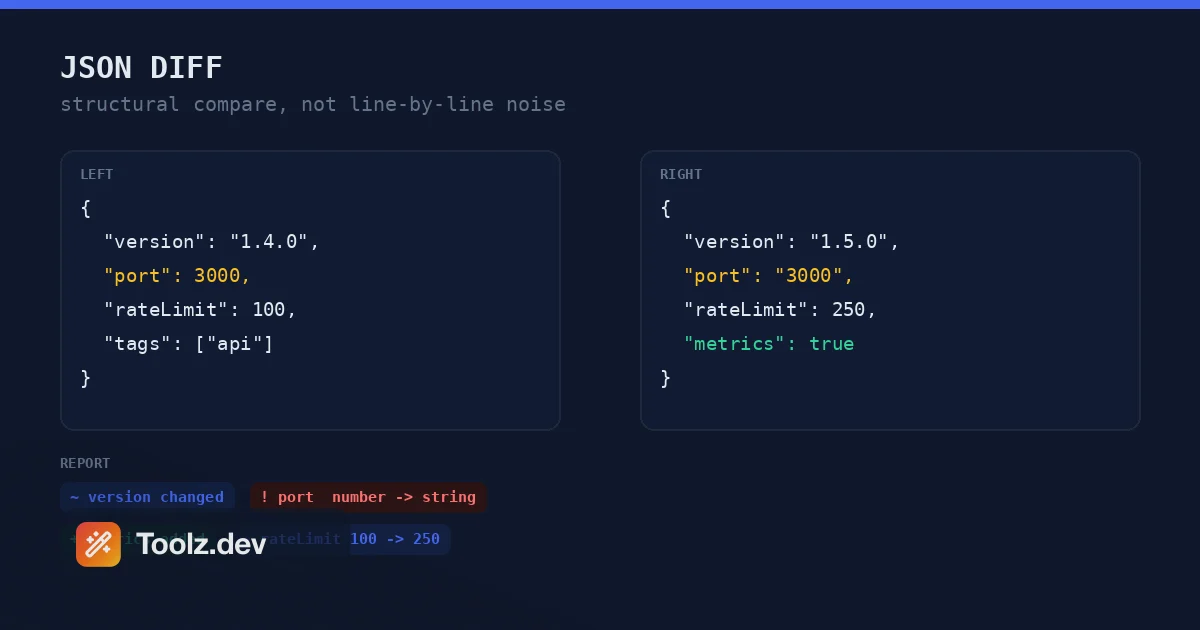
versionchanged from"1.4.0"to"1.5.0"features.metricswas added with valuetrueportchanged type from number to stringtags[2]was added with value"monitored"
Each difference carries its full JSON path, so in a deeply nested document you know exactly where to look. users[12].address.postalCode tells you which user, which field, no scrolling required.
The contrast with a text diff is starkest on real-world documents. Take a package.json regenerated by a different npm version, an API response after the backend team upgraded their serializer, or a config file run through a formatter. Text diff: hundreds of changed lines. Structural diff: the three changes that actually happened, or the honest answer that there are none - "structurally identical" - which is itself valuable. Confirming that a risky refactor produced zero data changes is half the reason I reach for this tool.
There's a place for line diffs, to be clear. Prose, code, HTML, anything where physical layout carries meaning - that's text diff territory. But JSON's layout carries no meaning by specification, and a comparison that pretends otherwise is generating noise you then have to filter with your eyes.
Why Do Type Changes Deserve Their Own Category?
Because they're invisible in every other view of the data, and they break things in ways that are miserable to debug.
1099 and "1099" render identically in a log file, a terminal, and most text diffs - the quotes are easy to miss at 2 AM. But to any typed consumer they are different values. JavaScript's === rejects the comparison. A JSON Schema declaring "type": "integer" fails validation. A Go service unmarshalling into an int64 returns an error; a strict Jackson deserializer in Java throws. PHP is famously forgiving with loose comparison, but the moment you enable strict types - which every modern Laravel codebase should - "1099" stops being money and starts being an exception.
The nastiest part is where these changes come from. Almost never from a developer deliberately editing a value. They come from serializer swaps, ORM upgrades, a database column migrating from INT to VARCHAR, a caching layer that stringifies numbers, or a well-meaning API gateway "normalizing" payloads. Nobody writes a changelog entry for them because nobody knows they happened.
So the JSON Diff Checker reports type changes as their own category - ! in the copyable report, distinct from ordinary value changes - with the old and new types spelled out. When you're staring at a summary that says 0 added, 0 removed, 0 changed, 1 type changed, you know precisely what kind of bug you're hunting before you've read a single path.
How Do You Compare Two JSON Files With the Tool?
Step 1: Paste Both Documents
Original (or known-good) JSON goes in the left panel, updated (or suspect) JSON in the right. The convention matters only for reading the output: "added" means present on the right but not the left, "removed" means the reverse. If you're comparing a working environment against a broken one, put working on the left and the diff reads as "what broke changed."
There's a Load Sample button that populates both panels with a small service config exercising every difference type - value change, addition, type change, array growth - which is the fastest way to learn how the output reads.
Step 2: Decide Whether Array Order Matters
This is the one option you need to think about, and the right answer depends on what your arrays mean- more on that below. Default is order-sensitive, which matches the JSON specification. Tick "Ignore array order" when your arrays are semantically sets.
Step 3: Compare
Both documents are validated before anything is compared. If either side has a syntax error - trailing comma, single quotes, an unquoted key, the usual suspects - you get the parser's exact message and, crucially, which side it came from. No silent failure, no comparing half-parsed garbage. If you're not sure your JSON is even valid, run it through the JSON Formatter first; it validates and pretty-prints in one step.
Step 4: Read the Summary, Then the Table
The summary line gives you counts by category - added, removed, changed, type changed - which is often all you need. "47 added, 0 removed, 0 changed" after an API version bump means new fields only: safe. "0 added, 3 removed" means fields your consumers might depend on just vanished: not safe. The table below lists every difference with its path, old value, and new value, truncated for readability on long values.
Step 5: Copy the Report
The Copy Report button produces a plain-text summary with + / - / ~ / ! markers and full paths - designed to paste directly into a pull request comment, a Slack incident thread, or a ticket. "Here's exactly what changed between staging and production config" with receipts, in one click.
When Should You Ignore Array Order?
JSON arrays are ordered by specification - [1, 2] and [2, 1] are different documents, and the default comparison respects that. But the specification describes the container, not your intent, and in practice arrays get used two different ways:
Arrays as sequences, where position is meaning: middleware chains that execute in order, migration lists, sorted leaderboards, paginated results. Reordering these is a real change - a middleware stack that runs auth after handle is a different (and probably broken) application. Keep order-sensitivity on.
Arrays as sets, where position is accident: tag lists, role assignments, feature flags, IDs returned by a database query with no ORDER BY. Postgres is entirely within its rights to return the same rows in a different order on different runs, and if your diff lights up because of it, that's noise. This is what the "Ignore array order" option is for - elements are matched regardless of position, so ["admin", "editor"] equals ["editor", "admin"].
My rule of thumb from years of comparing API payloads: if the backend applies an explicit sort, treat the array as a sequence; if it doesn't, it's a set whether the authors realized it or not, and order-insensitive comparison tells you the truth about the data.
Structural Diff vs Text Diff vs Manual Inspection
| Structural JSON Diff | Text/Line Diff | Eyeballing It | |
|---|---|---|---|
| Reordered keys | No difference reported | Every moved line flagged | Easy to miss changes |
| Reformatted whitespace | No difference reported | Everything flagged | N/A |
Type change (1 → "1") |
Flagged as type change | Two characters in a sea of lines | Nearly invisible |
| Nested change location | Exact path: a.b[2].c |
Line number in formatted text | Manual traversal |
| Array reorder (intentional) | Flagged (or ignored, your choice) | Flagged | Depends on array size |
| Best for | JSON, API payloads, configs | Code, prose, markup | Two-line documents |
| Failure mode | None on valid JSON | False positives bury real changes | Human fatigue |
The honest summary: text diffs aren't wrong, they're answering a different question - "did the bytes change?" For JSON you almost always want "did the data change?", and those questions have different answers surprisingly often.
What Are the Real-World Workflows for a JSON Diff?
Debugging API Regressions
The workflow from my webhook story, now systematized: capture a payload from before the change (logs, a recorded fixture, your test suite's snapshot) and one from after. Left panel, right panel, Compare. The diff tells you in seconds what the provider's changelog didn't - which fields moved, which changed type, which quietly disappeared. I do this every time a third-party API announces a version bump, before the old version sunsets, and file the report in the upgrade ticket.
Catching Config Drift
Staging works, production doesn't, and both were "deployed from the same config." Were they? Export both - environment JSON, a docker inspect output, a Kubernetes ConfigMap dumped with -o json- and diff them. Config drift is nearly always one or two keys, and the path column takes you straight there. This beats diff <(jq -S . a.json) <(jq -S . b.json) in a terminal because it also catches type changes, which jq-normalized text diffs render nearly invisibly.
Reviewing Lockfile and Manifest Changes
A package.json or composer.json that got mangled by conflicting merges, or a generated OpenAPI spec after a framework upgrade: structural diff shows you the dependency changes without the noise of the regenerated formatting. For WordPress plugin work - WP Adminify ships settings as JSON - I diff the exported settings schema between releases to make sure a refactor didn't drop a key that thousands of installs depend on. An accidental removal shows up as a - line; in a text diff of a 4,000-line settings export it shows up as nothing at all.
Verifying Data Migrations
Before: export a representative record as JSON. After the migration: export it again. The diff should show exactly the changes the migration intended and nothing else. "Structurally identical" on a record that shouldn't have been touched is the cheapest regression test you'll ever run. This pairs well with converting tabular exports through CSV to JSON when the data comes out of the database as CSV.
Comparing Environment Responses
Hit the same endpoint in two environments, diff the responses. Fields present in dev but missing in production usually mean a feature flag, a stale deployment, or an environment variable that never got set. The summary counts alone often diagnose it.
Why Does Client-Side Processing Matter More for This Tool Than Most?
Think about what you paste into a JSON diff: API responses with customer emails, config files with internal hostnames, webhook payloads with payment metadata, database exports. This is exactly the data that must not leak, pasted at exactly the moment - mid-incident - when nobody is auditing which online tool just received it.
The toolz.dev diff checker parses and compares entirely in your browser. No request carries your documents anywhere; the tool works offline once the page has loaded, which you can verify by cutting your network and comparing again. This isn't a premium feature or a policy promise that could change - it's the architecture. The comparison logic is pure JavaScript operating on two parsed trees in memory. There is no server component to send data to.
The same privacy argument applies across the whole toolbox - it's the reason the developer toolkit on toolz.dev is built browser-first - but diff tools are where it's most acute, because comparing two production documents doubles the exposure of pasting one.
How Big a Document Can You Compare?
The comparison visits every node in both trees once, so the work scales linearly with document size. In practice: documents in the hundreds of kilobytes compare instantly; low single-digit megabytes complete in well under a second on anything resembling a modern laptop; tens of megabytes will work but you'll feel it, since the browser has to parse both documents and hold both trees in memory simultaneously.
Two practical tips for very large payloads. First, if you only care about part of the document, compare just that subtree - paste response.data.items from both sides rather than the full envelope. Second, if the diff produces thousands of entries, that's usually a sign one side is a different shape (an array wrapped in an object, an extra nesting level) - check the first few paths before scrolling; they'll tell you whether you're looking at one structural change cascading or thousands of genuine ones.
FAQ
How do I compare two JSON files online?
Open the JSON Diff Checker, paste one document into the left panel and the other into the right, and click Compare. You get a categorized list of every added, removed, changed, and type-changed value with its exact JSON path. Both documents are processed entirely in your browser - nothing is uploaded to any server.
Why does a text diff show so many changes when my JSON data is the same?
Because text diffs compare lines, and JSON allows the same data to be written many ways. Reordered keys, different indentation, and whitespace all change the text without changing the data. A structural diff parses both documents first and compares actual values, so formatting differences produce zero reported changes.
Does the order of keys in a JSON object matter?
No. RFC 8259 defines a JSON object as an unordered collection of name/value pairs, so {"a":1,"b":2} and {"b":2,"a":1} are the same object. The diff checker compares objects by key name and never reports reordering as a change. Array element order, by contrast, is significant by default - arrays are ordered in the specification.
When should I use the "Ignore array order" option?
Use it when your arrays are semantically sets rather than sequences - tag lists, role collections, IDs from an unsorted database query. With the option on, [1,2,3] and [3,1,2] compare as equal. Leave it off when position carries meaning, like ordered middleware chains, ranked results, or paginated lists.
What is a type change and why is it flagged separately?
A type change is when a value's JSON type differs between documents even if it looks similar - the number 3000 becoming the string "3000" is the classic case. It's flagged separately because it breaks strict-typed consumers, schema validation, and strict equality checks while being nearly invisible in text diffs and logs. It's one of the most common causes of API integration regressions.
Can I share the comparison result with my team?
Yes. The Copy Report button generates a plain-text diff report with + (added), - (removed), ~ (changed), and ! (type changed) markers and full JSON paths for every difference. It's formatted to paste cleanly into pull request comments, Slack threads, and issue trackers.
Is it safe to paste production API responses into the tool?
Yes. Parsing and comparison run entirely in JavaScript in your browser - no network request is made with your data, nothing is logged or stored, and the tool keeps working offline. That makes it safe for payloads containing customer data, internal hostnames, or credentials, though redacting secrets before sharing the report is still on you.
What happens if one of my documents isn't valid JSON?
The tool validates both sides before comparing and reports the parser's exact error message along with which side it came from - left or right. Common culprits are trailing commas, single quotes instead of double, and unquoted keys. Fix the reported issue, or run the document through the JSON Formatter to locate the problem, then compare again.
Structural comparison is one of those tools that changes which bugs you can even see. Text diffs answer "did the bytes change?"; for JSON, the question that matters is "did the data change?" - and for the API payloads, configs, and manifests that run your systems, the JSON Diff Checker answers it in seconds, in your browser, with your data never leaving your machine. More JSON workflows - formatting, validation, conversion - live in the coding tools guide.