The first time a percentage bug cost me real money, I was reconciling affiliate payouts for a plugin launch. A commission tier was set at "15% after a 20% platform cut," and I did what most people do under time pressure: I chained the percentages in my head, trusted the number, and moved on. It was wrong by enough that a partner noticed before I did. That is the thing about percentages - the arithmetic is trivial, but the direction of the calculation is where everyone slips. Is this number a share of a total, or a change from a starting point? Multiply or divide? Compare against the old value or the new one?
I build developer tools for a living - toolz.dev, the WP Adminify plugin, a stack of Laravel and React apps - and I still keep a percentage calculator one tab away, because the cost of a silent mistake is always higher than the two seconds it takes to check. This guide explains how each type of percentage calculation actually works, when to use which, and how to stop guessing. The Percentage Calculator on toolz.dev handles all three common cases and shows you the formula it used, so you are never trusting a black box.
TL;DR: There are three percentage questions you will ever really need. "What is X% of Y" multiplies a percent by a total (tips, discounts, tax). "X is what percent of Y" divides a part by a whole (scores, completion rates, market share). "Percentage change" compares a new value against the original (growth, price moves, deltas). Pick the right one, and the math is foolproof. The Percentage Calculator does each in-browser and prints the working so you can verify it.
Why do percentages trip up so many people?
A percentage is just a fraction with a fixed denominator of 100. "45 percent" means 45 per 100, or 0.45. That part is simple, and it is not where mistakes happen. Mistakes happen because the word "percent" gets attached to three completely different operations, and English does not make the difference obvious.
When a shop says "20% off," you multiply. When a teacher says "you got 18 out of 24," you divide to find the percentage. When an analyst says "revenue is up 30%," you are comparing two numbers against the first one. Same word, three different formulas. Under deadline pressure, the brain grabs whichever formula it used most recently, and that is how a discount gets calculated as a growth rate.
The second trap is compounding, or rather the false assumption that percentages add and subtract cleanly. A 20% cut followed by a 15% cut is not a 35% cut. A price that drops 50% and then rises 50% does not return to where it started - it ends up 25% lower. Percentages are multiplicative, and treating them as additive is the single most common percentage error in spreadsheets and invoices. Once you see each calculation as an explicit multiply or divide against a specific base, these traps disappear.
How do I find X percent of a number?
This is the "what is 15% of 80" question, and it is the one you use for tips, discounts, sales tax, VAT, interest, and commission. The formula is:
(percentage ÷ 100) × total
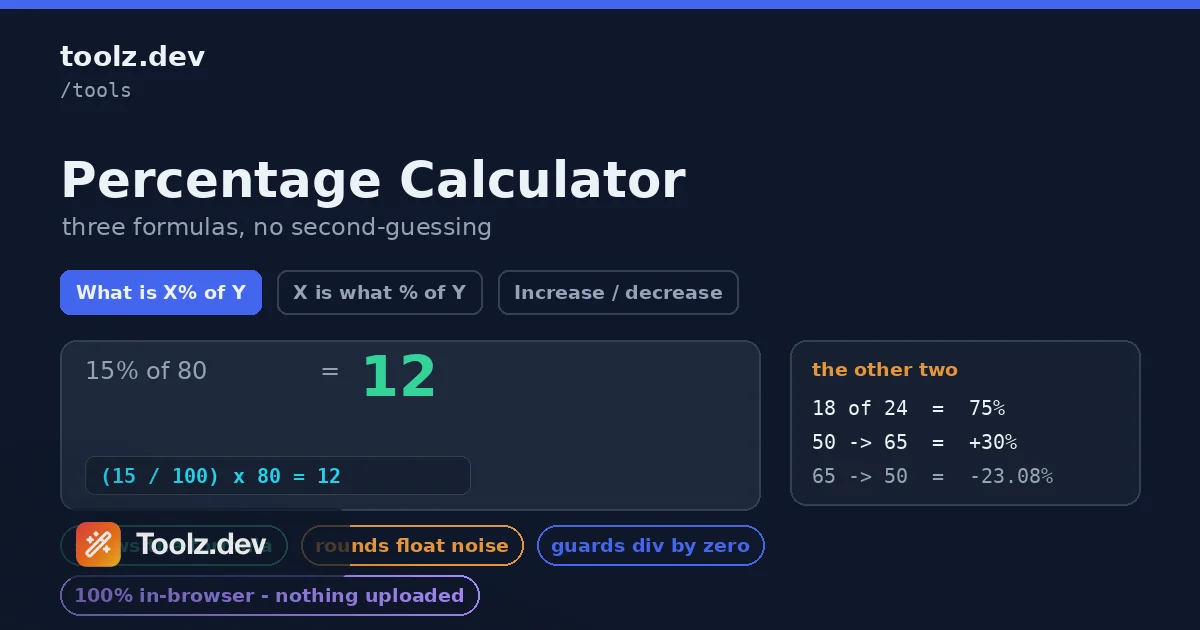
So 15% of 80 is (15 ÷ 100) × 80 = 0.15 × 80 = 12. If you are adding a 15% tip to an 80-dollar bill, the tip is 12 and the total is 92. If you are taking 15% off an 80-dollar item, you subtract: 80 − 12 = 68.
The mental shortcut worth memorizing: 10% of any number is that number with the decimal point moved one place left. 10% of 80 is 8. From there you can build almost anything - 5% is half of that (4), 20% is double (16), 15% is 10% plus 5% (8 + 4 = 12). This is genuinely useful at a restaurant or when you want a fast sanity check on a calculator result. But for anything that ends up in a document or an invoice, run the exact number.
In the Percentage Calculator, you select "What is X% of Y," type the percentage in the first field and the total in the second, and the answer appears with the formula spelled out. Because the working is visible, you can catch an input mistake - like typing 150 instead of 15 - immediately, instead of discovering it after you have already sent the number to someone.
How do I calculate what percent one number is of another?
This is the "18 out of 24 is what percent" question. You use it for test scores, task completion, conversion rates, market share, storage usage, and any time you have a part and a whole and want the ratio as a percentage. The formula is:
(part ÷ whole) × 100
So 18 out of 24 is (18 ÷ 24) × 100 = 0.75 × 100 = 75%. A conversion rate of 42 signups from 1,400 visitors is (42 ÷ 1400) × 100 = 3%. Your test suite passing method 190 of 200 assertions is 95%.
The one rule that keeps this correct: the whole goes on the bottom. The number after "of" is almost always the denominator. "18 out of 24" - 24 is the whole. "42 signups from 1,400 visitors" - 1,400 is the whole. If you flip them, you get a number over 100% when the part is smaller than the whole, which is your signal that the inputs are reversed. The calculator's "X is what % of Y" mode labels the fields so the whole is unambiguous, and it guards against dividing by zero, because "what percent of zero" has no meaningful answer.
How does percentage increase and decrease work?
This is the growth question - the one people get wrong most often, because it involves a subtraction and a choice of base. The formula is:
((new − old) ÷ old) × 100
Going from 50 to 65 is ((65 − 50) ÷ 50) × 100 = (15 ÷ 50) × 100 = 30% increase. Going from 65 to 50 is ((50 − 65) ÷ 65) × 100 = −23.08%, a decrease. Notice that the same absolute gap of 15 produces different percentages depending on which number is the starting point, because the base changes. This asymmetry is why a 50% loss needs a 100% gain to recover, not another 50%.
The critical detail is that you always divide by the old value, not the new one and not the difference. The old value is your baseline - the thing you are measuring change relative to. Getting the base wrong is the number one reason growth figures in reports look off. The Percentage Calculator handles this in "Increase / decrease" mode: you enter the original value and the new value, and it computes the change, labels it as an increase or decrease, and shows the formula with the correct base so there is no ambiguity about which number it divided by.
There is also a vocabulary trap here worth naming. "Percentage change" and "percentage points" are not the same. If a conversion rate moves from 4% to 6%, that is a rise of 2 percentage points, but it is a 50% percentage increase (2 is half of 4). Mixing these up makes a modest change sound dramatic or vice versa. When you report a change between two percentages, be explicit about which one you mean.
Which calculation do I actually need?
Here is the decision table I wish someone had handed me years ago. Match the phrasing of your problem to the mode.
| You're asked… | Example | Mode | Formula |
|---|---|---|---|
| Find a portion of a total | "15% tip on $80" | What is X% of Y | (X ÷ 100) × Y |
| Add or subtract a percent | "20% off $50" | What is X% of Y, then ± | total ∓ (X% of total) |
| Express a part as a percent | "18 of 24 tasks done" | X is what % of Y | (X ÷ Y) × 100 |
| Compare against a baseline | "revenue 50 → 65" | Increase / decrease | ((Y − X) ÷ X) × 100 |
| Difference between two percents | "4% to 6% rate" | subtract directly | Y − X = points |
If you can phrase your problem in one of the first four rows, one of the calculator's three modes covers it. The fifth row - percentage points - is a plain subtraction you do not even need a tool for, but it is included because confusing it with percentage change is so common.
Common real-world use cases
Discounts, tax, and tips
Retail math is all "X% of Y." A 25%-off sale on a 120-dollar item is 0.25 × 120 = 30 off, so you pay 90. Sales tax works the same way in reverse - add it on. When a price already includes tax and you need to extract it, that becomes a division problem: a 108-dollar price that includes 8% tax means the pre-tax amount is 108 ÷ 1.08 = 100. That last one catches people, because the instinct is to take 8% of 108, which overshoots. The pre-tax base is smaller than the tax-inclusive total, so you divide.
Project and test metrics
As a developer, most of my percentages are ratios. Code coverage is lines-covered over lines-total. Sprint completion is points-done over points-committed. Error rate is failed-requests over total-requests. All of these are the "X is what percent of Y" pattern, and all of them want the total on the bottom. When I wire up a dashboard for one of my apps, I sanity-check the first few computed percentages against the Percentage Calculator to make sure I have not inverted a ratio in the query.
Growth, churn, and price moves
Anything that changes over time is a percentage-change problem: month-over-month revenue, user churn, ad spend, a stock's daily move. The baseline is always the earlier value. Churn from 1,000 users where 40 leave is a 4% churn rate (a ratio), but if last month's churn was 3% and this month's is 4%, describing that as "churn rose 33%" (a change) versus "churn rose 1 point" tells two very different stories from the same data. Be deliberate about which one you report.
Freelance and agency billing
When I invoice, percentages show up as retainers, deposits, and platform fees. A 30% upfront deposit on a 4,000-dollar project is 1,200. A platform that takes 5% of a 4,000-dollar payout leaves 3,800. Stacking them - a deposit calculated on the post-fee amount versus the gross - is exactly the kind of ordering question where writing the calculation down, rather than doing it in your head, prevents an awkward correction later.
Why compute percentages in the browser?
Every calculation in the toolz.dev Percentage Calculator runs client-side in plain JavaScript. Nothing you type is uploaded, logged, or stored, and the page keeps working with no network connection once it has loaded. That matters more than it sounds when the numbers are a client's revenue, an unannounced price, or a payout you are reconciling - data you would rather not paste into a random server-side calculator whose privacy policy you have not read.
There is also a precision reason. Naive JavaScript arithmetic produces artifacts like 0.1 + 0.2 = 0.30000000000000004, and percentage math involves exactly the kind of division and multiplication that surfaces those tails. The calculator rounds results to a sensible number of decimals and formats them with thousands separators, so you get 12.5% instead of 12.499999999999998%. For a deeper look at why in-browser tools are worth preferring, the data privacy in online tools guide covers the tradeoffs, and the broader web developer toolkit roundup puts the calculator in context with the rest of the utilities I reach for daily.
If your work involves dates as well as numbers - proration, billing periods, deadline math - the Date Difference Calculator pairs naturally with this one, and the Word Counter rounds out the everyday toolkit for anyone writing as much as they calculate.
FAQ
How do I calculate what percent one number is of another?
Divide the part by the whole and multiply by 100. For example, 25 out of 200 is (25 ÷ 200) × 100 = 12.5%. Select the "X is what % of Y" mode, enter 25 and 200, and the calculator returns 12.5% instantly.
How do I find X percent of a number?
Divide the percentage by 100 and multiply by the total. For example, 15% of 80 is (15 ÷ 100) × 80 = 12. Use the "What is X% of Y" mode, enter 15 as the percentage and 80 as the total, and you get 12.
How is percentage increase or decrease calculated?
Subtract the original value from the new value, divide by the original, and multiply by 100. Going from 50 to 65 is ((65 − 50) ÷ 50) × 100 = 30% increase. A negative result means a decrease. The tool labels the direction for you.
What is the difference between percentage change and percentage points?
Percentage change measures relative change against the starting value, while percentage points measure the absolute gap between two percentages. Moving from 10% to 15% is a 5 percentage-point rise but a 50% percentage increase. This calculator computes percentage change; the point difference is simply the subtraction of the two percentages.
How does it handle dividing by zero?
If a calculation would divide by zero - such as asking what percent a number is of zero, or the change from a starting value of zero - the tool returns a clear message instead of Infinity or NaN. Percentage change from zero is mathematically undefined because there is no baseline to compare against.
Is the percentage calculator accurate for money and taxes?
Yes. Results are rounded to four decimal places, which is more than enough precision for currency, tips, discounts, VAT, and sales tax. For final billing, round the displayed answer to two decimals to match standard currency formatting.
Does my data stay private?
Yes. The calculator runs 100% in your browser using plain JavaScript. No numbers are transmitted, logged, or stored, and the tool continues to work with no internet connection once the page has loaded.