What is the HTML to Markdown Converter?
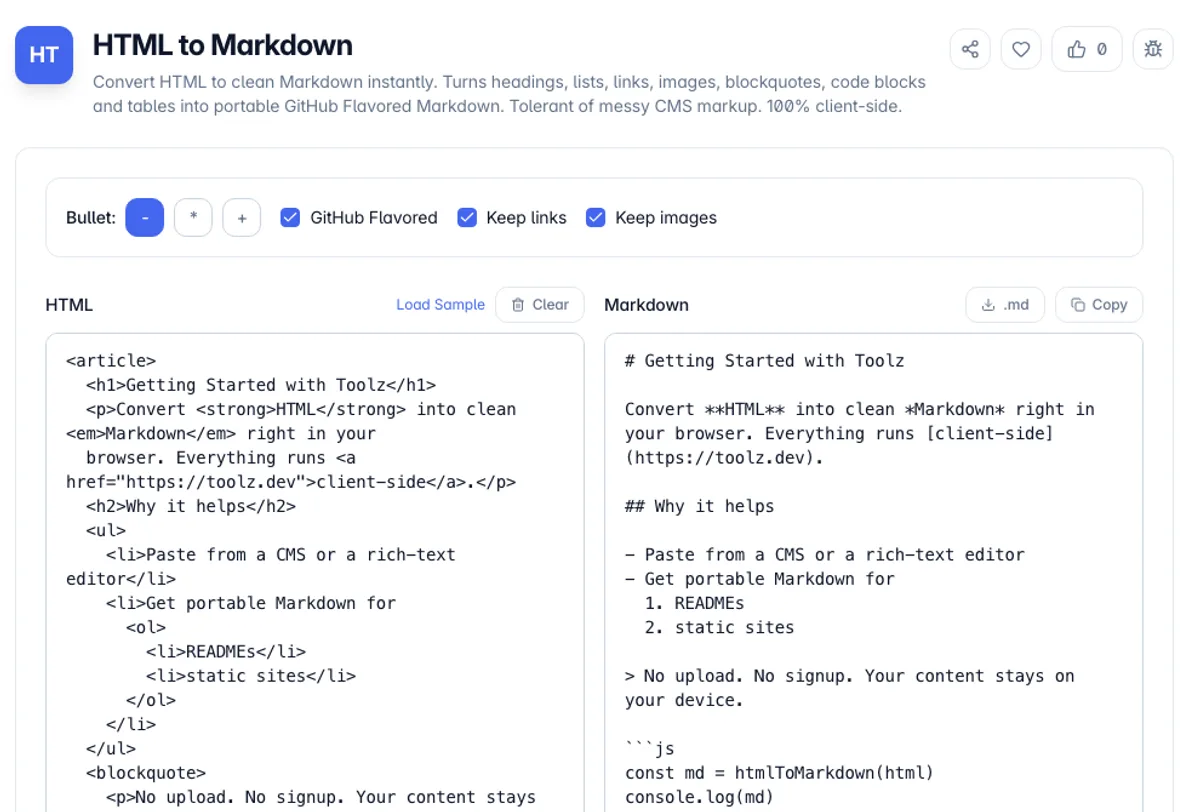
The HTML to Markdown Converter takes HTML - a page you copied from a CMS, the output of a rich-text editor, a chunk of a rendered article - and turns it back into clean Markdown. Headings become # lines, <strong> and <em> become bold and italics, anchors become [text](url) links, <img> becomes image syntax, ordered and unordered lists become numbered and bulleted lists, <blockquote> becomes > quotes, <pre><code> becomes fenced code blocks, and tables become GitHub Flavored Markdown pipe tables.
Converting HTML to Markdown by hand is slowest with tables, which is where an HTML to Markdown converter saves the most time. Paste <table><tr><th>Plan</th><th>Price</th></tr><tr><td>Free</td><td>$0</td></tr></table> and you get three lines back: | Plan | Price |, then the | --- | --- | divider, then | Free | $0 |. The same HTML table to Markdown step works for a pricing grid copied from a docs page or a spec table exported from a wiki, and you can check the result by pasting it into any GitHub comment preview.
Markdown is the portable format that documentation sites, static blogs, README files, note apps and AI prompts all understand. HTML is what you usually end up with when you copy from the web or export from a WYSIWYG editor, and it carries a lot of markup you do not want in a plain-text document. Converting one to the other by hand is tedious and error-prone; a rule-based converter does it consistently.
Everything runs in your browser. The parser is hand-written and dependency-free - it does not use a remote API and it does not even rely on the browser's DOM, so it is tolerant of the unclosed tags and stray attributes that real-world HTML is full of. Your drafts, internal pages and pasted content never leave the page. Paste HTML, choose your bullet style, then copy the Markdown or download an .md file.
The conversion is lossy in one direction by design, because Markdown expresses far less than HTML does. Classes, ids, inline styles, spans, data attributes and anything positional are dropped, since Markdown has no way to carry them: what survives is the structure, which is usually the point of converting. GitHub Flavored Markdown handles tables, but only simple ones, so a table with merged cells or block content inside a cell cannot be represented and comes across flattened. Nested lists convert cleanly; deeply nested combinations of lists and blockquotes are where output gets fragile. Messy CMS markup with unclosed tags is parsed rather than rejected, so pasting from a rich text editor generally works, and it is worth reading the result rather than trusting it.
How to use the HTML to Markdown Converter?
Paste your HTML
Type or paste HTML into the editor - copied from a web page, exported from a CMS, or produced by a rich-text field. The Markdown updates as you type; load the sample to see what is supported.
Choose your options
Pick the bullet character for unordered lists, keep GitHub Flavored Markdown on for tables and strikethrough, and decide whether to keep links and images or strip them down to plain text.
Review the Markdown
Read the output next to your source and check the stats - words, headings, links, images, code blocks and estimated reading time - to confirm the structure came across intact.
Copy or download
Copy the Markdown to your clipboard or download it as an .md file, ready to drop into a README, a docs site, a note app or a static blog.
Key Features
Full Block Coverage
Headings, paragraphs, ordered and unordered lists (including nested lists), blockquotes, horizontal rules, code blocks and description lists are all mapped to their Markdown equivalents
GFM Tables and Strikethrough
HTML tables become GitHub Flavored Markdown pipe tables with a header row and divider, and <del> / <s> become ~~strikethrough~~ - the extensions your README and docs already use
Links, Images and Inline Code
Anchors become [text](href "title"), images become , and <code> spans are wrapped in backticks with their contents left untouched so snippets survive the conversion
Tolerant of Messy Markup
Unclosed tags, uppercase tag names, unquoted attributes, comments and <script> / <style> blocks are all handled gracefully - the converter never throws on real-world HTML
Frequently Asked Questions
Related Tools
HTML Formatter
Format, beautify, and minify HTML online. Re-indents messy or minified markup, keeps script, style, and pre content verbatim, and runs entirely in your browser.
HTML Table Generator
Generate an accessible HTML table from pasted CSV or tab-separated data. Add a header row, caption, striped rows, and borders, then copy the HTML and CSS. Runs client-side.
Markdown to HTML
Convert Markdown to clean, semantic HTML with GitHub Flavored Markdown support - tables, task lists, fenced code, heading anchors, live preview and a full HTML document export.
Markdown TOC Generator
Generate a linked table of contents from Markdown headings
Comments
0 comments
No comments yet. Be the first to share your thoughts!