<?xml version="1.0" encoding="UTF-8"?>
<urlset xmlns="http://www.sitemaps.org/schemas/sitemap/0.9">
  <url>
    <loc>https://example.com/</loc>
    <lastmod>2026-09-15</lastmod>
    <changefreq>weekly</changefreq>
    <priority>0.8</priority>
  </url>
  <url>
    <loc>https://example.com/about</loc>
    <lastmod>2026-09-15</lastmod>
    <changefreq>weekly</changefreq>
    <priority>0.8</priority>
  </url>
  <url>
    <loc>https://example.com/blog</loc>
    <lastmod>2026-09-15</lastmod>
    <changefreq>weekly</changefreq>
    <priority>0.8</priority>
  </url>
  <url>
    <loc>https://example.com/blog/getting-started</loc>
    <lastmod>2026-09-15</lastmod>
    <changefreq>weekly</changefreq>
    <priority>0.8</priority>
  </url>
  <url>
    <loc>https://example.com/contact</loc>
    <lastmod>2026-09-15</lastmod>
    <changefreq>weekly</changefreq>
    <priority>0.8</priority>
  </url>
</urlset>What is the XML Sitemap Generator?
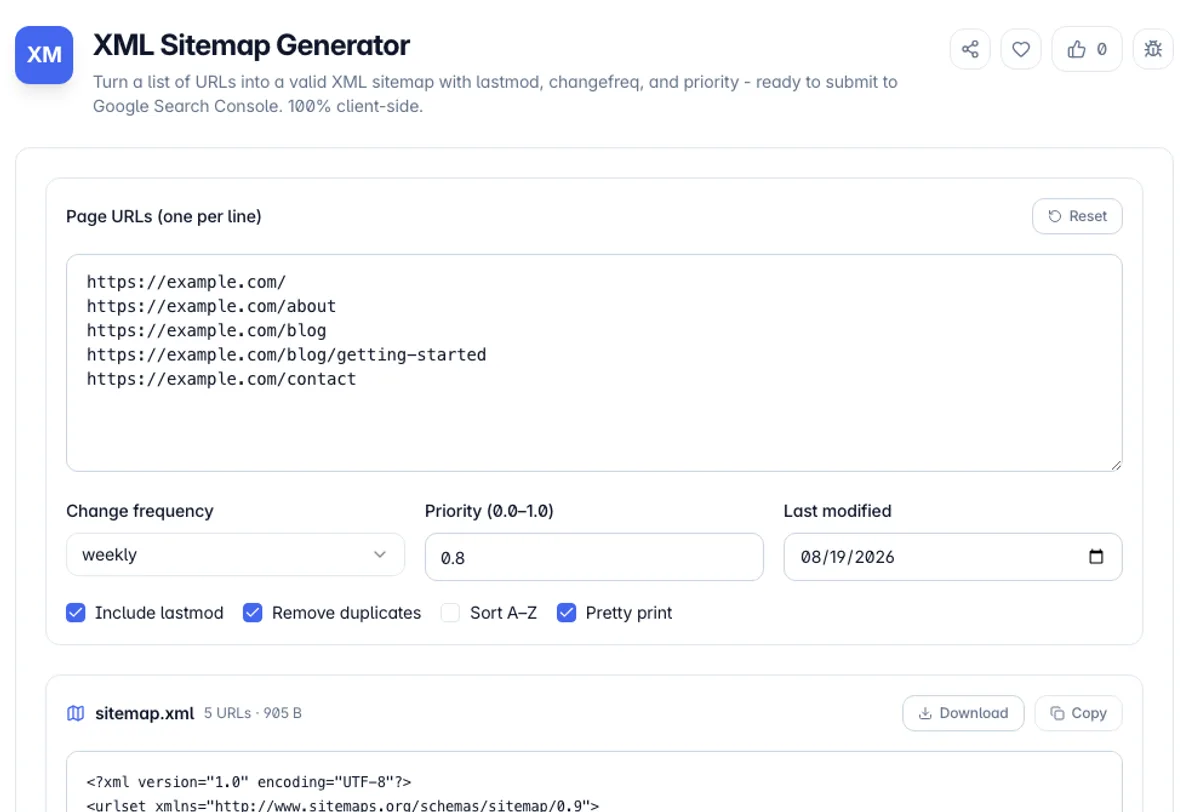
The XML Sitemap Generator turns a plain list of page URLs into a valid sitemap.xml file that follows the sitemaps.org 0.9 protocol - the same format Google, Bing, and every other major search engine reads. Paste one URL per line, choose the change frequency, priority, and last-modified date you want applied, and the tool produces a ready-to-upload <urlset> with a properly escaped <loc> for every page. A sitemap is how you hand a crawler a clean map of your site instead of hoping it discovers every page by following links.
Beyond just wrapping URLs in tags, the generator does the validation work that a hand-written sitemap often gets wrong. It rejects anything that is not an absolute http or https URL, XML-escapes ampersands and other reserved characters that would otherwise break the file, removes duplicate URLs, and can sort the list alphabetically. It also counts your entries and the file size against the protocol's 50,000-URL and 50 MB limits, warning you when it is time to split into multiple sitemaps behind a sitemap index.
Everything runs in your browser. Your URLs - which can reveal your entire site structure - are never uploaded to a server, and the tool works offline once loaded. That makes it safe to use on staging sites, internal tools, or client projects under NDA. When you are done, copy the XML or download it as sitemap.xml, drop it in your site root, and submit the URL in Google Search Console.
A sitemap is a hint, not an instruction. Listing a URL does not cause it to be indexed, and omitting one does not prevent it, which is why a sitemap is most useful for large sites, new sites and pages that are poorly linked internally. Two protocol limits apply: 50,000 URLs and 50MB uncompressed per file, and beyond either you need several sitemaps and an index referencing them.
Here is a quick way to check what this XML sitemap generator tool does with a messy list. Paste three lines: https://example.com/, https://Example.com and example.com/about. The output holds one URL, https://example.com/, and the report lists two skipped lines: the second one is a duplicate once the host is lowercased and the trailing slash added, and the third has no scheme, so it is not an absolute URL. Many XML sitemap generator tools copy lines through as typed, which is how duplicates and broken <loc> values end up in a live file.
How to use the XML Sitemap Generator?
Paste your URLs
Enter one absolute URL per line (starting with http:// or https://). Blank lines and lines beginning with # are ignored, so you can annotate the list.
Set the defaults
Choose a change frequency (daily, weekly, monthly…) and a priority from 0.0 to 1.0. Toggle the last-modified date on to stamp every URL with today or a date you pick.
Clean up the list
Enable de-duplication to drop repeated URLs and, if you like, sort alphabetically. The tool reports any lines it skipped and why.
Copy or download sitemap.xml
Copy the generated XML or download it as sitemap.xml, upload it to your site root, and submit the sitemap URL in Google Search Console or Bing Webmaster Tools.
Key Features
Valid Sitemaps.org 0.9 Output
Produces a standards-compliant <urlset> with the correct namespace that Google, Bing, and other engines accept without complaint
lastmod, changefreq & priority
Apply a last-modified date, a crawl frequency, and a 0.0–1.0 priority to every URL, with each optional tag omitted cleanly when you leave it blank
URL Validation & XML Escaping
Rejects non-absolute and non-http(s) URLs and escapes ampersands, angle brackets, and quotes so a stray character never breaks your sitemap
De-duplication & Sorting
Removes repeated URLs and can sort the list alphabetically, with a report of exactly which lines were skipped and why
Frequently Asked Questions
Related Tools
Backlink Finder
Find sites in your niche that accept guest posts, using the search footprints those pages leave behind. Deduplicated by domain, with the page that matched.
htaccess Redirect Generator
Generate Apache .htaccess 301 and 302 redirect rules from a list of old-to-new URLs, plus force-HTTPS and www canonicalization directives, all in the browser.
Schema Markup Generator
Build valid schema.org JSON-LD for Organization, Article, Product, FAQ, LocalBusiness, Breadcrumb, and more - copy the ready-to-paste script tag. Client-side.
Time Zone Converter
Convert any date and time between IANA time zones with DST-accurate offsets, see the gap between two cities, and plan meetings across the world
Comments
0 comments
No comments yet. Be the first to share your thoughts!