| Key | Value (decoded) |
|---|---|
| color | red |
| size | 42 |
| size | 43 |
| q | trail runner |
What is the URL Parser?
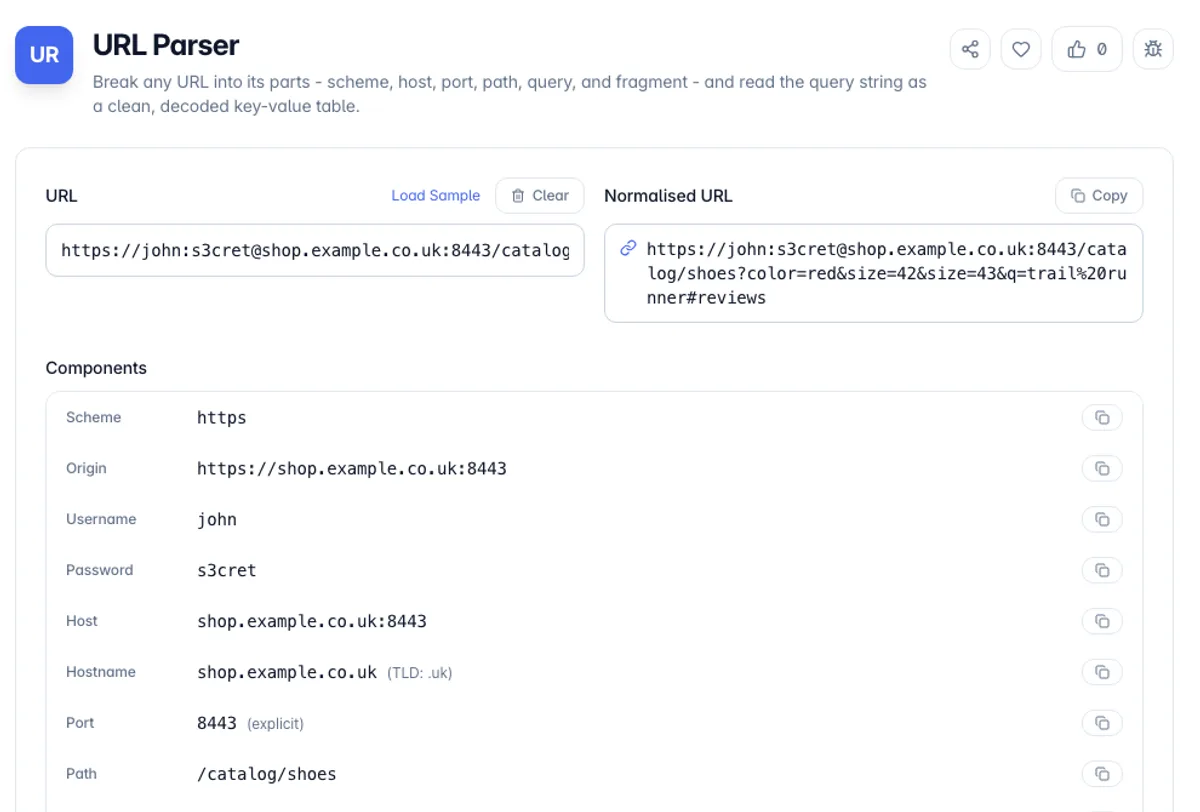
The URL Parser takes any web address and splits it into the parts a browser sees: the scheme, the credentials, the host and port, the path, the query string, and the fragment. Instead of squinting at a long link full of percent signs and ampersands, you get a labelled breakdown and a decoded table of every query parameter, in the order they appear.
A URL is more structured than it looks. It follows the WHATWG URL standard - the same rules browsers use - with a defined grammar for each component. Reading it by eye is error-prone: a stray question mark, an encoded slash, or a repeated parameter is easy to miss, and those are exactly the details that break routing, tracking, or an API call. This tool uses the browser's own URL engine, so what you see is what the browser would parse.
Everything happens in your browser. Paste a link with tracking parameters, an API endpoint with a dozen query values, or a bare domain, and the parser resolves it locally. Nothing is uploaded, so it is safe to inspect URLs that contain tokens, session IDs, or internal hostnames. It works offline once the page has loaded.
Parsing follows the WHATWG URL standard, which is what browsers implement, and it is more forgiving than people assume: it will normalise a missing scheme, collapse dot segments in a path, and lowercase the host, because hosts are case-insensitive while paths are not. Two areas repay attention. Internationalised domains are stored as punycode, so a host in Cyrillic or Chinese displays in its own script and travels as an ASCII string beginning xn--, and those two forms are the same host. And percent-encoding is only meaningful in context: a slash encoded as %2F inside a path segment is data rather than a separator, which is exactly why decoding a whole URL in one pass and then re-parsing it gives the wrong answer.
A quick check of what this online URL parser returns: paste example.com/pricing?plan=pro&plan=team&q=trail+runner. It notes that https:// was assumed, lists the hostname as example.com with TLD .com, and shows port 443 marked as the scheme default. The Query parameters table has three rows, plan = pro, plan = team and q = trail runner, because a plus sign in a query means a space. The JSON copy button groups the repeated key as {"plan": ["pro", "team"], "q": "trail runner"}, ready to paste into a test.
How to use the URL Parser?
Paste your URL
Drop in a full URL such as https://[email protected]:8443/path?q=1#top. A bare domain like example.com/page works too - the parser assumes https:// when no scheme is given.
Read the component breakdown
Scheme, host, hostname, port, path, search, and fragment are listed separately, each with a copy button, plus the effective port and top-level domain.
Inspect the query parameters
Every key-value pair from the query string is shown decoded in a table, in original order, with repeated keys kept as separate rows.
Copy what you need
Copy any single component, the decoded query as JSON, or the whole normalised URL to reuse elsewhere.
Key Features
Full Component Breakdown
Scheme, username, password, hostname, port, path, query, and fragment are each isolated and labelled, matching the WHATWG URL model browsers use
Decoded Query Table
Query parameters are parsed and percent-decoded into a readable table, preserving order and keeping repeated keys as distinct rows instead of collapsing them
Default Port Detection
When a URL omits its port, the parser shows the effective port for the scheme - 443 for https, 80 for http, 22 for ssh - and flags that it is the default
Scheme-Optional Input
Paste a bare host like example.com/pricing and the parser assumes https:// so you do not have to type the scheme every time, and tells you it did so
Frequently Asked Questions
Related Tools
Query String Parser
Parse a URL query string into structured JSON, or build a query string from a JSON object. Handles repeated keys, bracket arrays, and encoding. 100% client-side.
Slug Generator
Turn any title or text into a clean, SEO-friendly URL slug - with accent transliteration, hyphen or underscore separators, stop-word removal, and batch mode.
UTM Builder
Build tagged campaign URLs for Google Analytics 4 with utm_source, utm_medium, utm_campaign, utm_term and utm_content - plus channel prediction, tagging warnings, batch mode and CSV export.
Open Graph Preview
Preview how your link will look on Facebook, X, LinkedIn, Slack, and Discord, validate your og: tags, and copy a correct meta block
Comments
0 comments
No comments yet. Be the first to share your thoughts!